

Table of Contents
How to Locate & Use your Affiliate Link
Once you have activated your ChemiCloud Affiliate Account, you’ll need to find your General Affiliate Link and incorporate it to your marketing strategy. Doing so will allow you to get paid for your referrals.
For those wondering what a General Affiliate Link is – it’s the default referral tracker that we provide every new Affiliate. It’s a link to ChemiCloud that Affiliates give to people. If they use that link to go buy our web hosting, a tracker is created so you can monitor the referral and get paid for it!
This Article will help you locate your General Affiliate Link and provide insight on using it.
How to Locate & Use your General Affiliate Link
Locating Your General Affiliate Link
Step 1: Login to your Affiliate account by opening the Affiliates Login Page. It will look like this:

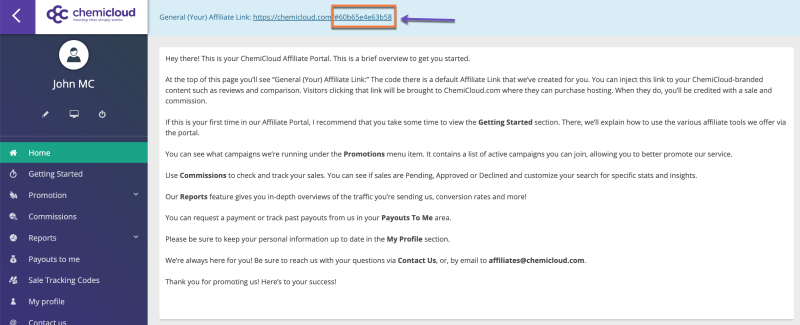
Step 2: Your General Affiliate Link is at the top of the Affiliate Dashboard. See below:
Using Your General Affiliate Link
You can use your General Affiliate Link in numerous ways which include(among others):
- Giving it to friends, family, and colleagues.
- Sharing it on Twitter, Instagram, or other Social Media.
- Hyperlinking it on your blog or other personal website.
- Discussion Rooms and Topical Forums.
The General Affiliate Link is a great place to start, and one of the best ways Affiliates of any experience level can earn referrals with us.
And that’s how you find find and use your General Affiliate Link.