Live Chat
 Help Center

Every time cPanel adjusts its pricing, the same conversation happens across hosting forums or Reddit posts. Somebody posts the new rate card. Somebody else works out that Pro went up seven dollars. And then everyone moves on, having badly underestimated what just happened to their business.
Seven dollars is not the number. The number is what the change does across your whole fleet, what it does to your margin, and what it would take to get that margin back. This article works through all three, using real arithmetic you can check, and then covers the part most operators find hardest: deciding whether to pass it on, and how to tell customers if you do.
If you haven’t worked out your own exposure yet, start with the cPanel Price Increase Calculator and come back. The rest of this will make more sense with your own figures in front of you.
Table of Contents
- Start with your total exposure, not the headline price
- The three ways to absorb an increase
- The annual billing lever you might be ignoring (Retail pricing)
- The annual prepay problem nobody models
- Should you pass it on to customers?
- How to announce a price increase without losing customers {#announcing}
- When the answer is to leave cPanel instead
- Frequently asked questions
Start with your total exposure, not the headline price
A single tier price is almost meaningless on its own. What matters is the sum across every licence you hold, plus the per-account overage you’re paying above Premier’s included hundred.
Here’s a host we’ll follow for the rest of this article. Ten Pro licences, three Premier licences, and 180 accounts sitting above the Premier limits. Four hundred and thirty billable customers, an average of $9.95 per customer per month, and a 62% gross margin.
Applying the 2025 to 2026 retail change:
| 2025 | 2026 | |
|---|---|---|
| Pro × 10 | $469.90 | $539.90 |
| Premier × 3 | $197.97 | $209.97 |
| Overage × 180 | $81.00 | $88.20 |
| Monthly total | $748.87 | $838.07 |
That’s $89.20 more per month, $1,070.40 more per year, an 11.9% increase on a licence bill that was already the second largest line in the business after hardware.
Nothing about that fleet is unusual. Thirteen licences is a modest operation. And the headline that got posted on the forum, Pro up seven dollars, accounts for $70 of it. The rest came from tiers and lines nobody was watching.
Three things to check when you run your own numbers.
Count every licence, including the ones nobody thinks about. The staging server. The legacy box still running two grandfathered clients. The licence on your own company server. These get left out of mental arithmetic and they cost the same as the ones you remember.
Treat overage as its own exposure. In the example above, overage is only 10% of the bill but it rose 8.9%, and it scales with growth. A host adding 200 accounts next year adds nearly $100 a month in overage alone at current rates.
Know whether you’re looking at retail or partner pricing. The figures above are retail. Partners and NOCs hold their own rate cards, which are not published and don’t move in step with the retail table. If you buy at partner rates, the percentages in this article won’t match yours. Use the partner mode in the calculator instead.
The three ways to absorb an increase
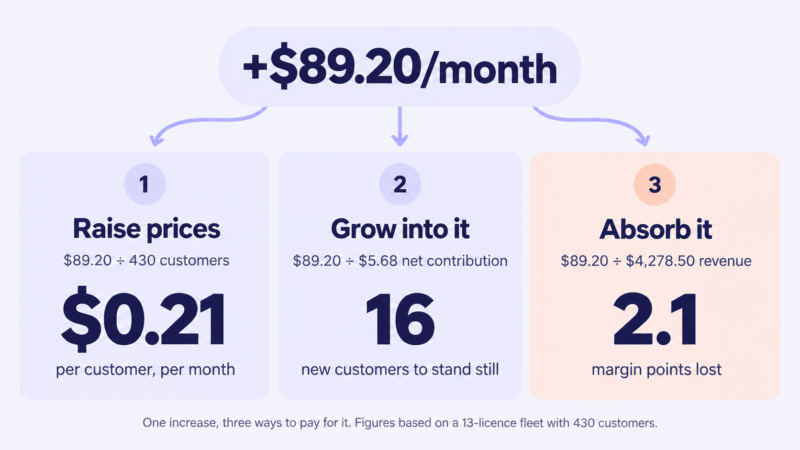
There are exactly three places the money can come from. Raise prices, add customers, or take it out of margin. In practice most hosts do some of each, but modelling them separately is the only way to see what any given blend actually costs.
Raise prices
Divide the monthly increase by your billable customer count.
$89.20 ÷ 430 customers = $0.21 per customer per month
That’s 2.1% of a $9.95 plan. Twenty-one cents.
This is usually the moment the problem stops feeling frightening. An increase that reads as a $1,070 annual hit to the business reads as twenty-one cents to the person paying it, and $0.21 rounds to nothing against the plan prices most hosts actually charge. Round it up to a clean number and you’ve covered the increase with room left over.
One caution: count billable customers, not cPanel accounts. A reseller client holding thirty accounts is one invoice. Divide by accounts and you’ll arrive at a per-customer figure that’s far too low and under-price the adjustment.
Grow into it
New customers bring contribution, but above 100 accounts on a Premier server they also bring cost, and that second part gets left out of most versions of this calculation.
Contribution per customer: $9.95 × 62% = $6.17 Less marginal licence cost: −$0.49 Net contribution per new customer: $5.68
$89.20 ÷ $5.68 = 16 new customers
Sixteen customers to stand still. Not to grow, not to improve anything, just to end the year in the same financial position as the one before it. For a host acquiring twenty or thirty a month that’s a few weeks of work. For one growing slowly it’s most of a year’s growth spent on a cost increase.
If you’re below the Premier threshold the $0.49 drops out and the number improves slightly. If you’re about to cross a Solo, Admin or Pro ceiling, it gets much worse, because the next account forces a whole tier upgrade rather than a per-account charge.
Absorb it and lose margin
Express this in margin points, not dollars, or it won’t land properly.
Monthly revenue: 430 × $9.95 = $4,278.50 $89.20 ÷ $4,278.50 = 2.1 margin points
Two points sounds survivable. Against a net margin of 15 to 20%, which is typical for small independent hosts, it’s between a tenth and an eighth of the entire profit of the business, given up for nothing in return. Do it three years running without adjusting prices and there’s no business left to run.
The annual billing lever you might be ignoring (Retail pricing)
Before touching customer prices, check whether you’re leaving money on the table on the licence side.
cPanel discounts annual billing by roughly 8.4% against the monthly equivalent. On our example host’s ten Pro licences:
10 × $53.99 × 12 = $6,478.80 per year 8.4% = $544 saved
That covers slightly more than half the entire increase, without a single customer conversation.
Two important limits:
Annual terms are only available on Solo, Admin and Pro. Premier is billed monthly. In the example above, the three Premier licences and all the overage are excluded, which is why the saving covers half the increase rather than all of it.
Partner licensing is normally billed monthly regardless. If you buy through a partner or NOC arrangement, this lever generally isn’t available to you at all. Your rate is already below retail, but the annual discount that retail buyers can reach for isn’t part of the deal.
It’s still the first thing to check, because it’s the only option on this list that costs you nothing and risks nothing. Switching billing cycle needs cash on hand, and that’s the real constraint for most small hosts, not willingness.
The annual prepay problem nobody models
Here’s the part that gets missed. If some of your customers prepaid for a year, you can’t reprice them until their term ends.
Say 40% of the base, 172 customers, is on annual terms, with renewals spread evenly through the year. Raise prices today and here’s what year one actually recovers:
Monthly customers: 258 × $0.21 × 12 months = $650.16 Annual customers: 172 × $0.21 × 6 months average = $216.72 Year one recovery: $866.88
Full-year cost of the increase: $1,070.40 Year one shortfall: about $203
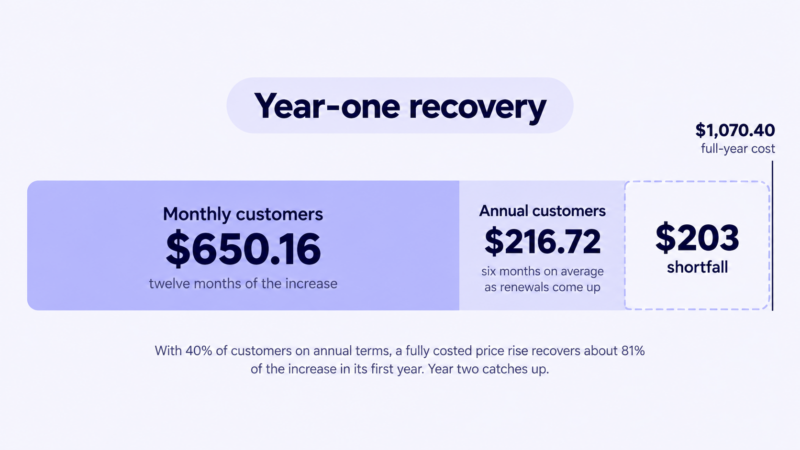
So a price rise that fully covers the increase on paper covers about 81% of it in the first year, and you eat the difference. From year two onward you’re square.
Three practical consequences.
Honour existing annual terms. Repricing mid-term is legally dubious in most jurisdictions and reputationally expensive everywhere. The two hundred dollars isn’t worth it.
Announce early enough that renewals catch the new rate. A customer renewing three weeks after your announcement should be renewing at the new price, with proper notice. Announce late and you’ve pushed another twelve months of that customer’s revenue to the old rate.
Don’t let this put you off annual billing. Annual prepay is good for cash flow and good for retention, and the repricing lag is a small price for both. If anything, an increase is a reasonable moment to push annual plans harder, since customers taking one lock in the new rate before the next adjustment.
Should you pass it on to customers?
Not automatically. There are conditions where raising prices costs more than absorbing the increase, and it’s worth knowing which side you’re on before you draft anything.
When raising prices is the right call
- You haven’t adjusted in three years or more. Your costs have moved every year in that window. A single catch-up increase is easier to justify than an apologetic annual trickle.
- Your plans are below market. If you’re at $9.95 and comparable hosts are at $12, you have room that has nothing to do with cPanel.
- Your margin is already thin. Below 20% net, absorbing two points isn’t a decision you can make more than once.
- Your customers didn’t choose you on price. If they came for support quality or migration help or uptime, a twenty-cent increase isn’t what makes them leave.
When absorbing it is the right call
- You compete primarily on price. If your positioning is “cheapest managed cPanel hosting,” a price rise attacks the only reason anyone picked you.
- You’re mid-campaign. Raising prices while running acquisition ads at a headline rate is an unforced error.
- The increase is genuinely small relative to your base. If total exposure is $15 a month across 600 customers, the announcement costs more goodwill than the money is worth.
- You’ve changed something else recently. Customers absorb one disruption at a time. A migration, an outage and a price rise in the same quarter compound badly.
What churn actually costs you
This is where most advice on this topic stops being useful, so here’s the arithmetic.
Raise 430 customers by $0.21 and you gain $90.30 a month, assuming nobody leaves. Each customer who does leave costs you their $6.17 contribution plus the $0.21 increment you’d have collected, offset by $0.49 of overage that frees up when their account goes. Net cost per departure: $5.89.
$90.30 ÷ $5.89 = 15.3 customers
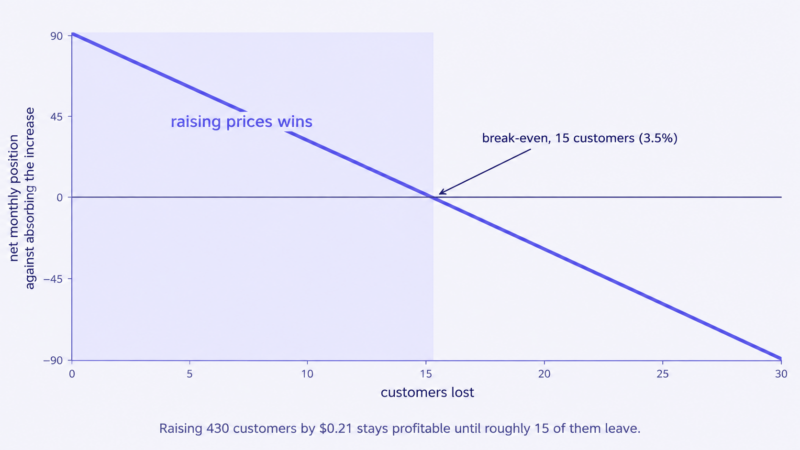
So the break-even is about 15 customers, or 3.5% of the base. Lose fewer than that and raising prices leaves you better off than absorbing. Lose more and you’d have been better off doing nothing.
Three and a half percent is the number to hold onto, and it’s a useful one in both directions. It’s high enough that a well-handled twenty-cent increase almost certainly clears it. It’s low enough that a badly handled one, or a much larger increase, genuinely might not. Run this calculation with your own figures before you decide, and run it again if you’re considering a larger adjustment than the increase strictly requires, because the break-even tightens as the increase grows.
How to announce a price increase without losing customers {#announcing}
Most of the churn risk in a price rise comes from how it’s communicated, not from the amount. A twenty-cent increase can cost you customers if the email reads badly.
Timing and notice
Give 30 days minimum, 60 if you can. Anything less reads as a fait accompli and generates support tickets.
Send it on its own. Not appended to a newsletter, not bundled with a feature announcement, not attached to an invoice. A price change buried in other content looks like an attempt to hide it, which is exactly the impression you can’t afford.
Tell each customer when their renewal changes, not just when the policy changes. “Your plan renews on 14 March at the new rate” prevents most of the confusion that otherwise arrives as tickets.
What to say, and what not to
Say the amount, the effective date, what it applies to, and when their specific renewal is affected. Give the reason once, in a sentence. Rising licensing and infrastructure costs is true and sufficient.
Don’t apologise at length. A long apology signals that you think you’ve done something wrong, and customers take the cue. Don’t blame cPanel by name, which looks like passing the buck and tells customers your costs are somebody else’s problem to solve. Don’t use vague phrases like “market conditions.” Don’t include anything that reads as an invitation to negotiate, unless you’re prepared to negotiate with everyone who asks.
And don’t over-justify. The longer the explanation, the more it sounds like a case being argued rather than a fact being communicated.
Email template
Adapt the bracketed parts and keep it roughly this short.
Subject: Price change to your hosting plan from [DATE]
Hi [NAME],
I’m writing to let you know that the price of your [PLAN NAME] plan is changing from [DATE].
Your plan will go from [OLD PRICE] to [NEW PRICE] per month. Your next renewal on [RENEWAL DATE] will be at the new rate.
This is the first change we’ve made since [YEAR]. Licensing and infrastructure costs have risen steadily over that period and we’ve reached the point where we need to reflect that.
Nothing else about your plan changes. Same resources, same support, same team.
If you have questions, reply to this email and I’ll answer personally.
[NAME] [COMPANY]
Two notes. Reply-to should be a real inbox someone reads; a no-reply address on a price increase is a trust cost you don’t need. And if you genuinely haven’t raised prices in years, say so, because it’s the strongest thing you can put in the email.
When the answer is to leave cPanel instead
Sometimes the honest conclusion is that the panel no longer earns its place.
The thresholds worth watching: overage dominating your licence bill, which usually means high account density on Premier servers; licensing consuming a share of hosting revenue you’d struggle to defend to anyone; or infrastructure you’re rebuilding anyway, where the migration cost is partly sunk regardless.
The counterweight is that switching costs are real and routinely underestimated. Migration engineering, staff retraining, updated documentation, support load while customers relearn an interface, and whatever features your workflow depends on that the alternative doesn’t have. A control panel is a multi-year decision, and the savings need to clear those costs by a comfortable margin rather than a marginal one.
If you’re weighing it seriously, we’ve covered the options and the switching maths in cPanel alternatives worth evaluating.
Frequently asked questions
How much notice should I give customers before a price increase? Thirty days is the working minimum and sixty is better. Enough time for customers to absorb it and ask questions, not so much that it’s forgotten before it takes effect. Whatever you choose, apply it consistently and make sure each customer knows which of their renewals is affected.
Should I raise prices for existing customers or only new ones? Raising new-customer pricing alone is the lower-risk move, but it only works if you’re growing fast enough for the new cohort to cover the increase across the whole base. For most small hosts it isn’t, and you end up with a widening gap between what old and new customers pay that becomes harder to close every year.
What’s a normal profit margin for a small hosting business? Independent hosts typically run somewhere between 15% and 25% net once hardware, licensing, support and acquisition are accounted for. Gross margins look much healthier, often 60% or more, which is why margin points rather than gross margin is the right lens for a cost increase.
Will I lose customers if I raise prices? Some, almost always, but usually far fewer than the fear suggests. Work out your own break-even churn rate using the method above. For a small increase on a modestly priced plan, the break-even is typically well above what a competently announced change actually produces.
Can I grandfather loyal customers at the old rate? You can, and it buys goodwill, but understand what it costs. Every grandfathered customer raises the increase everyone else has to carry, and the exception becomes permanent because removing it later is a second price rise with worse optics. If you do it, define the group narrowly and say up front that it’s a one-time arrangement.
How often should I review my hosting prices? Annually, whether or not you change anything. The hosts who find price increases painful are usually the ones who go four or five years without looking, then face a large correction all at once. A yearly review, even one that concludes no change is needed, keeps the decision small.
The arithmetic in this article works for any increase, in any year. Run it against your own fleet with the cPanel Price Increase Calculator, which handles both retail and partner pricing and does the exposure and break-even maths for you.