Live Chat
 Help Center

Almost every comparison of cPanel alternatives you’ll find online was written by someone selling one of the alternatives. That’s not a criticism of those articles, some are genuinely good, but it does mean none of them can credibly tell you to stay where you are.
We can. ChemiCloud sells hosting, not control panels. We’re a cPanel partner and buy licences at partner rates, which means we have no product in this category and nothing to gain from whichever way you decide. It also means we’ve been on the receiving end of every price increase in the last five years, so we understand exactly why you’re reading this.
What follows is a comparison of the panels worth considering, an honest account of what migration costs, and a section on when the right answer is to stay on cPanel. That last one exists because for a lot of operators it’s the correct conclusion, and nobody else is going to say so.
If you haven’t worked out what cPanel is currently costing you, start with the cPanel Price Increase Calculator.
Table of Contents
Before you compare panels, understand the three pricing models
The single most important thing about any alternative isn’t its feature list or its interface. It’s how it charges you, because that determines whether you can be repriced the same way again.
Every panel on the market uses one of three models.
Per account. cPanel. Your bill scales with your customer count. Every account you add makes the panel more expensive, which means your costs grow with your success rather than with your infrastructure. Above 100 accounts on Premier you pay a per-account rate on every additional one.
Per server, flat. DirectAdmin, AdminBolt, Plesk. You pay for the machine, not the customers on it. Account density becomes a margin lever instead of a cost multiplier, and the marginal cost of a new customer drops to zero.
Per website. Enhance. You pay for each site hosted, at a rate that decreases as the platform scales. This sits between the other two: it still grows with usage, but at a granularity that suits servers running a small number of sites rather than hundreds.
Why the model matters more than the price
Run the same server through all three and the answer flips depending on how many accounts are on it.
A server with 40 accounts
| Panel | Cost per month |
|---|---|
| cPanel Premier | $69.99 |
| Plesk Web Host | $62.99 |
| DirectAdmin Standard | $29.00 |
| AdminBolt VPS/Cloud | $20.00 |
The same server with 400 accounts
| Panel | Cost per month |
|---|---|
| cPanel Premier + 300 overage | $216.99 |
| Plesk Web Host | $62.99 |
| AdminBolt Bare Metal | $45.00 |
| DirectAdmin Standard | $29.00 |
At 40 accounts, cPanel costs roughly three and a half times DirectAdmin. At 400 accounts, it costs seven and a half times as much, and the gap widens with every customer you sign.
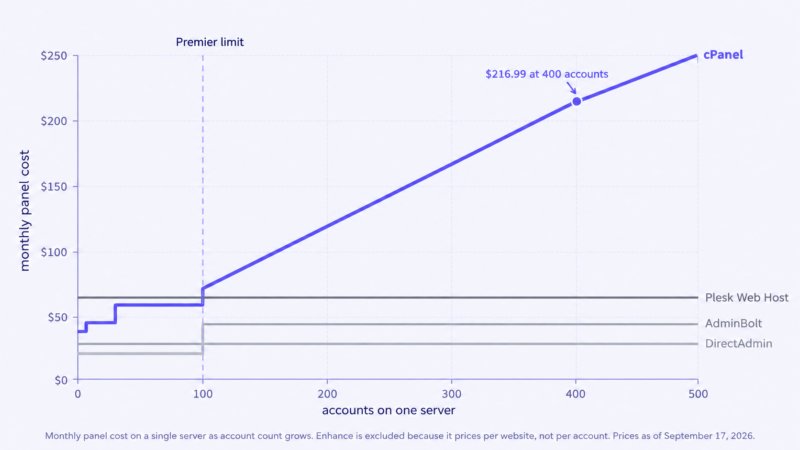
That’s the whole argument in two tables. It’s also why generic advice is useless here. A host with low-density servers and a host with high-density servers should reach different conclusions, and neither should take a recommendation from an article that doesn’t know which one they are.
A note on Enhance specifically: because it prices per website rather than per account, you can’t slot it into the tables above without knowing your site count. A cPanel account holding six websites is one account and six sites. Work out your real site number before comparing, because a naive account-count estimate will understate what Enhance costs you.
Plesk is owned by the same company as cPanel
This one catches people out, so it’s worth stating early.
cPanel, Plesk and WHMCS were acquired by Oakley Capital around 2018 and consolidated under the WebPros umbrella. cPanel’s move from per-server to per-account licensing followed in 2019, shortly after that consolidation.
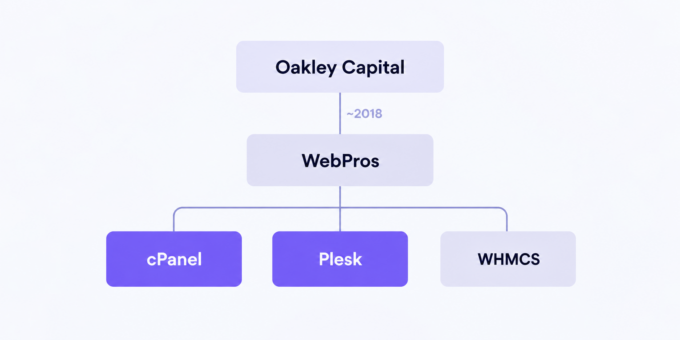
Plesk is a capable product with genuine strengths, particularly on Windows, where it has no real competitor. It’s on the list below and it belongs there.
But if the reason you’re reading this article is that you no longer want your cost base set by WebPros, moving from cPanel to Plesk doesn’t achieve that. It changes your interface and your pricing model. It doesn’t change who decides what you pay next year.
That may still be a good trade. Per-server pricing at a predictable rate is a meaningful improvement over per-account pricing regardless of who owns it. Just make it a decision you took deliberately rather than one you discover later.
The cPanel alternatives, compared
| Panel | Pricing model | Indicative cost | Multi-server | WHMCS | Email included | Best suited to |
|---|---|---|---|---|---|---|
| DirectAdmin | Per server, tiered by accounts | $5 / $15 / $29 per month | Limited | Yes | Yes | Cost-focused hosts, single-server operations |
| Enhance | Per website | From ~$0.15 per site | Native clustering | Yes | Yes | Multi-server operators, low-density servers |
| AdminBolt | Per server, flat | $20 VPS / $45 bare metal | Agent-based, multi-node | Yes | Yes | Hosts wanting flat pricing with modern tooling |
| Plesk | Per server, tiered | $16.99 / $29.99 / $62.99 | Yes | Yes | Yes | Windows hosting, enterprise multi-server |
| CloudPanel / CyberPanel / HestiaCP | Free | $0 | No | Partial | Varies | Agencies, developers, single servers |
September 17, 2026. All figures indicative and need verification at source.
DirectAdmin
The conservative choice, and the one most operators end up shortlisting. It has been around long enough that the ecosystem, documentation and community knowledge are all mature, and it runs lean enough that you get more account density out of the same hardware.
Pricing is per server with tiers by account count: a single-account tier at around $5, a ten-account tier at around $15, and an unlimited tier at around $29. Volume discounts kick in from four servers and increase substantially at larger fleet sizes, which matters if you’re running more than a handful.
The honest weakness is multi-server operation. DirectAdmin was built around the single server and still shows it. Each machine is administered separately, there’s no native multi-node dashboard, and API coverage is thinner than panels designed for automation from the start. If you’re running three servers that’s fine. If you’re running thirty and planning to orchestrate them centrally, this is the thing that will frustrate you.
Consider it if: you want the lowest predictable cost, your fleet is modest, and you value ecosystem maturity over modern tooling.
Enhance
The most architecturally different option on this list. Enhance is built around a cluster rather than a server: a control plane manages multiple nodes, sites run containerised with their own resource limits, and you can assign roles to individual machines for database, mail, DNS or backups.
Pricing is per website, starting around 15 cents per site and decreasing as your platform grows. That model rewards operators running many lightly loaded servers and penalises nobody except high-density single-box operators, who’ll find per-server pricing cheaper.
It ships migration tooling for both cPanel and Plesk, which materially reduces the biggest cost in switching.
The trade-offs: it’s newer than DirectAdmin, the third-party ecosystem is smaller, and the per-site model needs careful modelling if your customers host multiple sites per account.
Consider it if: you run or plan to run multiple servers as a cluster, and site isolation and central management matter more than the absolute lowest licence cost.
AdminBolt
The newest entrant, launched in 2026 by the founder of ModulesGarden. Flat per-server pricing with unlimited accounts: around $20 a month for VPS and cloud servers, around $45 for bare metal, with a standalone tier from about $7 capped at two accounts. Agent-based and multi-node from the ground up, with a full REST API. There’s a 30-day trial without a card.
On paper it addresses the exact complaint that brought you here. Flat pricing, unlimited accounts, no per-account tax, modern architecture.
The caveat we’d want stated if we were in your position: it launched in 2026. This article argues repeatedly that a control panel is a multi-year decision, and a panel with under two years of production history hasn’t yet been through the things that reveal a vendor’s character. How they handle a serious security incident. What happens to pricing once the growth phase ends. Whether support scales. None of that is a criticism of the product, which reviews well and is backed by a team with a long track record in the hosting tooling space. It’s an argument for weighting the risk properly rather than for excluding it.
If you’re considering it, the trial is genuinely useful. Run it on a non-production server for a full billing cycle before committing anything customer-facing.
Consider it if: flat per-server pricing and multi-node tooling are your priorities and you’re comfortable with a younger vendor, or you’re deploying new servers where the switching cost is near zero.
Plesk
Mature, well-supported, per-server pricing with tiers at roughly $16.99, $29.99 and $62.99 depending on how many domains you need. Deep WHMCS integration, a large extension catalogue, and the strongest Windows support of anything on this list by a wide margin. If you host Windows servers, the shortlist is basically Plesk.
Per-server pricing means you escape the per-account model. At high density it’s dramatically cheaper than cPanel, as the tables above show.
The consideration is the ownership point covered earlier. Read that section before shortlisting.
Consider it if: you host Windows, you need enterprise multi-server features, or you want per-server pricing from a vendor with a long operational history.
CloudPanel, CyberPanel and HestiaCP
Grouped together because the calculus for all three is the same: no licence cost, and everything else is a trade.
They’re genuinely good software. For an agency running a handful of client sites, or a developer managing their own infrastructure, any of them can replace cPanel entirely and the annual saving is the full licence cost.
For a hosting business the picture changes. What you give up is commercial support with an SLA, WHMCS integration depth that ranges from solid to community-maintained, and a vendor to escalate to when something breaks at 3am with customers watching. Free licences don’t mean free operation; they move the cost from a licence line to a staffing line, and for most hosts that’s a worse trade.
Consider them if: you’re an agency or developer rather than a hosting provider, or you have the in-house expertise to be your own support tier.
What we left off, and why
InterWorx and ispmanager are both real products but have thin ecosystems for this audience, and neither comes up often enough in operator conversations to justify the words. SPanel is tied to a single host. Webmin and Virtualmin are system administration tools rather than hosting panels; they can do the job but weren’t designed for multi-tenant hosting with a reseller layer.
What migration actually costs
The licence saving is the easy half of this decision. The migration cost is the half that gets underestimated, and it’s where most of the regret lives.
The four things that break
Email. Budget more time here than anywhere else. Moving accounts and mailboxes is tractable. Moving filters, forwarders, autoresponders, spam thresholds and every customer’s device configuration is not. Expect a long tail of tickets from customers whose mail worked yesterday and doesn’t today, and expect that tail to run for weeks.
WHMCS provisioning. Account creation, suspension, unsuspension, termination and package changes all have to work end to end, or your billing and your hosting drift apart silently until someone notices that terminated accounts are still live. Check whether the integration is vendor-maintained or community-maintained before you commit, and test every lifecycle action on a staging setup rather than discovering the gap in production.
Everything customer-facing. Every knowledge base article, every screenshot, every tutorial you’ve written, and every third-party guide your customers rely on. Support volume rises for weeks after a panel change, and some of the customers who leave will leave because of the interface rather than the price.
Staff knowledge. Years of accumulated instinct about where things are and what usually causes a given symptom doesn’t transfer. Your team gets slower before it gets faster, and that dip is a real cost even though it never appears on an invoice.
A realistic budget
For a mid-size fleet, a workable planning assumption is five to ten days of upfront work building and testing your migration tooling, then one to three days per server, plus a support load increase of roughly 30 to 50% for the first month after each batch.
For a thirteen-server fleet that’s somewhere around thirty to forty engineering days in total.
Whether that’s expensive depends entirely on who does it. If you’re paying contractors, it’s a real cash cost and you should model it as one. If you’re doing it yourself, the cash cost is near zero but the opportunity cost is a month of not building anything else. Both are real. Only one shows up in the bank account.
Migrate in phases, per server. Big-bang migrations are where the horror stories come from. Start with your least complex server, learn what your tooling gets wrong, then work up. A phased approach takes longer in calendar time and costs far less in incidents.
When migrating makes financial sense, and when it doesn’t
Work out the payback period
Annual licence saving ÷ one-time migration cost = payback in years
Take the thirteen-licence fleet from our “What a cPanel Price Increase Actually Costs Your Hosting Business” article: ten Pro licences, three Premier, 180 accounts in overage, costing $838.07 a month at current retail rates.
Moving that fleet to flat per-server pricing at around $20 a server gives you $260 a month, a saving of roughly $578 a month, or $6,936 a year.
Against thirty to forty engineering days, that’s a payback somewhere between about eighteen months and two and a half years, depending on what you value a day at.
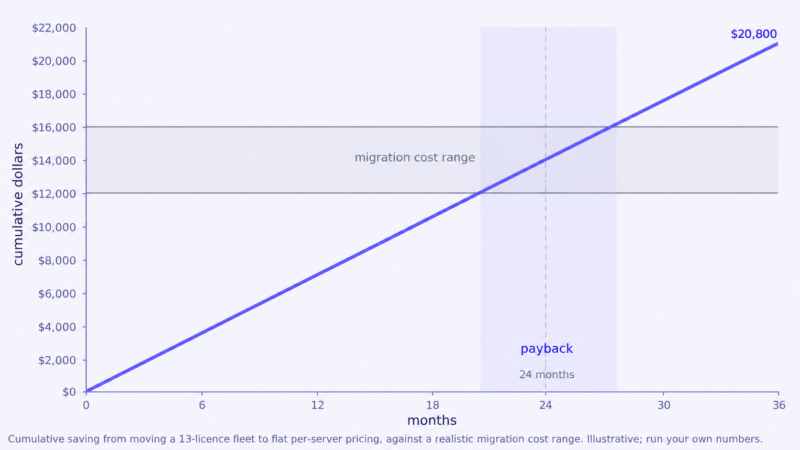
That’s a longer payback than most people expect, and it’s worth sitting with. A payback beyond 18 to 24 months rarely survives contact with reality, because something in the plan always costs more than the plan said. If your numbers land in that zone, the decision isn’t obvious and you should treat it as genuinely marginal rather than talking yourself into it.
Migrate when
- Overage dominates your bill. High-density Premier servers are where per-account pricing hurts most and where per-server pricing wins by the largest margin.
- You’re rebuilding anyway. If servers are being replaced or infrastructure re-architected, much of the migration cost is already sunk.
- Your fleet is large enough that the annual saving clears the migration cost comfortably rather than marginally.
- Growth is your plan. Per-account pricing taxes growth. If you expect to double your customer count, model the saving at the future size, not today’s.
Stay when
- Your fleet is small. Three servers and a modest saving won’t cover a month of disruption.
- You depend on something cPanel-specific. An integration, a workflow, a tool your team built. Check before you plan, not after.
- You’re already stretched. A migration during a period when you have no slack is how outages happen.
- Your customers came for the familiar interface. Some did. They won’t tell you until it’s gone.
The option most articles miss
You don’t have to choose for the whole fleet at once.
Running a second panel on new servers only captures most of the benefit at almost none of the cost. New capacity has no migration burden, no customer disruption and no legacy configuration to untangle. Your existing cPanel servers keep running until hardware refresh makes moving them free.
It costs you some operational complexity, since your team maintains competence in two panels and your documentation forks. For most mid-size hosts that’s a much better trade than a fleet-wide migration project, and it lets you evaluate a panel properly in production before betting the business on it.
If you’d rather not hold licences or run migrations at all, our reseller hosting plans include the licensing, and the panel decision stops being yours to make.
Frequently asked questions
Is there a free alternative to cPanel that’s good enough for a hosting business? Technically yes, practically it depends on your team. CloudPanel, CyberPanel and HestiaCP are all capable software. What you’re giving up is commercial support, guaranteed response times and WHMCS integration depth. For an agency that’s usually fine. For a hosting business with paying customers and an SLA, the licence saving often gets consumed by staffing.
Can I run two control panels at once? Yes, on separate servers, and it’s often the smartest approach. You can’t run two panels on the same machine, but there’s nothing stopping you from putting new customers on a new panel while existing servers stay on cPanel. The cost is operational complexity and forked documentation.
Will I lose customers if I switch control panels? Some, usually fewer than you fear if you communicate well and migrate in phases. The customers most likely to leave are the technical ones with established workflows, and the ones whose email breaks. Both risks are reducible with good preparation and generous notice.
Does DirectAdmin, Enhance or AdminBolt work with WHMCS? All three integrate with WHMCS, but the depth varies and the distinction between a vendor-maintained module and a community one matters when something breaks. Verify the specific lifecycle actions you rely on, particularly suspension and termination, before committing.
How long does migrating from cPanel take? For a single server with straightforward configuration, days. For a fleet, months of calendar time if you’re doing it properly in phases. The engineering work is a smaller share of that than people expect; most of the elapsed time is testing, customer communication and letting each batch settle before starting the next.
Is Plesk cheaper than cPanel? At high account density, substantially, because Plesk charges per server and cPanel charges per account. At low density the gap narrows considerably. Run your own numbers rather than assuming, and read the ownership section above before you shortlist it.
Whatever you conclude, make it a decision rather than a drift. Work out what cPanel currently costs you with the cPanel Price Increase Calculator, work out what you’d need to charge to absorb the next increase in What a cPanel price increase actually costs your hosting business, and then compare that against the payback maths above.