Live Chat
 Help Center


Hosting.com is the company you knew as A2 Hosting. The name changed in April 2025 after World Host Group acquired the business, and for a lot of long-time customers, the experience changed with it. Some are happy. Many are not.
If you’re one of the ones looking for the exit, the good news is that you can easily cancel your Hosting.com account. Everything happens inside the Hosting Panel, and depending on how long you’ve been a customer and what you bought, you may be entitled to a refund.
Below you’ll find why customers are leaving, what to sort out before you pull the trigger, the exact cancellation steps, how to handle your domain, and how to claim your money back.
Table of Contents
- Why You Might Want to Cancel Your Hosting.com Account
- What to Prepare Before You Cancel Your Hosting.com Account
- How To Cancel Your Hosting.com Account
- Cancel or Transfer Your Domain Away From Hosting.com
- How to Request a Refund at Hosting.com (if Applicable)
- Cancel Your Hosting.com Account FAQs
- Conclusion
Why You Might Want to Cancel Your Hosting.com Account
Hosting.com holds a strong Trustpilot score — roughly 4.8 stars across more than 6,800 reviews. That number is real, and the praise for individual support agents is genuine.
But the one and two-star reviews cluster around the same handful of problems, and they’re the problems that make people leave. Here’s what former customers actually complain about.
Billing surprises and unwanted renewals
This is the single loudest complaint on Trustpilot. Customers report being charged twice, being charged after they’d already left, and watching prices climb on services they considered expensive to begin with.
One reseller customer described a six-year relationship with A2 Hosting that ended badly: after asking for a discount and being refused, they gave notice to leave — and say their card was charged days before the renewal date anyway, leaving them chasing a wire transfer to get the money back while their access was suspended with time still left on the contract.
Hosting.com’s own billing documentation explains part of the mechanism: auto-renewal is charged three days before the renewal date by default. If you plan to leave, three days is a narrow window to be casual about.
Support got slower after the rebrand
A2 Hosting built its reputation on fast, knowledgeable support. That’s the exact thing customers say slipped.
Reviewers describe tickets that used to be answered in minutes now taking a full day. Reddit threads across r/webhosting and r/HostingReport follow the same pattern, with former A2 customers reporting response times degrading from minutes to days. CNET re-tested the service in late 2025 and cited frustrations contacting customer support as one of the reasons it no longer recommends the host.
A control panel that got harder, not easier
The rebrand introduced a new Hosting Panel alongside the existing cPanel accounts. The result is two different interfaces with two different sets of options, and reviewers describe it as confusing and slow to navigate. CNET’s re-test pointed to the removal of A2’s site assistant as a step backwards, concluding that Hosting.com is now harder to use than competitors.
Migration side effects added to the friction: historical invoices took time to import, and cPanel and WHM auto-login broke for some accounts during the transition.
None of this is unusual for a host that’s been acquired and restructured. It’s also not your problem to absorb. Migrating away is straightforward, and the effort pays for itself the first time you don’t have to argue about an invoice.
What to Prepare Before You Cancel Your Hosting.com Account
Three things need to happen before you submit that cancellation request. Skip them and you risk downtime, lost data, or both.
1) Finding a Hosting.com alternative
Line up the new host first. Cancelling before you have somewhere to land is how sites go dark.
Before you commit to a replacement, work out what you actually need — traffic volume, PHP version, storage, email accounts, staging, server location. Bring that list to every sales chat you have. A representative who can answer it fluently is a good sign. One who deflects is a preview of your future support tickets.
Looking for a Hosting.com alternative? 👋 Join the growing club of happy customers who made the switch to better, faster web hosting.
9 Essential questions to ask when choosing a hosting provider
Cheap and good rarely travel together. When a host competes on price alone, something is being cut — usually support, usually infrastructure, usually right when you need both. We don’t lead with low prices for that reason. We lead with service quality.
Ask these nine questions before you hand over a card.
1) How long have you been in business? A host that launched last year deserves scrutiny. But age isn’t proof of quality either — plenty of two-decade veterans deliver substandard service. Weigh longevity alongside everything else.
2) Will your support team help me solve more complex technical issues? Support quality is the feature you’ll use most and can judge least from a homepage. Ask a genuinely technical question before you buy. Vague or evasive answers now mean unresolved tickets later.
3) Do you offer white-glove migrations? How many sites, and what does it cost? Moving a site is a real project if you’ve never done it. Some hosts — us included — handle it free of charge with zero downtime. A migration fee tells you how much a host wants your business.
4) Do you offer multiple server locations? Physical distance between your server and your visitors is measurable latency. Match the server location to where your audience actually is; use a CDN if that audience is global. ChemiCloud runs 16 global server locations so your site sits close to the people loading it.
5) Will you provide a reliable backup system? Plenty of hosts advertise backups. Fewer store them offsite, which is the part that matters when a server fails. Ask specifically where backups live and how you restore from them. ChemiCloud provides remote backups through JetBackup.
6) How do you protect my sites against brute force attacks and malware? WordPress is the most-attacked application on the web. Ask what’s running at the server level to stop brute-force attempts and how the infrastructure is hardened against malware.
7) What features simplify my life? Is the control panel usable? Can you grant collaborator access? Are staging sites included? Are SSL certificates free and one-click? These aren’t luxuries anymore.
8) What’s the money-back guarantee? The only real test of a host is running your site on it. A meaningful guarantee period lets you do that without risk. Many strong providers offer 45 days.
9) What uptime guarantee do you offer? 99.9% is the industry floor. ChemiCloud guarantees 99.99%, and if we miss it, you’re entitled to compensation.
2) Migrating your website to a new web host
The cleanest way out of Hosting.com is a managed migration handled by your new provider.
At ChemiCloud, free white-glove migration and onboarding are included with every plan. Most sites move in about an hour, with zero downtime.
Three steps:
- Sign up: Pick the plan that fits your needs from our Plans & Pricing.
- Submit your migration request: Log in and file the free migration request.
- Done: A migration specialist takes it from there.
3) Generate a backup of your site
Do this before you cancel anything. Hosting.com does not retain data after an immediate cancellation, and end-of-period cancellations wipe everything once the grace period expires. Once it’s gone, it’s gone.
If your account uses cPanel:
From your Hosting.com dashboard, it is possible to make a full or partial backup. To do this, please take the following steps:
1) Log in to your Hosting.com dashboard, locate the Product & Services > Hosting & Servers section, and click on Log in to cPanel
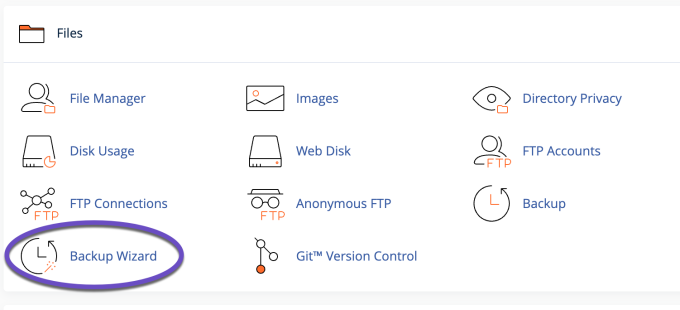
2) Once logged into cPanel, navigate to Files, then click on Backup Wizard
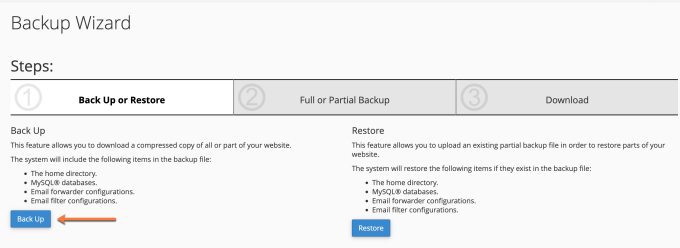
 3) On the next screen, click on the Back Up button
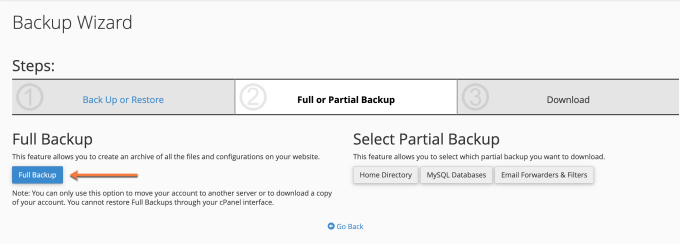
4) You can select the backups you want to download to your computer. Choose the Full Backup option to create an archive of all the files and configurations on your website(s).
5) Once the backup is generated, you will find an option to download the backup to your computer. Alternatively, you can find the backup inside your account’s home directory which you can access by using the File Manager feature in cPanel.
How To Cancel Your Hosting.com Account
With your backup saved and your new host ready, here’s the process.
First, decide what you’re cancelling. Hosting.com sells hosting, domains, SSL certificates and third-party services separately, and each is cancelled on its own. Cancelling hosting does not cancel your domain — and you can still transfer your domain away afterwards.
Step 1) Log in to the Hosting Panel at https://my.hosting.com.
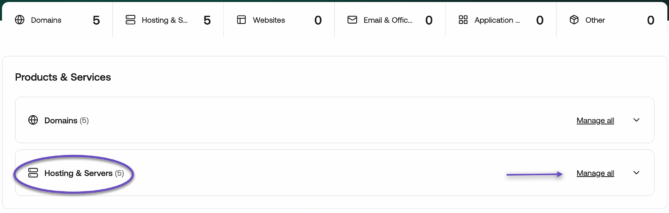
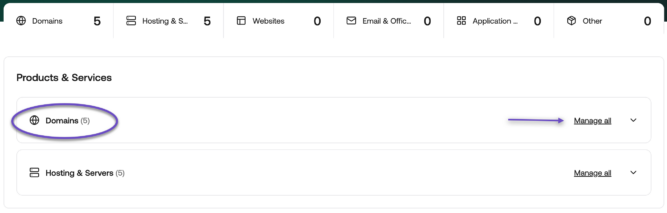
Under the Product & Services > Hosting & Servers find the product or service you want to cancel and click Manage all.
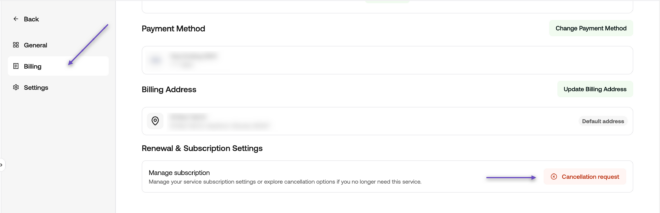
Step 2) In the left sidebar, click Billing.
The Subscription Breakdown for your hosting service will open.
Step 3) Scroll to the bottom of the page. Under Renewal & Subscription Settings, click Cancellation request.
Step 4) In the Product cancellation request dialog, choose when the cancellation takes effect and give a reason. Then click Submit request.
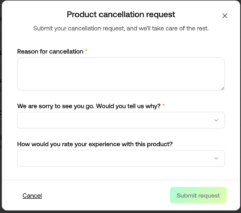
You’ll receive an email confirmation with the date your service stays active until.
One more detail people miss: if your domain uses Hosting.com’s nameservers, you must update your DNS nameserver entries — and any custom DNS records you created — before the account goes away. Otherwise your email and site stop resolving even after a successful migration.
A note on timing: Hosting.com charges auto-renewals three days before the renewal date. Submit your cancellation well before that window, not on the day.
Cancel or Transfer Your Domain Away From Hosting.com
You have two options for a domain registered with Hosting.com: stop it renewing, or move it to another registrar.
Cancel the renewal if you’ve already bought a replacement domain elsewhere. In the client Area, expand Products & Services, click Domains, select the domain, and switch it off auto-renewal in the renewal settings.
Be aware that a domain set to manual renewal will expire — and become available to anyone — if you don’t actively renew it.
Transfer it if you want to keep the name. Before you start the transfer at your new registrar, complete these steps at Hosting.com:

- Request the EPP / auth code for the domain
- Unlock the domain at the registrar
- Confirm at least 60 days have passed since registration or the last transfer (an ICANN rule, not a Hosting.com one)
- Temporarily disable WHOIS privacy so you receive the transfer verification email
- Verify your admin contact email is current and accessible
Transfers typically complete in 5–7 days. Start before your expiry date, not after.
How to Request a Refund at Hosting.com (if Applicable)
Hosting.com offers a 30-day money-back guarantee for new customers. Cancelling does not automatically trigger it — you have to ask.
Contact the billing team through live chat or a ticket in the Hosting Panel within 30 days of your purchase and request the refund explicitly. Get the confirmation in writing.
What’s covered: new purchases of Shared Hosting, WordPress Hosting, Reseller Hosting and email hosting bought directly from Hosting.com. Annual and multi-year terms are covered too.
What’s not covered: domain registrations, domain renewals and transfers, VPS plans, dedicated servers, SSL certificates, and third-party products such as Microsoft 365 and Google Workspace. Renewal fees are also excluded — the guarantee applies to new purchases, not to a plan renewing into year two.
If you bought a domain alongside your plan, the hosting portion is refundable and the domain fee isn’t. You keep the domain for the year you paid for.
Some Hosting.com materials still reference prorated refunds between days 31 and 90, a policy inherited from A2 Hosting. The current guarantee page doesn’t state it. If you’re past 30 days, ask billing directly and get the answer in writing before you cancel.
Cancel Your Hosting.com Account FAQs
Can I get a refund for my Hosting.com account? If you’re a new customer within 30 days of purchase, yes — for shared, WordPress, reseller and email hosting plans. Domains, VPS, dedicated servers, SSL certificates and third-party services are excluded, as are renewal charges. Contact billing to claim it; it isn’t automatic.
Will cancelling my hosting also cancel my domain? No. Hosting and domain registration are separate products and must be cancelled separately. This is a good thing — it means you can leave the host and keep the name.
What happens to my data after I cancel? For an end-of-billing-period cancellation, your account is suspended for 14 days and can be reactivated with data intact. After that, everything is deleted. For an immediate cancellation, no data is retained at all. Back up first.
How do I stop Hosting.com from charging me again? Submit the cancellation request in the Hosting Panel, and turn off auto-renewal on any domains you’re not keeping. Because auto-renewal charges land three days before the renewal date, act early rather than on the deadline.
Can I cancel by email or phone? Cancellation requests go through the Hosting Panel. Refunds are requested through live chat or a ticket.
What’s the easiest way to migrate away from Hosting.com? Let your new host do it. ChemiCloud handles migrations free, with zero downtime, usually within the hour. Have your website migrated today.
Conclusion
Cancelling your Hosting.com account takes four clicks in the Hosting Panel. Doing it safely takes a little more: back up your site, line up your new host, sort your domain, and claim your refund before the window closes.
The customers leaving Hosting.com aren’t leaving over one bad ticket. They’re leaving over renewal invoices they didn’t expect, support that stopped being fast, and a panel that got harder to use. Those are structural problems, and no amount of waiting fixes them.
You know how to cancel your Hosting.com account and move your sites — whether to another provider or to us. (But we’re pretty great, 😉)
Ready for worry-free hosting? Try ChemiCloud today. Your website’s in good hands.