Live Chat
 Help Center

Our CTO on why we put AI to work behind the scenes, and kept real people in charge of every ticket and chat.
We’ve been quietly building something behind the scenes, and we’d like to tell you about it. It’s called Sidekick, and it’s an AI assistant for our support team.
We chose the name on purpose. A sidekick is the trusted partner who works alongside the hero, not the hero itself. In our case, the heroes are the people on our support team.
Lots of companies are adding AI to customer support right now, and not all of it is good news for customers. Chatbots that answer before they understand the problem. Replies that sound confident and turn out to be wrong. We didn’t want any of that.
So we put AI where it actually helps: on the investigation side, doing the digging that used to eat up our team’s time. A real person still reads your ticket, makes the decisions, and talks to you.
Here’s what we built, why, and what it means for you.
Table of Contents
What Sidekick does
When you open a ticket about a slow or broken website, an email that isn’t arriving, or a blocked IP, there’s usually some digging to do before anyone can give you a proper answer. Which plugin is slowing the site down? Is the bottleneck the database or the PHP version? Did the email bounce, get filtered, or never leave the sender? Was the IP blocked by the firewall, a failed login, or a rule meant to catch bots?
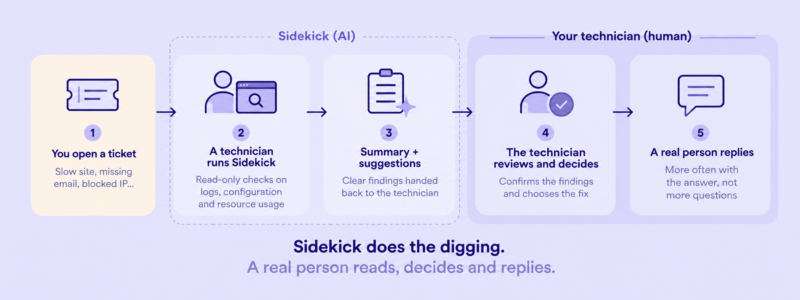
Answering those questions used to mean a technician working through logs, configuration, and resource graphs by hand, one check at a time. Now a technician can hand that digging to Sidekick. It runs a set of read-only checks, gathers the facts, and hands the technician a clear summary of what it found, along with suggestions. The technician reviews the summary, confirms it, decides what to do, and replies to you.
More answers, fewer questions
The biggest change is in how your technician prepares a reply. Before writing back, they can run Sidekick on your account and quickly get a picture of the problem: your account’s resource usage, what the error logs say, which requests are slow, and what changed recently. So instead of a first reply asking you for more details, you’re more likely to get the answer.
Help with the fiddly, routine jobs
Some tasks are simple in principle but tedious in practice, and easy to get slightly wrong in a hurry. This is where Sidekick is especially useful:
- Blocked IPs. It works out why a visitor’s IP was blocked and which rule triggered it, then explains it in plain terms. You get a real reason, not just “the firewall blocked it.”
- Track email delivery. It traces where a message got stuck, whether that’s on our side, at the sender, or at a filter in between, so we can tell you exactly what happened and what to do about it.
- Slow websites. It checks resource usage, slow database queries, plugin and theme behavior, and caching, then points the technician to the likely cause instead of a list of guesses.
Giving every technician a head start
Like most hosting companies, we organize support in levels. Our Level 1 (L1) technicians are usually the first people to pick up your ticket. Trickier technical problems are escalated to our Level 2 (L2) specialists.
Today, our L2 specialists use Sidekick’s full set of tools, and our L1 team uses a growing part of it. That already helps with everyday tasks, like finding the right account faster or running quick checks on email delivery, so L1 can handle more on their own before anything needs to be passed along.
We’re adding more capabilities for L1 step by step, based on the problems they run into every day. The goal is for the experience that used to live in a few heads to be built into the checks everyone uses. For you, that means support that feels more seamless, with fewer handoffs and fewer “let me pass this to a colleague” moments, no matter which part of our team picks up your ticket.
Where AI fits, and where it doesn’t
We were deliberate about where to use AI and where to keep it out. Three principles guide everything we build:
- AI investigates, people decide. Sidekick gathers facts and suggests causes. Every decision about what to change, what to tell you, and how to fix the problem is made by a person on our team.
- Facts over guesses. Sidekick doesn’t answer from general knowledge about hosting. It answers from what it actually found on the server: the log entry, the slow query, the firewall rule. If it can’t find evidence, it says so instead of making something up.
- It observes, it never acts. Sidekick can look, but it can’t change anything. (More on how we’ve limited its access in the security section below.)
The short version: we use AI to make our people faster and better informed, not to replace the judgment good support depends on.
What this means for our customers
The benefits are practical, and you’ll notice them in the tickets you open.
- Faster, more useful answers. Checks that used to take a technician a long stretch of manual work now come back as a clear summary. For common issues, the first reply often includes the diagnosis.
- Fewer back-and-forths. You’ve probably had a support experience that went “Can you send a screenshot?”, then “Can you try clearing your cache?”, then “When did this start?” With the facts already gathered, we ask fewer questions and skip the guesswork.
- More thorough checks. A technician under time pressure checks the three most likely causes. Sidekick checks all of them, every time, in the same order, including the unlikely one that turns out to matter. The quality of the investigation no longer depends on how busy the queue is.
- The same quality at 3 a.m. Whether you write to us at noon or at midnight, the checks are the same, and so is the information your technician works from. Time of day no longer affects how good the answer is.
- Clearer explanations. With the facts laid out, it’s easier to explain what actually happened, like why an IP was blocked or where an email went, in plain terms rather than vague ones.
How Sidekick keeps your information safe
A tool that looks at servers raises a fair question: is my information safe? Security has been part of Sidekick from the very first line of code. Here’s how it works, in plain terms.
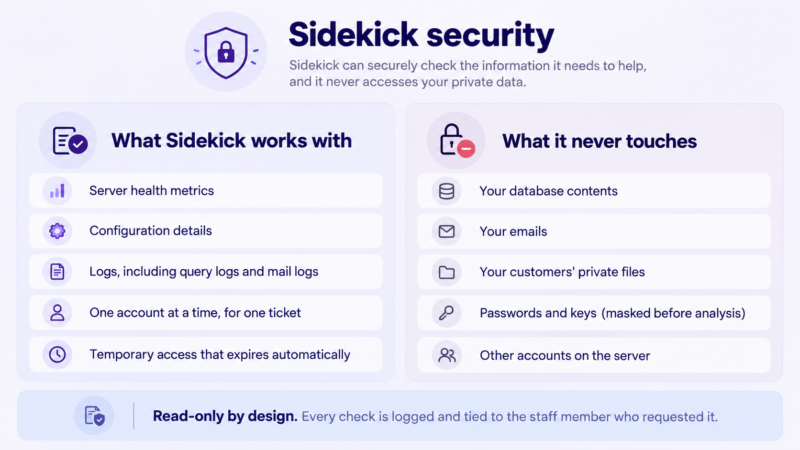
- It looks, but doesn’t touch. Sidekick’s checks are read-only. It can’t act on its own or change your site, configuration, services, or data, or our servers. If something needs fixing, a person does it.
- Limited access by design. Sidekick doesn’t have full access to your server. It can only reach specific areas through a set of predefined, purpose-built tools, each limited to what its task needs. It can’t browse the server freely or run arbitrary commands.
- One account at a time. Each investigation is limited to the single account the ticket is about. There’s no tool that “looks at everything.” Sidekick can’t see your neighbors on the server, and they can’t see you. This also means that even if an account contains malware or a prompt injection (hidden instructions meant to trick an AI), it can’t be used to hijack Sidekick into reaching another account’s data or any other information.
- Your private content stays private. Sidekick doesn’t read the contents of your databases, your emails, or files containing your customers’ private information. It works with server health metrics, configuration details, and logs. Passwords, keys, and other sensitive credentials are masked before anything is analyzed.
- Only our team, only for the task. Only authorized staff can use Sidekick. Access is granted temporarily for a specific investigation and expires automatically when the job is done. Nobody, and nothing, has standing access.
- Everything is recorded. Every check is logged and tied to the staff member who requested it, so we can always answer the question “who looked at what, and when?”
- The watchers are watched. Our team reviews Sidekick’s own activity, and anything unusual triggers an alert.
People first, always
We want to be clear about one thing: Sidekick works alongside our team, not instead of them.
Whether you open a ticket or start a live chat, you’re talking to a real person. Not a chatbot, and not an AI deciding whether your problem deserves a human’s attention. A real technician reads your message, checks what Sidekick found, makes the decisions, and talks to you. You will never get a reply written by a machine pretending to be a human.
What changes is where our team spends its time. Less of it goes into repetitive digging through logs and configuration. More of it goes into the human side of support: understanding what you’re actually trying to do, explaining things properly, and solving the problem rather than just the symptom.
What’s next
Sidekick is already in use, and we’re improving it based on what our team runs into every day and what you tell us. Right now, our technicians run its checks on demand while working on a ticket. Next, we want Sidekick to start investigating as soon as a ticket arrives, so the facts are ready when a technician picks it up, and to give our L1 team more of its tools. The direction stays the same: tools that observe and analyze, people who decide and act, and a service that keeps getting better as a result.
Thanks for being with us. And as always, if you have a question, a real person is just a ticket or a chat away.