Live Chat
 Help Center

If you host only your own sites, buy shared hosting. If you host sites for paying clients and don’t want to administer a server, buy reseller hosting. If you need root access or software that a control panel won’t run, buy a VPS. If you’re comparing reseller hosting to a dedicated server, you’ve almost certainly skipped a step.
That’s the short version. The longer version matters because these four things are not four sizes of the same product, and the comparison tables that treat them that way are why the decision feels harder than it is.
This guide is a spoke of our larger guide on how to start a reseller hosting business. If you already know you want to resell, start there instead.
| Shared | Reseller | VPS (managed) | VPS (unmanaged) | Dedicated | |
|---|---|---|---|---|---|
| Built for | Your own sites | Selling hosting to clients | Apps that outgrow shared | Same, if you’re the sysadmin | Scale, hardware or compliance needs |
| Who patches the server | Provider | Provider | Provider | You | You, or a management contract |
| Root access | No | No | Usually | Yes | Yes |
| Separate logins per client | No | Yes | Only with WHM | Only with WHM | Only with WHM |
| White-label / private nameservers | No | Yes | Yes | Yes | Yes |
| Resource isolation from strangers | No | No | Yes | Yes | Yes |
| Control panel licence included | Yes | Yes | Sometimes | Rarely | Rarely |
| Skill floor | None | Low | Moderate | High | High |
| Your time per month | Near zero | Low | Moderate | High | High |
| Typical entry cost | $3–10/mo | $20–40/mo | $40–100/mo + licences | $10–40/mo + licences | $100+/mo + licences |
The comparison everyone gets wrong
Search for these four terms together and you’ll get a dozen pages that line them up in one table and compare them on RAM, storage and price, as though reseller hosting were a middle rung between shared and VPS.
It isn’t. Reseller hosting is the odd one out, and once you see why, the decision resolves quickly.
Two questions, not one
You’re actually answering two separate questions at the same time, and most comparisons collapse them into one.
Question one: who are you hosting for? Your own projects, or other people who will pay you money and email you when their site goes down? This is a business question. It has nothing to do with server specifications.
Question two: who administers the server? You, or the provider? This is a skills-and-time question.
Shared, VPS and dedicated are answers to question two. They describe how much of a machine you control and how much of it you’re responsible for. Reseller hosting is an answer to question one. It’s shared hosting infrastructure plus the tooling to sell it: WHM for creating and managing accounts, per-client cPanel logins, private nameservers, and a billing platform.
Put both questions on a grid and the picture is clearer:
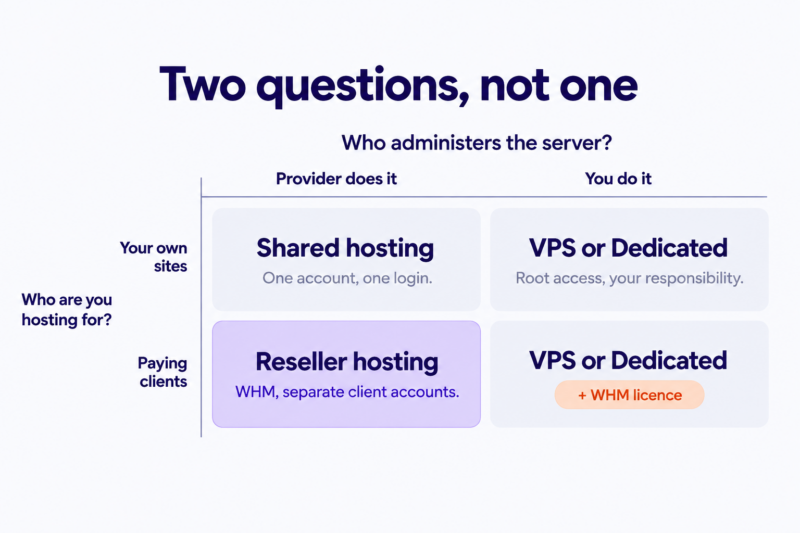
| Provider administers the server | You administer the server | |
|---|---|---|
| Hosting your own sites | Shared | VPS, dedicated |
| Hosting paying clients | Reseller | VPS or dedicated, with WHM |
Reseller hosting occupies a square nothing else fills. That’s the whole point of it. You get the apparatus for selling hosting without the apparatus for running a server.
The option most comparisons leave out
Look at the bottom-right square. A VPS or dedicated server with a cPanel/WHM licence does everything reseller hosting does — client accounts, white-label branding, private nameservers — and adds root access on top.
This is the real alternative to reseller hosting, and almost no comparison page names it, because it doesn’t fit the tidy four-way ladder. If you’re a developer weighing reseller against VPS, this is very likely the option you should be costing out. We’ll come back to it.
Shared hosting
You get one account on a server shared with a lot of other accounts, a cPanel login, and a provider who handles everything below the panel: OS, web server, patching, backups.
Genuinely good at: being cheap and requiring nothing of you. For a portfolio site, a small business site, or a handful of your own projects, it’s the correct answer and there’s no cleverness required.
Where it ends: the moment someone else’s site is on your account. You can usually host client sites on a shared plan, but you’ll be handing out your own credentials or acting as the manual middleman for every DNS change and email account your client wants. There’s no separation, no branding, and no clean way to hand a site over when a client leaves.
Reseller hosting
A reseller account is a shared hosting account with WHM on top. WHM lets you carve your allocation into individual cPanel accounts, one per client, each with its own login and its own resource limits. You set the packages, you set the prices, you bill the client. The provider runs the server and stays invisible.
Genuinely good at: letting you sell hosting on day one without becoming a sysadmin. Private nameservers mean your clients see your brand, not your provider’s. If you already have clients paying you for websites, this converts an existing relationship into recurring revenue with very little added risk.
Where it ends: you have no root. You’re inside a control panel, running whatever software stack the provider supports, on a machine you share with other resellers. You also inherit your provider’s uptime and support quality, and pass it on to your clients under your own name. Choose accordingly.
For the full definition and how the account structure works, see what is reseller hosting. For what WHM actually does day to day, see WHM for Resellers
VPS hosting
A virtualised slice of a server with guaranteed CPU and RAM, and usually root access. Your resources are yours; a noisy neighbour can’t take them.
Managed vs unmanaged is the real decision
“VPS” covers two very different products and the word does a lot of hiding.
Unmanaged means you get an IP address, root credentials and an operating system. Everything after that is yours: web server, PHP, firewall, security updates, mail configuration, backups, monitoring. When it breaks at 2am, it breaks for you.
Managed means the provider handles the OS layer and often supplies a control panel (e.g. cPanel/WHM). You keep root, you lose some of the 2am. You pay for the difference.
Genuinely good at: running things a shared environment won’t. Custom PHP extensions, Node or Python services, Docker, long-running queue workers, your own nginx config, sub-minute cron, a staging pipeline that assumes shell access.
Where it ends: the responsibility is real and it does not go away because you’re busy. An unmanaged VPS with unpatched packages hosting ten client sites is a liability with a monthly invoice attached.
Dedicated hosting
An entire physical machine. No virtualisation, no neighbours, full hardware control.
Genuinely good at: sustained heavy load, workloads that need specific hardware, and situations where you have to be able to tell a client or an auditor that their data sits on isolated hardware.
Where it ends: cost, and the fact that you now own a physical server’s worth of responsibility. If you’re reading a guide that compares reseller hosting to dedicated servers, dedicated is almost certainly not your next move. Most operators who genuinely need one arrive there from a VPS, having already run out of room. See Outgrowing Reseller Hosting
Reseller vs shared: can’t I just put clients on a shared plan?
Often, technically, yes — within your provider’s terms and your plan’s site limit. Plenty of freelancers start this way. It works until it doesn’t, and it stops working for reasons that are organisational rather than technical.
One login. Shared hosting gives you one cPanel account. If a client needs to add an email address or point a subdomain, either you do it for them every time or you give them credentials that also reach every other client’s files.
No separation. One client’s runaway plugin or compromised install is inside the same account as everyone else’s site. Resource limits apply to the whole plan, not per client.
No brand. Your clients see your provider’s nameservers and your provider’s name in the panel.
No clean exit. When a client leaves, you’re extracting their site from a shared account by hand rather than handing over an account.
The practical threshold isn’t a specific number of sites. It’s the first time you need a client to have their own login, or the first time you want to invoice hosting as a separate line item under your own brand. That’s the point where account separation is worth paying for. Check your provider’s acceptable use policy before you assume either arrangement is permitted — terms vary, and some shared plans prohibit hosting third-party sites outright.
Reseller vs VPS: the decision most people are actually making
This is the comparison that brought most readers here, and it deserves a straight answer rather than a diplomatic one.
What you give up on reseller
No root. In practice that means:
- No installing system packages, custom PHP extensions or modules the provider doesn’t offer
- No Docker, no containers
- No long-running processes: queue workers, websocket servers, background daemons
- No custom web server configuration beyond what the panel exposes
- Cron at whatever minimum interval the provider allows, not every 10 seconds
- No non-cPanel stack — if your deployment assumes shell access, Git hooks and a build step, you’ll be fighting the panel
If two or more of those are load-bearing for your work, stop reading this section. You need a VPS.
What you take on with a VPS
Root is not free. It comes with a job description:
- OS and package patching, on a schedule, forever
- Firewall configuration and intrusion prevention
- Backups — configured, offsite, and restore-tested, because an untested backup isn’t one
- Uptime monitoring and alerting that reaches you when you’re asleep
- Mail deliverability and IP reputation, which is a genuine ongoing chore
- Incident response. Your clients’ sites are down and there is no support queue above you
Budget honestly for this. It is not a weekend of setup and then nothing; it’s a recurring commitment measured in hours per month, and it competes directly with billable work.
The licence arithmetic
This is where the comparison usually flips, and it’s the part sticker prices hide.
Note: Licence and pricing figures verified 9 September 2026. cPanel and WHMCS both adjust pricing annually; check current rates before making a decision.
cPanel licences are priced per server by account count, and the tiers matter. As of January 2026, Solo runs about $29.99/month for a single account. You have WHM access — but you can’t create separate client accounts, so it’s irrelevant here. Admin is about $35.99/month for five accounts, Pro about $53.99/month for thirty, and Premier about $69.99/month for a hundred, plus roughly $0.49 per account beyond that. Those numbers rose across every tier in January 2026 and have risen every year since cPanel moved off flat per-server pricing in 2019.
Billing software sits on top. WHMCS retired its Starter tier on 1 January 2026, so the entry self-hosted licence is now Plus at $34.95/month for up to 250 clients, with Professional at $54.95/month for up to 500. Blesta is the cheaper alternative and worth costing separately. See WHMCS vs Blesta
On a reseller plan, the control panel licence is the provider’s problem and isn’t billed to you. On a VPS it’s usually a separate line item, though some managed VPS plans bundle it — check rather than assume. Either way, at small account counts the licence stack costs more than the server.
Who should choose which
Choose reseller hosting if: your clients run standard WordPress or PHP sites, you want to sell hosting rather than operate servers, and an hour spent on server maintenance is an hour not spent on billable client work.
Choose an unmanaged VPS if: you need root, you’re running a non-standard stack, and you already administer Linux servers competently. If you’re a developer whose application is the product and hosting is incidental to it, this is your answer and reseller hosting will only frustrate you.
Choose a managed VPS with a WHM licence if: you need both root and per-client account separation, and you’re prepared to pay for both. This is the honest answer for a fair number of agencies with a mixed client base — some plain WordPress sites, some custom applications — and it’s the option the standard four-way comparison never mentions.
Reseller vs dedicated, and VPS vs dedicated
Both comparisons are short, because dedicated is rarely the live option.
Against reseller, it isn’t really a comparison at all: one is a way to sell hosting without running servers, the other is a way to run a server with no selling apparatus attached. If you’re weighing them directly, you’re missing the VPS rung in between.
Against VPS, the legitimate triggers are narrow: sustained resource consumption where you’re consistently paying for a large VPS anyway, workloads with specific hardware requirements, or a contractual or regulatory need to keep data on isolated physical hardware. Absent one of those, a VPS does the job with better economics and easier scaling.
What each option really costs
Sticker price is the least useful number in this comparison. Here’s a full stack for 5-30 client sites, at September 2026 rates.
| Monthly cost | Reseller | Managed VPS + WHM | Unmanaged VPS + WHM |
|---|---|---|---|
| Base plan | $20–40 | $40–80 | $10–40 |
| cPanel licence (5-30 accounts) | Included | $36–54 | $36–54 |
| Billing software | Included on some plans, else $35 | $35 | $35 |
| Backups (offsite, tested) | Usually included | $5–15 | $5–15 |
| Monitoring & alerting | Provider’s | $0–20 | $0–20 |
| Cash subtotal | $20–75 | $116–204 | $86–164 |
| Your time, hours/month | 1–3 | 3–6 | 8–15 |
| Your time × your hourly rate |
Two things fall out of that table.
The licences cost more than the server. At 5 accounts, cPanel and billing software together run roughly $70–90/month regardless of which VPS you buy. That’s why the unmanaged column saves far less cash than people expect — you cut the cheapest line and keep the expensive ones. Reseller plans bundle the control panel licence, and some bundle billing software too; ChemiCloud includes a WHMCS or Blesta licence on its reseller plans above the entry tier, which at this scale is the single largest line in the table.
The bottom row usually decides it. Fill it in with your own rate. If you bill $80/hour and unmanaged costs you ten hours a month, that’s $800 of foregone billable work against maybe $40 of monthly savings. The arithmetic only favours running your own server when you’d have those hours anyway, or when reseller genuinely can’t do the job.
Before you commit either way, run your own numbers on the reseller profit calculator and read how much you can actually make reselling hosting.
You’re not choosing forever: the upgrade path
Most people treat this as a permanent decision. It isn’t. There’s no penalty for starting on the cheaper, simpler option while your client count is small and your revenue is unproven.
But when a reseller plan does start to pinch, the reflex is to assume the answer is a VPS. Usually it isn’t. First work out which problem you actually have, because they have different answers and wildly different costs.
Do you need more room, or different capability?
More room means you’re out of disk space, out of cPanel accounts, or bumping resource limits. Nothing about your work has changed — there’s just more of it.
Different capability means a client needs something a control panel fundamentally cannot do: root access, a custom stack, containers, a contractual guarantee of dedicated resources.
Only the second one requires a VPS.
If you need more room
Move up a reseller tier, or buy a second reseller account and split your clients across both. This is the option people skip, and it’s usually the cheapest and least disruptive one available.
The reason it’s worth checking: some providers let you run multiple reseller accounts under the same private nameservers. If yours does, adding capacity involves no DNS change, no propagation window and nothing your clients will ever notice — you provision new accounts on the second plan and carry on. Ask before you assume, because this varies by provider and it materially changes what expansion costs you.
If you need different capability
This is the move that’s a real project. You provision a server, install and licence a control panel, migrate accounts, and repoint DNS — and the DNS change is the part with a propagation window and a blast radius. cPanel-to-cPanel transfers are well understood and your clients needn’t know it happened, but budget for it properly rather than treating it as an afternoon. See Outgrowing reseller hosting
Signals, sorted by which problem they are
| Signal | Which problem | Likely answer |
|---|---|---|
| Account count approaching your plan’s cPanel limit | More room | Higher tier or a second reseller account |
| Recurring resource-limit warnings | More room | Higher tier or a second reseller account |
| Running out of storage | More room | Higher tier or a second reseller account |
| Clients asking for software the panel can’t run | Capability | VPS |
| Needing to guarantee resources contractually | Capability | VPS or dedicated |
| Support volume justifying dedicated infrastructure | Capability | VPS, with management budgeted |
One signal is noise. Two or three in the same column is a decision. See also our guide on overselling hosting to learn on how shared resource ceilings actually behave.
Frequently asked questions
Is reseller hosting just shared hosting with a different name? No. It runs on comparable infrastructure, but a reseller account includes WHM, which lets you split your allocation into separate cPanel accounts for individual clients, set your own packages and limits, and run private nameservers under your own brand. A shared account can’t do any of that.
Do I need a VPS to host client websites? Only if those sites need something a control panel can’t provide — root access, custom system packages, containers, long-running processes. For standard WordPress and PHP sites, a reseller account does the same job with far less operational work.
Can I host client sites on a normal shared hosting plan? Usually yes, within your provider’s terms and site limits, but you’ll have one login shared across all of them, no per-client resource separation and no white-label branding. Check your provider’s acceptable use policy first; some prohibit it outright.
Is reseller hosting cheaper than a VPS? At small account counts, almost always, because the control panel licence is included rather than billed to you separately. At September 2026 rates, a cPanel licence for ten accounts alone runs roughly $36–54/month before you’ve paid for the server or billing software.
Do I get root access with reseller hosting? No. You get WHM, which is reseller-level access — enough to create, suspend, upgrade and manage client accounts, but not shell access to the underlying server. If root is a requirement, you need a VPS or dedicated server.
How many client sites can a reseller account handle? That depends on the plan’s account limit and its resource allocation, not on a universal number. Plans typically cap the number of cPanel accounts you can create, so read that limit before you buy, and size for where you expect to be in a year rather than where you are today.
Where to go next
If reseller hosting is your answer, the full walkthrough is in how to start a reseller hosting business — it covers packaging, pricing and the operational reality of supporting clients. Then price your plans with how to price reseller hosting.
If a VPS is your answer, that’s a legitimate outcome and this isn’t the guide for it. Go and cost out a managed VPS with a WHM licence against an unmanaged box, and be honest with yourself about the hours.
If you’re an agency or freelancer with clients already, start with should web designers resell hosting to their clients — the calculus is different when you arrive with fifteen sites instead of zero.