Live Chat
 Help Center

Something has prompted this. An account limit warning. A client asking why their site is slow. A support reply that didn’t answer the question. Somebody at a meetup mentioning they run their own servers.
Whatever it was, the conclusion that follows is usually the same one: we’ve outgrown reseller hosting, it’s time for a VPS. Sometimes that’s right. More often the book hasn’t outgrown anything — one account has, or one plugin has, or the provider has stopped being good enough — and moving a hundred client sites onto a server you now own is an expensive way to fix a problem that had a cheaper answer.
This page is for someone already running the book. If you’re a designer with a dozen client sites, you’re not near any of this: should web designers resell hosting to their clients is your version of the capacity question. If you haven’t started yet, how to start a reseller hosting business is the sequence. And if what you actually want is the straight comparison between hosting types, reseller vs shared vs VPS vs dedicated does that job and this page won’t repeat it.
One disclosure before anything else, because it shapes how you should read the rest: we sell reseller hosting and we sell managed VPS hosting. This article will tell a good share of readers to stay exactly where they are, and it will tell a smaller share that what they need is something we don’t sell at all. Both of those are in here because they’re true.
Table of Contents
- The short answer
- The four ceilings that are real
- The symptoms that aren’t a capacity problem
- The signals that genuinely mean it’s time
- What the move actually costs
- The option most people should take first: the hybrid
- VPS or dedicated, and what “managed” covers
- Migrating a book of accounts without breaking clients
- What changes the day you own the server
- When the answer isn’t a server at all
- Mistakes worth avoiding
- Frequently asked questions
The short answer
- Four things genuinely run out: account count, storage and bandwidth, per-account CPU and memory, and administrative control. Everything else that hurts is something else wearing a capacity problem as a costume.
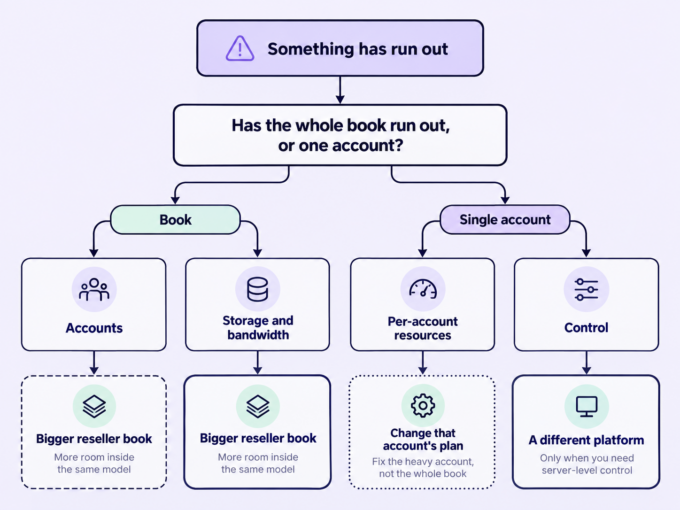
- Check whether the constraint is the book or a single account. If it’s one account, move the account, not the book.
- A VPS at your account count usually costs more than your reseller plan, not less, once the control panel and billing licences are counted. Buy it for control, isolation or a client requirement — never for savings.
- “Managed” means the provider keeps the platform running. It does not mean somebody else owns your clients’ problems.
- If what you’ve outgrown is wanting to do this at all, that’s a business decision, not an infrastructure one.
Three readers should stop here and go elsewhere. If you’re under about forty accounts, a tier change or a second reseller account is almost certainly the cheaper correct move. If the trigger was one client’s site, the next section is the whole article for you. And if the trigger was a provider who couldn’t answer your question at one in the morning, you have a provider problem — buying a server is a very expensive way to change providers.
The four ceilings that are real
Name the ceiling before you price the remedy. These four are the only ones that are actually about capacity, and each has a different cheapest correct fix.
| Ceiling | How you notice | Cheapest correct remedy | When it genuinely means a server |
|---|---|---|---|
| Account count | New accounts refused; you’re rationing, or doubling clients up in one account | Tier change, switch to an accounts-optimised plan, or a second reseller account on the same nameservers | You’re at the top of the accounts-optimised ladder and still growing |
| Storage and bandwidth | Plan-level quota warnings rather than account-level ones; a suspension notice | Tier change; clear client-generated backups out of accounts; storage-optimised plan | Top tier reached and the book is genuinely heavy — media libraries, large mail archives |
| CPU and memory per account | One or two accounts struggling under load; everything else fine | Per-account resource add-on, or move that one account | Several accounts routinely need more than the per-account envelope allows |
| Administrative control | You need software, a service, a setting or a level of access the platform doesn’t expose | None. This ceiling has no remedy inside the reseller model | Immediately, if the requirement is real and recurring |
Account count
Reseller plans top out somewhere in the low hundreds of accounts, and the ladder usually runs along two axes rather than one: more storage with fewer accounts, or more accounts with less storage. So the first remedy for an account ceiling is often sideways rather than up. On our own plans, for example, the accounts-optimised range tops out at 200 cPanel accounts while the storage-optimised range tops out at 250 GB and 130 accounts — same money, different shape (verified September 2026).
There’s also an option most resellers don’t know they have: a second reseller account on the same nameservers. Capacity doubles, your clients see nothing different, and you don’t change platform, billing or anything else. It’s worth asking your provider about before you price a server, because it’s usually the difference between a small monthly increase and a project.
Storage, inodes and bandwidth
Three different limits that get talked about as one.
Storage is usually the least urgent and the most often self-inflicted: a surprising share of full reseller plans are full of client-generated backups sitting inside client accounts. Your provider’s own retained backups don’t normally count against your plan — backups your clients make inside their accounts do. Worth auditing before you conclude you need more space. What you’re actually responsible for backing up, and who carries the blame when a client deletes something, is a separate question: backups, and who’s responsible when a client deletes their site covers it.
Inodes — file count rather than file size — bind first on mail-heavy books and sites with large media libraries, and they’re usually fixable per account rather than per plan.
Bandwidth is the one to watch, because it behaves differently from the other two. You’ll normally be warned as you approach the limit, but exceeding it suspends, and a suspension is visible to every client on the plan rather than being an inconvenience you absorb quietly. It’s the only capacity ceiling that turns straight into an outage, which makes it the one worth monitoring monthly rather than noticing annually. Check your own provider’s behaviour here; it varies, and the difference between throttling and suspension is the difference between a slow week and a phone call from every client you have.
CPU and memory per account
The per-account envelope — how much memory and CPU any single cPanel account can use — is set by the provider and is typically identical on every tier of the plan ladder. Upgrading to a bigger reseller plan buys more accounts or more storage. It does not buy any one account more power.
That single fact is behind most unnecessary migrations. A WooCommerce store with a large catalogue, a course platform, a membership site with a heavy plugin stack — these strain one account’s envelope while the other ninety accounts sit comfortably inside theirs. The plan isn’t exhausted. One account is. Most reseller plans sell a per-account resource add-on for exactly this, and it costs a fraction of a server.
Administrative control
The only one of the four with no remedy inside the model — which makes it the only ceiling that, on its own, justifies leaving.
It looks like this: a PHP extension or module the platform doesn’t carry. A service that needs to run outside cPanel. A monitoring, backup or deployment tool that needs server-level access. A client contract specifying isolation or controls you can’t supply. A configuration change you can describe precisely and cannot make.
Worth being clear-eyed about what’s happening here. The restriction isn’t a defect — it’s the product. Managed hosting is the arrangement where you trade access for someone else carrying the platform. When you need the access back, you’re not fixing a broken plan; you’re buying a different arrangement, with a different price and a different job description attached. What WHM does and doesn’t expose to a reseller is covered in cPanel & WHM for resellers.
The symptoms that aren’t a capacity problem
All of these are real problems worth solving. None of them is solved by moving the book to a server — and three of them get harder.
- One heavy client. Covered above, and worth repeating because it’s the most expensive mistake available on this page. Remedies in order of cost: the per-account add-on; that one client on their own small server; or that client priced properly for what they actually consume. How to price reseller hosting plans builds the number, and raising hosting prices on existing clients is the conversation.
- Sites that feel slow. Before it’s a platform problem it’s usually a caching, plugin or image problem, and the way to know is a proper workup at a quiet hour rather than during a peak. A site that’s slow because of forty plugins will be slow on hardware you own, at four times the price and with nobody to ask.
- A client demanding root access. Almost never a reason to move everyone. It’s a reason for that client to have their own server, or for you to decline the requirement — which is a legitimate answer, and easier to give if your terms say what you host.
- Email deliverability. Spam-folder complaints, a blacklisted IP, an outbound limit. On a managed reseller plan you’re borrowing the provider’s relay and the provider’s reputation, and the problem is largely theirs to fix. On your own server, the IP reputation is yours, permanently, including whatever the previous tenant did with it. Moving to fix email is usually moving in the wrong direction — and white-label hosting: where the seams actually show covers what your clients can and can’t see either way.
- A provider you can’t get answers from. The genuine case, and the one most often misdiagnosed as a capacity problem. Slow support, a crowded server, an outage nobody explained. This is a provider problem, and the fix for a provider problem is a different provider at the same product tier: one migration, no licence stack, no new operational load. It costs a fraction of what a server costs.
- “Real hosts have their own servers.” Status, not capacity. Your clients cannot tell and have never asked. It’s a real feeling and it sells a lot of unnecessary servers.
The signals that genuinely mean it’s time
Eight statements. Answer yes or no.
- You’re at the top of the plan ladder on the axis that binds you, and still growing.
- A ceiling you’ve hit has no remedy inside the reseller model — control, an extension, a service, an isolation requirement.
- More than one or two accounts routinely need more than the per-account envelope allows.
- A client contract or procurement process requires dedicated resources or controls you cannot currently supply.
- You need to sell something the plan can’t deliver: a specific stack, a staging arrangement, a resource guarantee you can put in writing.
- You have, or can pay for, somebody who will own the server when it misbehaves.
- The move survives its own arithmetic — the next section — without assuming it will save money.
- You can absorb a migration window in the next quarter without it landing on top of something else.
The pass rule: you need a yes to #1 or #2, and a yes to both #6 and #7. A yes to #4 is sufficient on its own — a contractual requirement doesn’t need a second reason. If your only yes is #5, check it against the previous section first; a surprising amount of “the plan can’t do this” turns out to be “I haven’t asked”.
What the move actually costs
The number on the plan page is one line of a bill with seven lines on it. A reseller plan is a bundle, and the bundle is invisible until you leave it.
What was in the bundle and now isn’t
| Line item | On a reseller plan | On a VPS | Note |
|---|---|---|---|
| Control panel licence | Included | Priced by account count | The big one — see below |
| Billing platform licence | Often included | A separate purchase | WHMCS vs Blesta |
| Account isolation layer | Included | A separate licence | Changes what you can safely sell |
| Web server / performance tier | Included | A separate licence | |
| Security and malware suite | Included | A separate licence | when a client site gets compromised |
| Outbound mail filtering | Included | A separate purchase, plus your own IP reputation | |
| Off-server backups | Included and provider-retained | A separate purchase, and yours to verify | backups and responsibility |
| Server administration | Included | Included on managed plans — for the platform only | See below |
The line item everyone forgets
Control panel licensing is priced by the number of accounts on the server, in steps. A reseller moving 150 accounts isn’t buying “a cPanel licence” — they’re buying the tier that covers 150 accounts, and at that point the licence alone is frequently a larger monthly line than the entire reseller plan they’re leaving.
Our own two products make the arithmetic concrete, and the numbers are typical rather than unusual. As of September 2026, a 150-account book sits comfortably on a top-tier accounts-optimised reseller plan at $77.95 a month at renewal, with the control panel, the billing licence, the isolation layer, the web server licence, the security suite, the outbound mail relay and daily retained backups all inside that price. Put the same 150 accounts on the nearest managed VPS and you’re at $92.95 a month for the server, plus the control panel tier that covers 150 standalone accounts at $66.95 — roughly double the monthly cost before isolation, security, web server, backups and billing are added back one licence at a time. The VPS also carries less bandwidth headroom than the reseller plan it replaced.
And the licence tier isn’t optional or deferrable. A migration that keeps every client as a standalone account needs a licence that covers every client as a standalone account; there’s no version where you move 150 accounts onto a single-account licence and sort it out later.
Other providers bundle differently, so do this arithmetic against your own two options rather than against ours. But do it before you decide, not after — and use how much you can actually make reselling web hosting or the reseller profit calculator to see what the new cost base does to your margin at your actual client count, because that’s the number that matters.
Your time, priced honestly
Even fully managed, you acquire work. Package design and resource allocation across accounts. Deciding how much to allocate and how much to hold back. Verifying that backups restore, not just that backup jobs report success. And first-responder status for everything application-shaped, because there’s no longer a queue above you for it.
Price that the way you should price all your support time: not as a deduction from profit, but as an effective hourly rate against the margin you’re keeping. If the move turns a comfortable margin into a modest wage, it’s worth knowing that at the point of decision.
The conclusion the rest of this page rests on: at small-host account counts, the move doesn’t save money. It buys control, isolation, or the ability to satisfy a requirement. If you can’t name which of those three you’re buying, you’re not ready.
The option most people should take first: the hybrid
This is where most agencies actually end up, and almost nobody writes it down.
The book stays on the reseller plan, where the economics are good and the platform is somebody else’s problem. The two or three accounts that genuinely need more get their own small servers. One brand, one billing system, one set of nameservers pointing at the right places.
- What it fixes: the heavy-client problem, without the licence stack and without a book-wide migration.
- What it costs: two environments to know, two places to look when something breaks, two bills.
- What the client sees: nothing, if your nameservers and branding are set up properly. Private nameservers covers that side.
- When it stops working: when “the two exceptions” becomes five. At that point you’re running a server estate by accident, and it’s worth consolidating on purpose rather than by drift.
One thing to handle rather than absorb: a client who needs their own server should be paying for one. That’s a repricing conversation, and raising hosting prices on existing clients is how to have it without losing them.
VPS or dedicated, and what “managed” covers
Why dedicated is rarely the answer now
For a book of a few hundred client sites, the case for dedicated hardware has narrowed to three situations: sustained resource demands that virtualisation genuinely can’t meet, a contractual or compliance requirement for single tenancy, and a cost crossover that arrives at a scale well beyond where most readers of this page are. “Get a dedicated server when you’re serious” is a status argument left over from an era when the alternatives were worse.
If you’re in one of those three situations, we can’t help you: ChemiCloud doesn’t sell dedicated or bare-metal servers. Go and buy one from somebody who does, and when you do, weigh the management model harder than the hardware specification — an unmanaged box is a second job, and a managed one costs enough that the crossover you were chasing may not be there.
Managed, unmanaged, and the gap between them
Managed usually covers the hardware, the hypervisor, the operating system, patching, the network and the control panel. It usually does not cover your packages, your allocation decisions, your clients’ applications, or verifying your backups. Unmanaged adds the entire platform to your list, and the honest test for whether that suits you is not whether you can do it — most operators can — but whether you want to be doing it at two in the morning during a kernel issue.
There’s one distinction worth checking carefully before you commit, because it catches resellers specifically: a managed VPS is not automatically a reseller platform. Running WHM with your own reseller-style sub-accounts requires root access, and plenty of managed plans — ours included — don’t provide root. On our managed VPS you can run client accounts as standalone cPanel accounts with a licence sized to your book, but if what you want is your own WHM with reseller accounts underneath it, you need a plan with root access, and that means looking outside our range. Ask the question explicitly of any provider you’re considering, in those words, before you migrate anything. It is not a question their plan page will answer.
Two smaller asymmetries worth knowing: VPS money-back windows are typically much shorter than the ones on shared and reseller plans, so front-load your testing; and the locations a provider offers for servers aren’t always the same list they offer for reseller plans, which matters if your clients have expectations about where their data sits.
Migrating a book of accounts without breaking clients
This section is about moving a book — sequencing, batching, DNS and mail. The mechanics of moving one site are a different job, covered in migrating client sites without downtime.
Before you move anything
- Export a full account inventory: account, domains, disk, inodes, PHP version, databases, mail accounts, SSL type and expiry.
- Flag the exceptions now — non-standard PHP versions, custom cron, hard-coded IPs, third-party SSL certificates, mail archives measured in gigabytes.
- Confirm where each client’s DNS is actually managed. It is not always where you think it is.
- Check what happens to your nameservers. On an internal move within one provider, the nameserver hostnames and their IPs often stay exactly as they are and only the hosting server’s IP changes, which means your registrar glue records don’t move at all. Moving to a different provider is the opposite case. Establish which one you’re in before you plan the cutover.
- Ask the provider two questions in writing: will your team do this transfer, and what licence tier does it require before you start? Both answers change the plan and the budget.
- Check what your billing platform assumes — server module, provisioning credentials, automation that will fail quietly rather than loudly.
- Take a backup and restore it somewhere. A backup job that reports success is not evidence.
- Write down your rollback point before you need it, and pick a window that isn’t a Friday, a billing date or a client’s launch week.
The order of operations
Provision and configure the target first. Recreate your packages before you create any accounts — how to create hosting packages in WHM is the mechanics, and if the move is prompting a rethink of what you sell, how many hosting tiers you should offer is the design question.
Then run both platforms live. Move a first batch of low-risk accounts — your own sites, then your most forgiving clients. Test each batch on the new server by hosts file or temporary URL before any DNS changes. Lower TTLs a day or two ahead. Cut over in batches, verify each one, and keep the old platform live and paid for through the full propagation window and a good while after.
Two rules that hold every time: never cut the whole book in one night, and never cut a batch you haven’t verified.
Nameservers, glue records and TTLs
Lower TTLs 24 to 48 hours before each cutover, and put them back afterwards.
Know which clients use your nameservers and which use their own or a third party’s DNS. The second group needs individual handling and lead time, and it’s where the surprises live — a client’s marketing agency holding the DNS is the classic one.
If your private nameservers themselves are moving to new addresses, the glue records at the registrar are the thing that bites, and they propagate on their own schedule regardless of what your zone files say. If they aren’t moving — the common case for an internal upgrade — this whole problem disappears, which is a genuine argument for staying within one provider if the destination is otherwise equal.
Email, which is the part that actually breaks
Web migrations get judged by clients on whether their email worked.
Mail keeps arriving at the old server after web traffic has moved, so plan a second sync of mail directories after each cutover rather than assuming the first one was final. Clients’ devices carry cached settings and will keep using them. And a new IP has no sending reputation at all: SPF, DKIM and DMARC records need rebuilding to match the new arrangement, and deliverability may be worse for a fortnight before it’s better.
The first week on the new server
Watch four things: resource use per account against what you allocated, the mail queue and deliverability, backups completing and restoring, and your support inbox.
Most clients need to be told nothing. A few — the ones with their own DNS, their own mail arrangements, or a launch in progress — need a heads-up with a date, not a technical explanation. If something does go visibly wrong, handling downtime: a communication plan is the playbook.
What changes the day you own the server
- You set the per-account envelope. The allocation decisions your provider used to make are now yours, including how much headroom to hold back — which is what overselling is actually about.
- Packages are yours to design and maintain. Nothing resets them for you.
- Backups are yours to verify. Nobody else notices a job that’s been failing quietly since April.
- You’re the escalation point. For application problems there’s no queue above you, and on an unmanaged plan there’s none for anything.
- Your cost base changed, so your prices probably should. A new fixed monthly cost spread across the same book changes the arithmetic in how to price reseller hosting plans.
- Your uptime promise is now partly yours to keep. Whatever your terms of service say still applies; the party who has to deliver it has changed.
When the answer isn’t a server at all
Four outcomes that are more common than the one this page is named after.
- Stay and change tier. The cheapest correct answer for most account and storage ceilings.
- Stay and add a second reseller account. Capacity without a platform change, and invisible to clients.
- Change provider. If the problem is support quality, crowded servers or a platform that can’t answer your questions, the fix is a different provider at the same product tier. One migration, no licence stack, no new job description.
- Sell the book. If what you’ve actually outgrown is wanting to run a hosting operation, no amount of infrastructure fixes that, and a book of recurring accounts is worth real money to somebody. Selling a hosting book of business is the page for that conversation, and it’s a more common ending than the industry likes to admit.
Mistakes worth avoiding
- Moving the whole book to fix one account.
- Budgeting from the plan page price.
- Forgetting that the control panel licence is tiered by account count.
- Migrating without a restore you’ve actually tested.
- Cutting the entire book over in one night.
- Leaving TTLs at their default.
- Assuming every client uses your nameservers.
- Cancelling the old plan the same week you finish.
- Telling clients more than they need, at the worst possible moment.
Frequently asked questions
How many client accounts can you run on a reseller plan? Typically up to somewhere in the low hundreds, depending on which axis of the plan ladder you’re on — more accounts with less storage, or more storage with fewer accounts. The practical limit is usually the one you hit first, and for most books that’s storage or bandwidth rather than the account count itself.
Is a VPS cheaper than reseller hosting? At small-host account counts, generally no. The reseller plan bundles the control panel, billing, isolation, security, mail filtering and backup licences into one price; on a VPS each is a separate line, and the control panel licence scales with the number of accounts. The move buys control, not savings.
Can I move some clients to a server and leave the rest where they are? Yes, and for most operators it’s the right answer. Keep the book on the reseller plan and give the one or two demanding accounts their own environment. Handle the nameservers properly and no client notices.
Do my clients need to know I’m changing servers? Most of them, no. The exceptions are clients who manage their own DNS, clients with unusual mail arrangements, and anyone mid-launch. Give those a date and a short explanation; give everyone else a stable service and nothing to read.
If the honest diagnosis was a provider problem rather than a ceiling — slow answers, crowded servers, an outage nobody explained — then what you need is one migration, not a platform change. Our reseller hosting plans include the licences and the isolation layer that a server would charge you for separately, and moving an existing book is a supported job rather than a weekend project.
If the ceiling is real and it’s a single heavy client, a managed VPS alongside the reseller plan is usually the cheapest version of the fix, and the hybrid section above is how to arrange it.
And if what you need is root access, your own WHM with reseller accounts underneath it, or dedicated hardware — we don’t sell any of those, and you should buy them from somebody who does. Ask them the WHM-and-root question in exactly those words before you commit to anything.