Live Chat
 Help Center

The notice arrives mid-afternoon. Your provider has found a phishing page on one of your accounts and taken it offline. The domain takes a minute to place: a bakery you built a site for four years ago, which has since closed, and whose hosting you never got round to cancelling. Nobody has logged in since. Somebody has.
That’s how a lot of compromises reach people who host client sites. Not through the site everyone is watching, but through one nobody is. And when it happens, you’re dealing with three incidents at once. There’s the technical one: something is running on the account that shouldn’t be. There’s the contractual one: your provider deals with you, not your client, and it’s already acting on its own timetable. And there’s the client one: someone expects you to fix it, explain it and possibly pay for it.
They run on different clocks, and the order you work them in decides how much damage you take. This guide covers the operating side of how to start a reseller hosting business: the first hour, how your provider will handle it, cleaning versus restoring, what to tell the client, and who pays.
If this is happening right now
Work out which accounts are affected.
Take the site offline yourself. Don’t wait to be suspended.
Copy the evidence before you change anything.
Change every password and key that touches the account.
Check your other accounts for the same weakness.
Tell your provider.
Send your client a short holding message.
Don’t restore a backup yet.
Table of Contents
- The short answer
- Whose clock you’re on
- The first hour
- What kind of compromise is it?
- Clean, restore or rebuild
- Finding the way in
- Telling the client
- Who pays for the cleanup
- After it’s clean
- When the same client keeps getting compromised
- Before you move hosts: questions to ask about compromised accounts
- Frequently asked questions
The short answer
Work in this order: contain it, preserve the evidence, change the credentials, find the way in, clean or rebuild, and only then restore. After that, tell the client what happened and decide what changes. Restoring first is the most common mistake. The site comes back, the way in is still open, and within days you’re doing this again.
Your position is an awkward one. Your provider deals with you, not your client. Your client deals with you, not your provider. And the cause is often neither of you: a reused password, a plugin nobody updated, an admin account left behind by a previous developer.
Server-level security catches a great deal. It scans, quarantines and blocks things before you ever see them. What it can’t do is refuse a login with a valid password, or fix a flaw in a plugin the site is running on purpose. Most compromises on a well-run host come in through that layer, the application, which is the part you and your client control. That isn’t a disclaimer. It’s the reason a plan matters.
Whose clock you’re on
Two lanes: act-now and warn-first
Providers sort abuse into two lanes. Anything that puts other people at risk right now — serving malware, hosting a phishing page, attacking other systems, sending spam — is usually acted on straight away, and you’re told afterwards. Problems that don’t threaten anyone else tend to get a warning and time to fix them first.
Assume a compromise is in the first lane until you know otherwise. That’s why the second step of the first hour is to take the site offline yourself: suspended on your timing, with your explanation, beats suspended on someone else’s at three in the morning. It also means your own terms have to allow it. Terms of service and AUP for a small host covers the immediate-suspension clause; without one, you’re caught between your provider’s rules and your own paperwork.
This is a separate process from suspension for non-payment, which runs on a timetable you can see coming. Non-payment, suspensions and getting paid covers that one.
How far one compromised account can reach
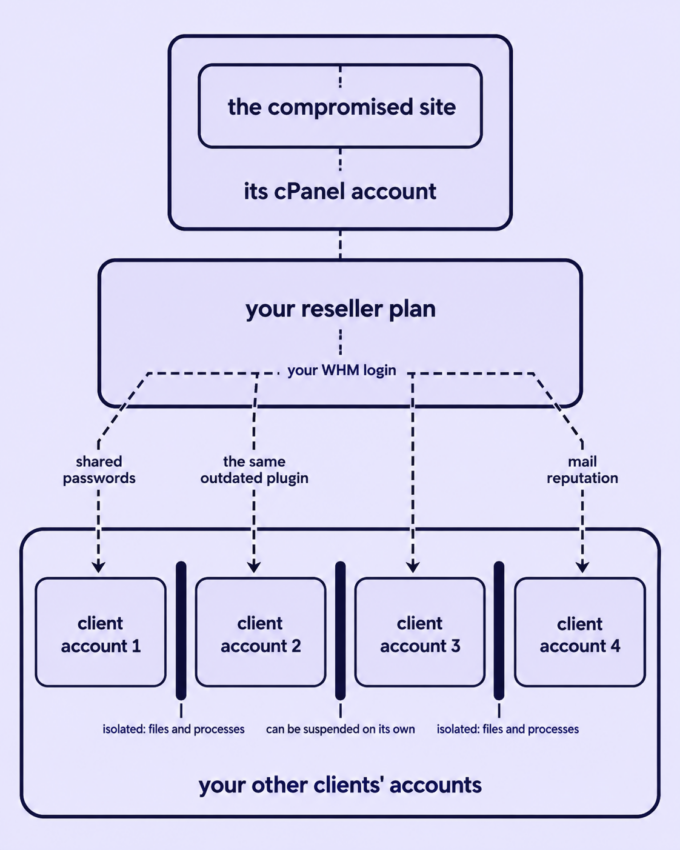
Mostly, not far. On a properly run reseller platform, each client’s cPanel account is walled off from the others at the file-system and process level, so malware in one account can’t read or change another account’s files. Providers can also suspend a single client account without touching the rest of your plan, and usually tell you first.
What isolation doesn’t contain is anything you’ve shared yourself:
- Credentials. The same admin password, FTP login or contractor account across several client sites. Whoever has it for one has it for all of them.
- Code. The same outdated plugin or theme on every site you built. The flaw that let them into one is sitting in the others.
- Your reseller login. If your WHM password was exposed, every account under it was exposed too.
- Mail. Spam from a compromised mailbox damages that domain’s sending reputation. A well-run platform stops it at the outgoing relay, often by blocking just the mailbox responsible, and tells you. The domain’s reputation still takes time to recover after the block lifts.
What a suspension does to your backups
A suspended account typically stops being backed up while it’s suspended, and older restore points keep ageing out on the normal schedule. Leave a compromised account suspended while nobody deals with it and you’re quietly losing the clean backups you’re going to need. Take your own full copy at the moment of suspension, and don’t let a suspension drift. Backups, and who’s responsible when a client deletes their site sets out what provider backups do and don’t promise.
The first hour
- Scope it. Which account, which domain, and whether anything else under your plan shows the same symptom. Go by the account name in your provider’s notice rather than the site the client rang about. It may be one you’d forgotten. And check who else got the notice: some notices go to the contact address on the cPanel account rather than to you, and that may be your client’s — white-label hosting: where the seams actually show covers that choice.
- Contain it. Suspend the account yourself in WHM (cPanel & WHM for resellers shows where), or put up a maintenance page if the client needs email to keep working while the site is down. Choosing the moment is better than having it chosen for you.
- Preserve before you touch. Download a full copy of the compromised account, with its access and error logs, before you clean anything. It’s your evidence for finding the way in, and your only record if customer data becomes a question later. Keep it on your own storage, not on the hosting account: most providers don’t allow hosting space to be used for backups, and you don’t want an infected copy sitting beside the site you’re cleaning.
- Change everything that touches it. This is the step where things get missed, so work down the list:
- the client’s cPanel password;
- FTP and SSH keys;
- database passwords, and the configuration file that stores them;
- every CMS admin user, deleting any that nobody recognises;
- passwords for email accounts on the domain;
- API tokens and any integration that holds credentials;
- your own WHM password, if there’s any chance it was exposed.
Turn on two-factor authentication wherever it exists.
- Check the neighbours. Any other site that shares a password, a plugin, a theme or a contractor with this one. Scan those now rather than waiting for the next notice.
- Tell your provider, even if they told you. Most providers’ terms ask you to report suspected unauthorised access promptly, and they can see things you can’t: where the traffic came from, what the mail relay blocked, whether anything else on the server was touched. Many will scan and review the account with you, so ask what they offer before you pay anyone else.
- Tell your client. A short holding message, not an explanation. Telling the client has the shape.
Over all of it sits one rule: nothing gets restored until you know how they got in.
What kind of compromise is it?
You rarely meet a compromise as a diagnosis. You meet it as a symptom or a notice, so start there.
| What you’re seeing | What it usually is | How far it reaches | How a provider usually reacts | Your first move |
|---|---|---|---|---|
| A browser warning such as “deceptive site”, or search results showing pages you never made | Injected spam pages or malicious redirects | The site, its search visibility, the domain’s reputation | Often a warning first, unless it’s serving malware | Contain and clean, then ask the search engine to review the site once it’s clean |
| Visitors bounced to another site, often only on mobile or when arriving from search | Redirect injection | Visitors, and the client’s trust | A warning or immediate action, depending on what the destination serves | Contain, then check every site that shares the same plugins |
| A notice that a phishing page is hosted on the account | A phishing kit uploaded through a weak point | Other people, directly | Immediate suspension, notice afterwards | Don’t just delete the kit — find how it was uploaded |
| Bounced mail, or a notice about outbound spam | A compromised contact form, a mailbox password, or a mailer script | The domain’s mail, and its reputation | Immediate block, often of the one mailbox | Change mailbox passwords, fix or remove the form, find the script |
| Resource warnings with no traffic to explain them | A cryptominer or botnet script | The account’s resources and the server | Usually immediate | Treat it as a full compromise: scripts like this rarely arrive alone |
| A defaced homepage | Defacement | Mostly the client’s reputation | Usually a warning first | The loudest symptom and often the shallowest compromise, but still check for a backdoor |
| Admin users you didn’t create, or a client locked out of their own admin | Stolen or guessed credentials | The site, and anything sharing that password | Varies | Do step 4 of the first hour before anything else |
Symptoms tell you what’s there, not how it arrived. The next two sections deal with both.
Clean, restore or rebuild
The rule first: a restore point has to predate the compromise, and restoring without closing the way in brings it straight back. Dating a compromise is harder than it sounds. The visible symptom can turn up weeks after the break-in, and a backdoor planted in March is in every backup taken since. How far back your restore points go, and why that’s a look-back limit rather than a safety net, is in the backups guide.
| Option | When it’s right | The catch |
|---|---|---|
| Clean in place | The compromise is recent and contained, and you know how they got in | You have to find everything, including the backdoor. A scanner is a first pass, not a verdict |
| Restore a clean backup, then patch | You can date the compromise, a restore point predates it, and the site changes rarely | Anything added since — orders, form entries, posts — is lost or has to be merged back, and the way in must be closed first |
| Rebuild | A brochure site you built, simple content, no restore point you trust | More work up front; for small sites, often the cheapest option overall |
When to bring in a specialist. A site that takes payments, a compromise you can’t date, or a second compromise after a cleanup you thought was complete. Specialist cleanup services exist for exactly this. Ask your provider what they’ll do first: a scan and a review of the account is sometimes enough to tell you whether you need anyone else.
When the site isn’t yours yet. If the compromised site belongs to someone who isn’t your client yet — a rescue from a host that let them down — it’s a cleanup before it’s a migration. Moving it moves the infection with it. Finding your first hosting clients covers the rescue offer, and migrating client sites to your reseller account covers the move, once there’s something clean to move.
Finding the way in
General lists of how websites get compromised are everywhere. These are the entry points that turn up specifically when one person hosts a lot of sites:
- Abandoned installs. Old staging copies, test sites, a former client’s site nobody took down, a forgotten WordPress in a subfolder. Nobody updates them, and nobody notices when they’re taken over.
- The same plugin everywhere. A plugin or theme you install on every build is a flaw you install on every build.
- Nulled themes and plugins. Pirated premium code, often added by the client or a previous developer, frequently arrives with a backdoor already in it.
- Shared and reused passwords. Across clients, or between a client’s site and their personal accounts.
- Admin accounts nobody removed. A former contractor, a previous agency, a member of staff who left two years ago.
- The client’s own login. An admin password you never controlled and they never changed.
The access logs, file modification dates and whatever the scanner flagged are where the way in usually shows. If you can’t find it, that’s the argument for a specialist, not for restoring and hoping.
Telling the client
Outage messages and compromise messages are different things. When a server goes down, the cause is usually known and nobody in particular is to blame. When a site is compromised, cause, fault and customer data are all open questions, and whatever you say in the first hour will be remembered. The cadence rule from handling downtime: a communication plan still holds: promise the next update, not a fix time. What goes in the messages is different.
There are three of them.
The holding message, within the hour. What you’ve seen, that you’ve taken the site offline (or that it’s safe to leave up), and when they’ll hear from you next. No cause, no blame, no promises about the future. For example:
Hi Priya — your website had a security problem this morning, so I’ve taken it offline while I deal with it. Your email is still working. I’ll update you by four o’clock, even if I don’t have the full picture by then.
The confirmation, once you know. What happened, in plain words. What was affected. Whether any customer data was involved, or that you don’t know yet and when you will. What you’re doing about it. And what you need from them, which is usually to change any password they’ve reused elsewhere.
The closing report, once it’s clean. What was done, how they got in, what has changed so it can’t happen the same way again, and what it costs, if anything. Keep it to a page. It’s the record you’ll want if the question of who was responsible ever comes back.
On wording: say “compromised” once you’ve confirmed it, not before. Don’t shrink it into “a small glitch”, and don’t dramatise it either. And if you once told this client that moving their hosting to you would make them more secure, this is the moment that sentence comes back. Telling existing clients you’re taking over their hosting is worth rereading for what not to promise next time.
If personal data may have been exposed
If the site collected customer data — orders, form submissions, account logins — a compromise can trigger legal duties with short deadlines. Under the GDPR, for example, the organisation that controls the data generally has 72 hours from becoming aware of a breach to report it to its regulator, unless it’s unlikely to put anyone at risk, and a provider handling that data on its behalf has to tell it without undue delay.
In most reseller arrangements, the duty to decide and report sits with the client. Your job is to tell them quickly and give them the facts, which is the other reason step 3 of the first hour matters. Which laws apply depends on where the client and their customers are. If data might be involved, the client should take advice now, not wait for your closing report.
Who pays for the cleanup
It depends on what you sold, and it should be settled before the first incident rather than during one. What belongs inside a retainer is covered in hosting inside a retainer vs billed separately, and the clause that makes client-caused work billable is in the terms of service guide. Applied to a compromise, these are sensible defaults rather than rules:
| What you sold | If the cause was on your side (an update you were paid to apply, a password you set) | If the cause was on the client’s side (a reused password, a plugin they installed) |
|---|---|---|
| Hosting only | Usually absorb it once, and fix what let it happen | Billable at your stated rate, if your terms say so |
| Hosting plus maintenance and updates | Yours. It’s what they paid for | Often absorbed the first time as goodwill, billable after that |
| A retainer that includes security response | Included | Included, within whatever limit the retainer sets |
Three things hold whichever row you’re in:
- No terms, no bill. If nothing in writing says cleanup is billable, charging for it afterwards costs you more goodwill than the cleanup cost you in time. Absorb it, then fix your terms.
- The cost goes in the closing report, not the first message. Nobody wants an invoice in the same breath as the bad news.
- Set the rate before you need it. If you charge, charge a rate you decided calmly; how to price reseller hosting plans is the place to work out what your time is worth, not the middle of an incident.
Check the other direction too. Some providers bill the account holder for abuse handling caused by a client’s site, and some don’t. Find out which yours is before it matters.
After it’s clean
What prevents the second incident is mostly housekeeping across your whole client list, not hardening one site:
- Keep an inventory. Every account under your plan, who it’s for, and when it was last updated. Delete or archive anything nobody is paying for. Most forgotten sites stay forgotten because nobody made the list.
- One login per person. No shared admin accounts, and contractor access removed the day the contract ends.
- Two-factor everywhere you control: WHM, every cPanel account, every CMS admin.
- An update routine you actually keep, and a written rule for clients who manage their own sites.
- Know before the notice does. Monitoring for the symptoms in the table above is part of what hosting support load actually looks like.
- Use the security tools the account already has, and know what they do without telling you.
- Write it up in the same incident log you keep for outages, so the next one goes faster.
The last two are where your provider’s specifics matter. On ChemiCloud’s reseller plans, as of November 2026, Imunify360 scans every client cPanel account automatically, on a schedule at the server level, and quarantines what it finds; Proactive Defense, which stops malicious PHP while it runs, is switched on by default. You can also run a scan on demand inside any account, though not in bulk from WHM, so checking the neighbours after an incident means opening each account in turn. The detail that changes how you work is that scan alerts aren’t switched on by default, so a file can be quarantined without anyone being told. If a client reports a page that broke overnight, look at that account’s quarantine list before assuming the worst, and make checking scan results part of your routine rather than waiting for an email that isn’t coming. If a client account is compromised, support will also scan it, run a brief security audit and recommend next steps, with no fee. ChemiCloud KB covers it: “How to Run a Malware Scan in cPanel Using Imunify360“.
When the same client keeps getting compromised
Once is bad luck. Twice with the same cause is a pattern, and it’s telling you what the third time will look like. You have three options.
- Take over the maintenance. Move them to an arrangement where you control updates and admin access, priced to match. Hosting inside a retainer covers how to structure it.
- Make cleanup billable from now on, in writing, under your terms.
- Stop hosting them. Some clients cost more in incidents than they will ever pay in hosting. Ending the arrangement properly — with notice, a full copy of their site and help moving it — is a legitimate outcome, not a failure. Why hosting clients leave puts that decision alongside the other reasons a client list shrinks.
A client who insists on a pirated theme, a shared password or an admin login for their nephew is describing the next incident to you. And if that describes a lot of your clients, should web designers resell hosting to their clients asks the wider question honestly.
Before you move hosts: questions to ask about compromised accounts
If you already run hosting and you’re weighing a move, these are the questions to have answered before a compromise tests them:
- When a client account is compromised, do you clean it, help, or suspend it and leave the rest to me?
- Is any of that billed? Do you charge me for abuse handling when a client’s site causes it?
- Which kinds of abuse do you act on without warning, and how am I told?
- Can you suspend one client account without affecting the rest of my plan?
- Who receives abuse and malware notices: me, or the address on the client’s account?
- What security tooling runs inside each client account, is it on by default, and can I scan every account at once?
- What happens to backups while an account is suspended?
- When a compromised mailbox sends spam, what gets blocked — the mailbox, the account or the whole plan — and who is told?
Frequently asked questions
Will one hacked site affect my other clients’ sites? Not directly, on a properly isolated platform: one account can’t reach into another’s files, and a provider can suspend a single account on its own. The risk is whatever you’ve shared between them — passwords, the same outdated plugin, your own reseller login. Check those first.
Should I restore from a backup after a website is hacked? Only after you’ve found and closed the way in, and only from a restore point that predates the compromise. Restoring first usually brings the compromise back within days, because the flaw that let it in comes back with the site.
Who pays to fix a hacked client website? It depends on what you sold and whose side the cause was on. If you were paid to maintain the site and an update was missed, it’s yours. If the client caused it and your terms make that work billable, you can charge. With no terms in place, absorb it once and fix the terms.
Do I have to tell my client their site was hacked? Yes, and quickly: a short holding message within the hour, then a fuller account once you know what happened. If customer data may be involved, they may have legal duties with short deadlines, and they can only meet them if you tell them.
Before the next notice arrives, do two things. Copy the first-hour list into wherever you keep your procedures. Then make the inventory from After it’s clean: every account, who it’s for, when it was last touched. The site that causes your next incident is usually the one that only turns up when you make the list.
And if you’re still deciding where client sites should live, how a provider handles a compromised account — what runs inside each account, who hears about it, whether one account can be suspended on its own — is worth checking before price. The questions above work for any provider, including ours: our reseller hosting plans are a place to start.