Live Chat
 Help Center

The message arrives while you’re in a meeting, or on a train, or asleep: the site’s down and customers are ringing. The reflex is to reply straight away — “there’s a problem with the server, I’m on it” — and it’s the reflex that gets resellers into trouble. At that moment you usually don’t know whose outage it is. It might be the server. It might be a plugin update, a domain that lapsed last night, or the client’s office Wi-Fi.
A downtime plan is a one-page set of decisions made before any of this happens: how you find out, how you work out whose problem it is, who you tell, how fast, through which channel, and what you do afterwards. Clients forgive the outage. What they don’t forgive is hearing about it from their own customers, or being told something that turns out to be wrong.
This is one piece of what you take on when you start a reseller hosting business — the piece that decides whether an outage costs you a client. If you haven’t sold any hosting yet, the question to settle first is simpler: what you’ll honestly promise about your hours, which finding your first hosting clients covers. And if something is down right now, skip to the four messages — after reading the five questions just below them.
Table of Contents
- The short answer
- Whose outage is it?
- What you’re responsible for when it isn’t your server
- The plan, written before you need it
- The four messages
- Planned maintenance
- When the outage is the client’s own
- When many clients are down at once
- After it’s over: the log, the credit, and what you owe
- Checking a provider’s incident process before you move
- Mistakes worth avoiding
- Frequently asked questions
The short answer
- Diagnose before you message. Two minutes on whose outage it is saves an apology later.
- Tell them before their customers do. How fast the first message arrives matters more than how much it says.
- Never give a fix time you didn’t get from someone who can fix it. Promise when they’ll hear from you next instead.
- Have a way to reach every client that doesn’t depend on the server that’s down.
- Write every incident up afterwards, even the ones nobody asks about.
Two readers need more than a communication plan. If a client’s business stops when their site stops — a shop that takes most of its orders online, a booking system that takes payment — and they expect a contractual uptime commitment with money attached, a shared reseller account probably isn’t where that site belongs, and no amount of good messaging fixes that. Reseller vs shared vs VPS vs dedicated and outgrowing reseller hosting cover where it should live. And if you’ve promised round-the-clock response you don’t actually provide, fix the promise before you write the plan — terms of service and AUP for a small host covers what to commit to instead.
Whose outage is it?
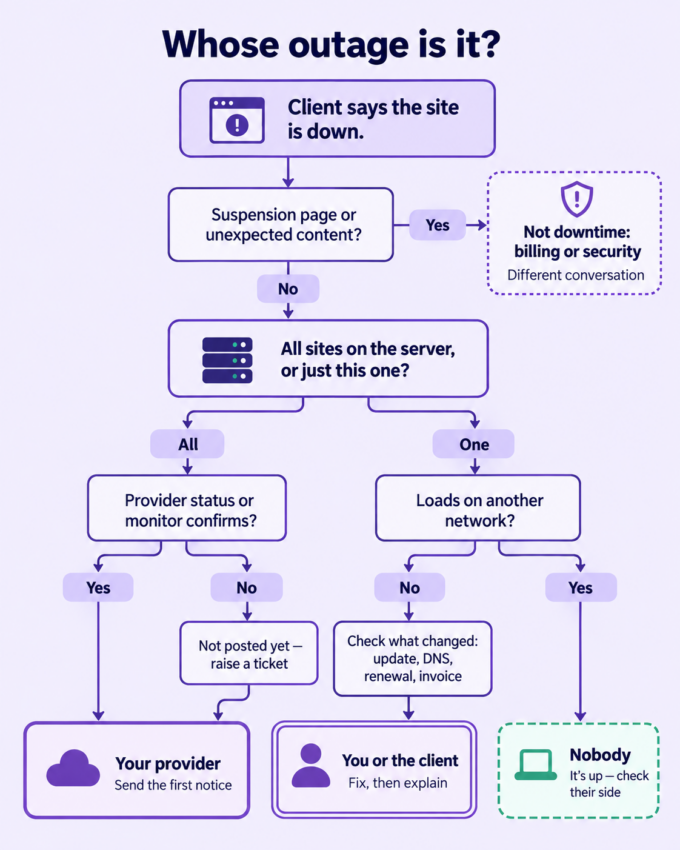
“The site is down” is a symptom, not a diagnosis. Everything a client calls an outage belongs to one of four owners: your provider, you, the client, or nobody — the last meaning the site is fine and something between it and the client isn’t. Each gets a different first message, and sending the wrong one is how a reseller loses credibility in an incident. The classic version: a confident “our provider is investigating a server issue” about a site that went down because of an update you ran an hour earlier.
Five questions before you write anything
Each takes seconds, and all five work from a phone.
- Is it one site, several, or all of them? One site points to that account. Every site on the server points upstream.
- Is it the website, the email, or both? They fail for different reasons and often independently.
- Does it load on a different network? Switch your phone to mobile data, or ask the client to. If it loads, the site is up and the problem is between them and it.
- What does your provider say? Their status page, and your own monitor if you have one.
- What changed recently? An update, a DNS edit, a renewal date, an unpaid invoice.
What clients call an outage, and whose it usually is
| What the client sees | Usually | Whose it is | What you say first | Where it’s covered |
|---|---|---|---|---|
| Every site on the server unreachable | Server or network incident | Your provider | “It’s a server-level problem, not your site. I’m on it with the infrastructure provider.” | Below |
| One site shows an error, the others are fine | A fatal error after an update, or a database problem | You or the client | “Your site is showing an error. I’m looking at it now.” | Below |
| One site slow, or erroring on and off | The account is hitting its resource limits | The account | “Your site is running into its limits. I’m on it, and I’ll explain what that means.” | How many hosting tiers to offer |
| A parking page where the site was | The domain expired | Whoever holds the renewal | Check who that is before you say anything | Telling clients you’re taking over their hosting |
| A browser security warning | The certificate expired or failed to renew | Usually you | “It’s a certificate problem. The fix is under way.” | Below |
| A suspension page | The account is suspended for billing or abuse | You | A different conversation entirely | non-payment, suspensions and getting paid |
| Redirects somewhere odd, or content that isn’t theirs | Compromise | Treat it as security, not downtime | Don’t use the outage messages | when a client site gets compromised |
| Loads for you, not for them | Their network, a DNS cache, or a recent DNS change | Nobody — or time | “It’s up from here. Can you try on mobile data?” | Below |
| Email down, website fine | The mail service, DNS/MX records, or their mail app | It depends | Narrow it down before replying | Below |
| Pages or content missing, site “reset” | Deleted, overwritten, or a bad restore | Varies | A data problem, not downtime | Backups, and who’s responsible when a client deletes their site |
The table routes; it doesn’t troubleshoot. And it carries one rule that makes the rest of this plan work: your first message only has to be right about whose problem it is, not why. The why can wait for the second message. Getting the whose wrong can’t be taken back.
What you’re responsible for when it isn’t your server
When the server fails, your provider owns the fix. You own everything the client experiences: finding out, telling them, keeping them updated, and the relationship afterwards. That can feel like being exposed as a middleman who controls nothing. It isn’t. Control of the server was never what the client was paying for — they were paying for someone who notices, tells them straight and handles it, which is the argument at the centre of should web designers resell hosting to their clients. An outage is simply the moment that service is visible. Three things follow.
You need to know before they do. At many providers the status page is the only place incidents appear — nobody emails you, and often there’s no way to subscribe. Which means your own monitoring is your notification. Setting it up is covered in what hosting support load actually looks like; the point here is only that a plan that starts with “when the client tells me” starts too late.
You’re relaying, not reporting. Everything you know about a provider incident arrives secondhand. Say so in your wording — “the data centre is reporting…” rather than presenting it as your own diagnosis — so that when their explanation changes, yours changes with it and nobody thinks you got it wrong.
White-label doesn’t survive an outage unless you plan for it. Your provider’s incident notice carries their name. Forwarding it answers the question you’ve taken trouble not to answer, which is why white-label hosting treats outages as the one seam you manage by rewording rather than by configuration.
The plan, written before you need it
One page, filled in once, reviewed whenever your client list changes. Four decisions.
Severity: what counts, and who hears about it
| Level | What it looks like | Who you tell | How |
|---|---|---|---|
| Full outage | Site or email unreachable for everyone | Every affected client, without waiting to be asked | Direct message, through their out-of-band contact |
| Partial | Slow, intermittent, or one feature broken | Clients who’d notice | A message, if it lasts beyond the threshold you’ve set |
| Blip | Brief, over before anyone noticed | Nobody at the time | In the log; mention it at your next check-in if you do them |
The decision to write down is where your threshold sits for telling a client about something they didn’t notice. A useful principle: if their customers could have noticed, tell them. Clients who find out later from their own analytics that you knew and said nothing stop believing your other messages.
Timing: what you can actually promise
Two commitments, both ones you control: how soon a client hears from you after you know, and how often they hear from you while it lasts. Set them to match your real hours rather than the ones you’d like to have, and put them in your terms so they aren’t renegotiated mid-incident — terms of service and AUP for a small host covers the wording. A short window you always meet is worth more to a client than an ambitious one you sometimes miss.
Where clients hear from you
This is the section generic outage advice misses, because it assumes the company that failed doesn’t also host its customers’ email.
Their email may be on the server that’s down. If a client’s mailbox lives on the same hosting account as their site, your “we’re aware of the outage” email to their business address can’t be delivered while the server is down. The sending server queues it and retries, and it lands after the fix — exactly when it’s no use. Collect one out-of-band contact for every client: a mobile number, a personal address, or whatever channel you already talk on. Keep the list somewhere that isn’t on the hosting account.
Your own contact routes shouldn’t live there either. If your business email and your support inbox sit on the same reseller account as your clients, a server incident takes out your ability to hear from them at the moment they’re most likely to write.
A status page: yours, your provider’s, or none. Under fifty or so clients, direct messages usually beat a status page nobody has bookmarked. If you do want one, it has to be hosted somewhere other than the server it reports on. And your provider’s status page is useful to you, not to a white-labelled client: it carries their name, and it’s usually written for incidents big enough to affect many customers, not the one account that has a problem.
When you’re not there
How you cover holidays and nights is a support-load decision, covered in what hosting support load actually looks like. The communication piece is small but has to be done before you leave: an auto-reply that tells clients what happens if something breaks while you’re away, who they should contact, and when you’re back. Your provider’s support carries on while you’re away. Your clients just need to know who’s watching.
The one-page plan
Fill this in once. Everything else in this article is what to do with it.
- [ ] How I find out — monitor, alert destination, the provider status page address
- [ ] Out-of-band contact for every client, stored off the hosting account
- [ ] Priority order — clients whose businesses take money through their site first
- [ ] My disclosure threshold — when a partial outage becomes a message
- [ ] First-message window — how soon after I know
- [ ] Update interval — how often while it lasts
- [ ] Where messages are drafted — the four below, saved and ready
- [ ] Cover — who watches when I’m away, and what the auto-reply says
- [ ] Where I log incidents — somewhere that doesn’t go down with the server
- [ ] Provider details to record — server name and IP for every account, and how to raise a ticket
The four messages
Mid-incident? Spend two minutes on whose outage it is first. The wrong message sent fast is worse than the right one sent five minutes later.
Each message has one job. The examples are deliberately plain: adapt the details, keep the shape.
First notice
Its job: we know, it’s being handled, here’s when you’ll hear next. It contains what’s affected, whose problem it is at the level you’re sure of, and when the next update comes. It leaves out cause speculation, a fix time you don’t have, and paragraphs of apology.
The rule that matters most on this page: promise the time of the next update, not the time of the fix. You control one of those.
Your website is down at the moment. It’s a problem on the hosting server rather than with your site itself, and the infrastructure provider is working on it now. I’ll update you by 3:30, or sooner if it’s back before then.
Updates
Send them on the interval you promised, even when nothing has changed. “No change yet — still being worked on, next update at 4:00” is a real update. Silence reads as absence, and absence is what clients remember.
Quick update: still down, still being worked on. The provider hasn’t given a time yet. Next update at 4:00.
Resolved
Say what’s working again, when it came back, and what they should check — contact forms, orders placed during the outage, email that may have queued. Say whether a fuller explanation is coming.
Your site’s been back since 4:12. Everything I’ve checked is working, but it’s worth looking at any orders from this afternoon, and a few emails may arrive late as the queue clears. I’ll send a short note tomorrow on what happened.
Afterwards
For anything beyond a blip, a short written summary within a day or two: what happened, how long it lasted, what was affected, and what changes as a result. For provider incidents, relay their explanation in your own words once it’s published, and don’t speculate ahead of it. Three short paragraphs, not a formal report.
Yesterday’s outage lasted about ninety minutes and affected every site on the server, including yours. The data centre traced it to a hardware fault and replaced the component. Nothing on your site was lost. I’ve added a second alert on my side so I’m told sooner if anything like it happens again.
Naming the cause (and your provider)
The question every white-label reseller asks. The position that holds up: say “our infrastructure provider” or “the data centre” when the problem is upstream. Don’t hide that it’s upstream, and don’t name the provider unless your arrangement with the client is already open about who they are. If a client asks you directly, don’t lie — white-label hosting covers the answer that works.
Two things never to say. Don’t blame a provider for anything you haven’t confirmed was theirs. And don’t say “it wasn’t our fault”: the client bought the whole service from you, and to them there’s no line between you and the server.
Planned maintenance
This is the easy case, and resellers handle it worst, because nothing prompts them to act.
Your provider’s maintenance notices come to you, not to your clients. If you don’t pass them on, the client experiences scheduled work as an outage — and it’s the one outage you could have warned them about days in advance.
Reword, don’t forward. The notice carries the provider’s name and assumes a technical reader. Translate it into what the client will see, when, and for how long: “Your site may be unavailable for up to twenty minutes early on Tuesday morning while the server is updated.”
Scheduled work usually sits outside uptime guarantees, which matters if a client later asks about compensation for it.
Planned work of your own follows the same rule. A migration or a PHP upgrade gets the same notice, in the same words — and migrating client sites without downtime covers keeping that notice as short as possible.
When the outage is the client’s own
A plugin they updated, a DNS record they changed, a domain renewal they ignored, a site that has outgrown its account. It happens, and it will happen again.
Fix first, explain second, blame never. The message has the same shape as any other. The cause goes in the afterwards note, stated as a fact rather than a finding: “The outage started when a plugin update conflicted with the theme.”
Whether you charge for the fix is a scope question you should already have answered. If hosting sits inside a retainer, hosting inside a retainer vs billed separately covers what’s included; if it doesn’t, your terms should say. Don’t decide it mid-incident.
If it will recur, say what prevents it. For a site hitting its resource limits, that may be a bigger allocation, and a bigger allocation has a cost — which is a package conversation, not an outage one.
When many clients are down at once
At thirty-plus clients, and routinely for anyone who has run a hosting business for a while, a single server event means dozens of affected clients writing to you at once.
Broadcast the first notice, personalise the rest. One message to every affected client first. Individual follow-ups afterwards, to the clients it matters most to.
Order by impact, not by alphabet. Clients whose businesses take money through their site hear first. That’s the priority column in your plan, and it has to exist before the incident — you won’t work it out at 11pm.
Keep one source of truth. If you run a status page, every message points to it. If you don’t, every message carries the same facts at the same time. Contradictory updates to different clients do more damage than slow ones.
Don’t answer each inbound message individually in the first hour. One holding reply to everyone who writes, then back to the broadcast interval. Writing thirty personal replies is time taken from following the fix.
After it’s over: the log, the credit, and what you owe
The incident log. Record every outage, however small: start and end time, what was affected, whose it was, what you told whom and when, and the provider’s ticket reference. It’s the evidence for any claim upstream, and it’s what you check before telling a client “this hasn’t happened before”.
The credit upstream. Most providers compensate downtime with credit on your account rather than cash, and only if you claim it inside a short window with specific evidence. What “specific” means is worth seeing in a real document. Ours, as of September 2026: under ChemiCloud’s service agreement, uptime is measured only by our internal monitoring, so a third-party monitor’s report isn’t accepted as evidence; a claim is a billing ticket raised within ten business days, giving the dates and times of the downtime and the name and IP address of the affected server; compensation is free hosting time rather than cash, and doesn’t extend to software licences; and scheduled or emergency maintenance, attacks, and downtime caused by an account reaching its resource allocation are excluded. The general lesson holds for any provider: your own monitor is for your messages, not your claim — and the claim needs details you’ll only have if you wrote them down at the time. Read your provider’s SLA once for three things: who does the measuring, how long you have, and what they need.
What you owe your client. Whatever your terms say — and if they say nothing, terms of service and AUP for a small host is the place to fix that before the next incident. Until then, the decision per incident is one of three: nothing, a goodwill credit, or passing on whatever you received. The rule: never give a client more than you received unless you’ve decided to pay for it yourself. A goodwill credit offered unprompted buys more than the same credit negotiated.
Checking a provider’s incident process before you move
If you already run a hosting business and you’re weighing a move, how a provider handles incidents decides how much of your plan runs on guesswork. Eight questions, each answerable from public pages or a single pre-sales ticket:
- [ ] Where does the provider publish incidents, and does it cover single-server problems or only large ones?
- [ ] Can you subscribe to it — by email, RSS or anything else — or do you have to go and look?
- [ ] Are you told directly about incidents on your own server?
- [ ] Do maintenance notices go to you, to your end clients, or both?
- [ ] How is uptime measured for the guarantee — their monitoring or yours?
- [ ] What’s the claim window, and what evidence do they need?
- [ ] What’s excluded — maintenance, attacks, resource limits?
- [ ] What does their support actually do at 3am, and have you tested it before you needed it?
None of these decides a provider on its own. Together they tell you which parts of your plan you’ll run on their information and which parts you’ll have to build yourself: usually monitoring.
Mistakes worth avoiding
- Messaging before diagnosing.
- Blaming the provider for something you haven’t confirmed was theirs.
- Giving a fix time nobody gave you.
- Emailing an outage notice to an inbox on the server that’s down.
- Forwarding your provider’s status page to white-labelled clients.
- Going quiet because there’s nothing new to say.
- Relying on your own uptime monitor as evidence for a credit claim without checking your provider accepts it.
- Offering a cash refund your provider won’t fund.
- Not writing it down.
Frequently asked questions
How quickly should I tell clients their website is down? As soon as you’ve confirmed it’s real and whose it is — ideally before they notice. The exact window is yours to set, and it should match the hours you actually keep. Publish it, then keep to it.
Should I tell clients about downtime they didn’t notice? If their customers could have noticed, yes. A short note that says it happened, how long it lasted, and that it’s resolved costs you nothing. Being found out later costs you the next time you tell them something.
Should I tell clients who my hosting provider is during an outage? You don’t have to. Say the problem is with your infrastructure provider or the data centre, so it’s clear it’s upstream. If a client asks directly who that is, don’t lie.
Do I have to refund clients for downtime? Only if your terms say so. Most providers compensate resellers with service credit rather than cash, so a cash refund to your client usually comes out of your own margin. Decide your position in writing before the next outage, not during it.
You’ve got the plan and the messages. The other half is finding out first and staying covered when you’re away — what hosting support load actually looks like covers monitoring, response windows and holiday cover, and what a one-person host can realistically promise.
And if you’re weighing up where your clients’ sites should live, how a provider tells you about incidents decides how much of this plan runs on guesswork. It’s worth checking before you compare reseller hosting plans on anything else.