Live Chat
 Help Center

Most small hosts should launch with one plan, or two. Not three, and not the four-step ladder every hosting blog draws for you.
That answer surprises people, so the rest of this page is the reasoning behind it: what each additional plan actually costs you to keep alive, what can legitimately separate one plan from another once you’re reselling, and how to tell when you’ve earned a second or third. This is a decision about what you sell to your clients — if you’re working out which reseller plan to buy for yourself, that’s a different question, and reseller vs VPS vs dedicated covers it.
It’s also a reversible decision, which is the part most people get wrong in the other direction. Adding a plan later is cheap. Retiring one you’ve already sold is not. If you’re at the earlier stage of working out whether to do this at all, start with the guide to starting a reseller hosting business and come back here once you’ve got an account.
The short answer: fewer than you think
Your plan count should follow one thing: the number of genuinely different things your clients need. Not what looks professional. Not what your upstream provider’s pricing page looks like.
Count the genuinely different things your clients need. That’s your plan count. If the answer is one, publish one.
If fourteen of your fifteen clients are WordPress brochure sites with a contact form and a few hundred visitors a month, you have one segment. One segment is one plan. The fifteenth client, the one with the enormous media library, is a one-off — and one-offs are handled at the end of this article, not by building a whole extra product for them.
A single-plan host doesn’t look amateurish. It looks decided. “Hosting is $25 a month, here’s exactly what’s included” is a clearer sales position than three columns a client has to compare and won’t understand. And in the reseller model specifically, most of your clients will never comparison-shop your ladder at all, because they didn’t go looking for hosting. You handed it to them.
The instinct to publish three plans comes from copying companies that have a hundred thousand customers. At that scale, segmentation pays for itself many times over. At fifteen clients, it doesn’t. It just costs you.
What each extra plan actually costs you
A plan is not a row in a table. It’s a set of artefacts you now maintain for as long as that plan exists.
| Artefact | Where it lives | What it costs you, ongoing |
|---|---|---|
| WHM package (quota, bandwidth, feature list) | WHM | Edited every time entitlements change |
| Billing product and price | WHMCS or Blesta | Renewal and proration logic that has to be right |
| Entitlement wording | Your terms of service | Must match the package exactly, forever |
| Upgrade and downgrade path | Process | Every adjacent pair of plans needs one |
| Support expectations | A doc, or your memory | What’s included at this level and what isn’t |
| Sales copy | Your website | Kept accurate through every price change |
| An upgrade trigger | Monitoring | Without it, the plan is decorative |
Seven artefacts, per plan. Three plans is twenty-one things to keep consistent with each other — and they do have to stay consistent, because the moment your sales page promises something your WHM package doesn’t allow, you find out at the worst possible moment, usually in a support ticket from an annoyed client.
The empty-plan problem
Here’s the arithmetic that decides it. You have fifteen clients and three plans. A realistic distribution is eleven on the entry plan, three in the middle, one at the top.
That top plan has one client in it. You still maintain all seven artefacts for it. You still write the copy, keep the terms aligned, define the upgrade path into it and out of it, and remember what’s included when that client asks. The cost per populated plan is wildly uneven, and the plan doing the least work costs the same to own as the one doing the most.
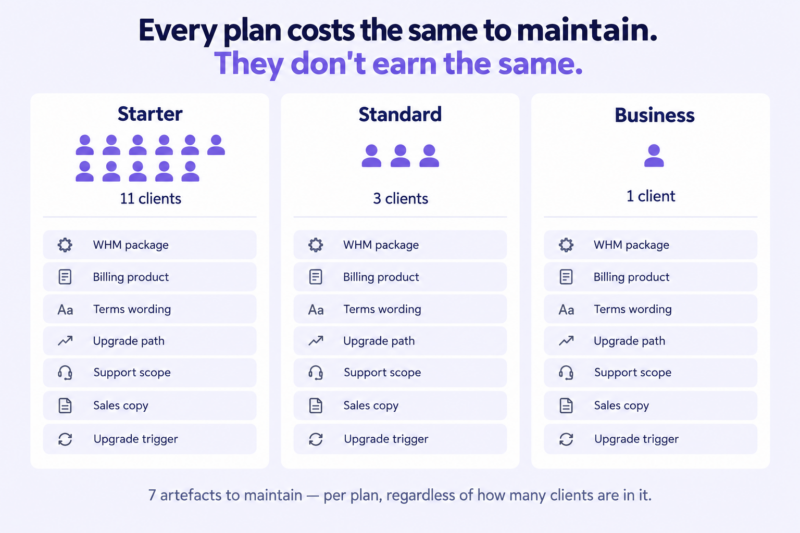
The cost isn’t really money. It’s attention — and attention is the genuinely scarce resource in a one-person hosting operation, because it’s the same resource that answers tickets. Every plan you publish is a permanent small tax on the thing you have least of.
What actually separates one plan from another
Suppose you do have two real segments. What goes in each?
The disk-space trap
The default answer is disk space: 10 GB, 25 GB, 50 GB. It’s the first field in the WHM package screen, so it becomes the differentiator by accident.
It’s close to the worst one available. Clients can’t evaluate it — nobody knows how large their website is, and the ones who guess are wrong by an order of magnitude in both directions. It doesn’t correlate with what the client actually receives from you. And it prices a five-page brochure site by exactly the same logic as a photographer’s media library, which means it’s either generous to the point of meaninglessness or restrictive in a way that generates a support ticket six months in.
Disk quota belongs in your plans. It just shouldn’t be the reason they’re different.
Levers you control
Inside a WHM package, a reseller can set disk quota, monthly bandwidth, addon domains, parked domains, subdomains, email accounts, databases, FTP accounts, inodes, and the contents of the feature list that determines what the client sees in cPanel.
That’s a real set of controls, and it’s enough to build a meaningful two-plan split — a plan that allows one site, five mailboxes and one database looks and behaves differently from one built for a store. If you want the mechanics of actually building these, creating hosting packages in WHM walks through the screen field by field, and the WHM guide for resellers covers what a package and a feature list are in the first place.
The performance plan: the one differentiator with a real cost
The question underneath most three-plan ladders is “can I sell a faster plan?” It deserves a direct answer.
On a reseller account, CPU and memory are allocated by your provider, uniformly. Every cPanel account on your plan gets the same allocation, and you cannot change that from WHM. You cannot make one plan faster by configuration. Where per-account uprating exists at all, it exists as something you buy, not something you set.
ChemiCloud is a useful example because the numbers are published. A resold cPanel account gets 2 CPUs and 3 GB of memory as standard. The Power Boost add-on raises a single account to 3 CPUs and 4 GB for $5.95 a month, or 4 CPUs and 6 GB for $7.95 a month. It’s bought per cPanel account, applied to the specific account you name, and pro-rated onto your plan’s billing date. (Figures verified 12 September 2026.)
Three consequences for how you design your plans:
1. A performance plan is the only plan with a genuine per-client marginal cost. Every other differentiator is either free — a quota number, a mailbox limit — or it’s your own time. This one appears on your invoice every month, for every client on it. It has a price floor the others don’t, and that floor has to be built into the price rather than discovered later. Work it into your per-account cost before you publish a number; the pricing guide has the model.
2. Don’t sell performance you haven’t bought. “Faster hosting” on a plan with no add-on behind it is a refund conversation with a delay on it. It’s the most common version of the promise you can’t keep, and it’s particularly dangerous because the client who pays extra for speed is the client who will notice they didn’t get it.
3. The boost is tied to one account and can’t be moved. If that client leaves, you cancel it and buy it again for whoever replaces them. Which means a performance plan is only worth publishing if you expect more than one client to sit in it. One demanding client isn’t a plan. It’s a one-off, and there’s a section below on exactly how to handle those.
Service-level differentiators
What’s left is the good stuff, and it’s the part almost nobody puts on a pricing page: backup retention and who performs the restore, support response expectations, whether updates and maintenance are included, staging environments, a monthly allowance of content edits, migration handling, and any uptime commitment you’re willing to put in writing.
| Differentiator | Costs you | Client perceives it | Can you honour it | Verdict |
|---|---|---|---|---|
| Disk quota | Little | Rarely | Yes | Weak on its own |
| Bandwidth | Little | Almost never | Yes | Weak |
| Email accounts | Nothing | Sometimes | Yes | Useful in a two-plan split |
| Per-account CPU and memory | Real monthly cost, per account | Yes | Only if you buy it | Viable — but the one plan with a hard cost floor |
| Backup retention and restores | Time | Yes, at the worst possible moment | Yes | Strong |
| Support response window | Time | Yes | Only if you scope it carefully | Strong, handle with care |
| Included maintenance and updates | Real time | Yes | Yes | Strongest |
| Staging environment | Little | Yes, for agency clients | Yes | Strong for designers |
Notice the pattern. Apart from the performance row, every strong differentiator costs your time, not your disk. Which is why plan count and support load turn out to be the same question wearing different clothes: a second plan that promises faster responses is a second plan that eats more of your week. Backups are worth particular attention here, because who restores a deleted site — and from how far back — is the single entitlement clients feel most sharply.
Three structures that work
One plan — the designer default
Everyone pays the same. One WHM package, one billing product, one set of terms. Oversized or unusual clients are handled as one-offs above the ladder.
Use it when your clients are broadly similar and you have fewer than about 25 of them. For a designer bundling hosting alongside builds and maintenance, this is almost always right, and it stays right for longer than people expect.
Two plans — when your clients genuinely split
The split is nearly always the same one: brochure versus application. A static or WordPress marketing site on one side; a store, a membership site, a booking system, anything with a database doing real work on the other. The second group needs more resources, generates more support, breaks more often and is worth more to you.
Use it when you have a genuine second segment with at least three or four clients already in it. Not when you can imagine one.
Three plans — what you need before this makes sense
Three plans need two things at once: enough clients that every plan is populated, and enough variance that the middle one isn’t arbitrary. If you can’t say in one sentence who the middle plan is for, it’s a pricing device rather than a product.
That’s not automatically disqualifying — a plan that exists partly to make the middle one look reasonable is a legitimate tactic, and the pricing guide covers the psychology. But it has to be a plan you’d actually deliver if someone bought it, because someone eventually will.
The fourth option: no public plans at all
For a lot of designers and agencies, the correct number of published plans is zero. Hosting sits inside a retainer, there’s no price list, and you keep internal cost bands so you know what each client is costing you.
This is a legitimate endpoint, not a cop-out — and it sidesteps every problem in this article. Hosting inside a retainer versus billed separately walks through the trade-offs.
| Structure | Suits | Variance required | What breaks it |
|---|---|---|---|
| One plan | Up to ~25 similar clients | None | A second segment you keep making exceptions for |
| Two plans | 15–60 clients | One clear split | Both plans drifting toward the same spec |
| Three plans | 40+ clients | Two clear splits | A middle plan nobody can describe |
| No public plans | Retainer-based client work | N/A | Clients who want hosting without the retainer |
Will your plans fit inside your reseller account?
Plan design collides with the account you actually bought, and it does so at two independent ceilings: the number of cPanel accounts your plan allows, and total storage. You hit whichever comes first, and they fail differently — running out of accounts stops you signing anyone new, while running out of storage starts breaking sites that are already live.
Take a mid-range reseller plan: 120 GB of storage across 60 cPanel accounts. Your standard plan promises each client 10 GB, which sounds modest and reads well on a pricing page.
Fill that account and you’ve promised 600 GB against 120 GB you actually have. That’s a 5:1 oversell on the day you hit capacity — not because you set out to oversell, but because you set a quota that sounded competitive rather than one that fitted.
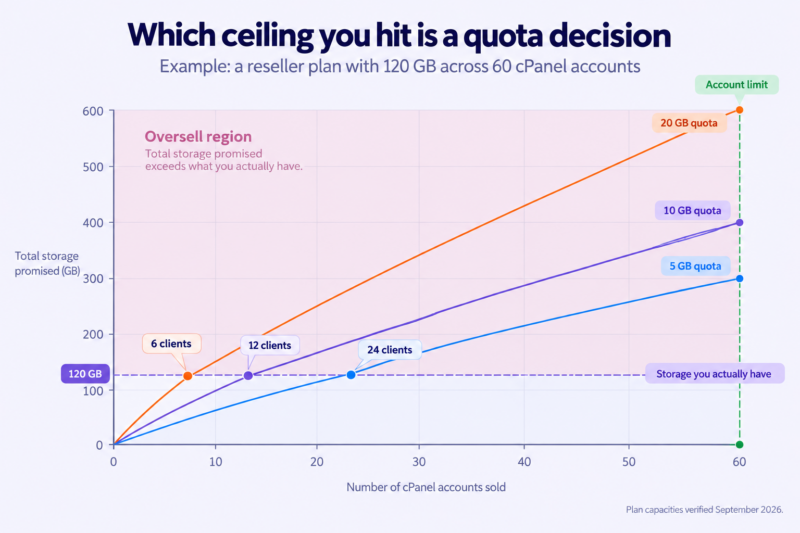
The conclusion isn’t “never do this.” It’s that the generosity of your quota is a capacity decision, not a marketing decision. Set quotas from observed usage: a typical WordPress brochure site sits in low single-digit GB, which means a 5 GB quota is generous for most of your client base and a 10 GB quota is mostly theatre. Overselling deliberately, with numbers behind it, is a defensible practice and has its own guide. Overselling by accident, because the pricing page needed a bigger number, is how people end up migrating clients at 2am.
Worth knowing before you buy: several providers split reseller plans into storage-optimised and accounts-optimised variants at the same price — more disk and fewer accounts, or the reverse. Picking the wrong variant is a common reason people hit a ceiling early. Match it to the shape of your client base, not to the bigger-looking number. If you want to run the per-account arithmetic against a specific plan, the reseller profit calculator does it — and what the whole operation earns once it’s full is the subject of how much you can actually make reselling web hosting. Outgrowing reseller hosting entirely covers what happens after the ceiling.
How clients move up (and why most ladders never get used)
Most ladders are decorative. Clients sign up on the entry plan and stay there for six years, because nobody ever defined the moment they cross a line.
Fixing that takes three decisions, made before you launch:
Pick an observable trigger for each boundary. Disk usage above a set percentage. Account type declared at signup. A support volume you actually track. “When they seem to need more” is not a trigger — it’s a thing you’ll never get round to.
Set the quota warning in WHM so the trigger reaches you before it reaches the client. The worst version of this conversation is the one that starts with the client’s site being unable to write files.
Decide the billing mechanics in advance. Does the upgrade apply at renewal, or immediately with proration? Do you absorb the difference until renewal? Note that if the upgrade involves a bought add-on, that bills from the day you activate it — which is a decent argument for prorating performance upgrades immediately rather than carrying the cost yourself for eleven months.
Then write the upgrade email once, and reuse it. Two or three lines: what you noticed, what it means, what it costs, when it takes effect. Telling clients you’re taking over their hosting. Our raising hosting prices article covers the version where the price goes up without the plan changing.
Changing your plans after you have clients on them
This is the anxiety that stops people launching: if I get this wrong, am I stuck with it forever?
No. But the way you change plans matters more than the plans themselves. Five rules:
- Never edit a live package’s limits without knowing exactly who is on it. Lowering a quota on a package with clients in it is how sites go read-only.
- Add new, don’t rewrite old. Close the old plan to new signups and let it age out rather than redefining it underneath the people already on it.
- Never reuse a plan name for different contents. “Standard” meaning two different things across two years makes every historical invoice, email and support ticket ambiguous.
- Migrate on renewal, not mid-term. The renewal date is the natural, expected moment for something to change.
- Grandfathering is a decision with an end date, not a permanent state. Decide the date when you make the decision.
The reassuring arithmetic: starting with one plan and adding a second costs you almost nothing. Starting with four and retiring two costs you migrations, awkward emails and a tangle of grandfathered prices. The asymmetry is the whole argument for starting small.
Custom and one-off plans
You will get asked. One rule handles almost all of it:
Custom arrangements go above the ladder, never below. A bespoke plan priced under your standard plan is a discount with extra administration attached, and it will outlive the reason you agreed to it.
Above the ladder is fine. Time-box it, write down what’s included, and review it at renewal. If the one-off needs bought resources — a performance add-on, extra storage — pass that cost through explicitly rather than absorbing it into a published price. That’s the difference between a profitable exception and a slow leak.
Plan-structure mistakes worth avoiding
- Plans separated only by disk space
- A plan with no clients in it six months after launch
- Selling performance you haven’t bought
- “Unlimited” anything you’d have to enforce
- Copying a large host’s ladder at a thousandth of their scale
- Entitlements in your sales copy that aren’t in your service terms
- A ladder with no upgrade trigger
- A free plan
Frequently asked questions
How many hosting plans should a reseller offer? Most should start with one or two. The right number follows the number of genuinely different things your clients need — not what looks professional, and not what large hosts publish.
Is it unprofessional to offer only one hosting plan? No. A single plan reads as decided rather than limited, and most reseller clients never compare your structure to anyone else’s because they were handed hosting by their designer rather than shopping for it.
What should actually be different between hosting plans? Entitlements and service level: storage and mailbox limits, backup retention and restores, support response, included maintenance, staging. Performance only if you’re paying an add-on for it, because resold accounts get a uniform resource allocation you can’t change from WHM.
Can I change my hosting plans after clients have signed up? Yes, if you add new plans rather than rewriting existing ones. Close the old plan to new signups, migrate people at renewal, and never reuse a plan name for different contents.
How many client accounts fit on a reseller plan? Two independent limits apply — the cPanel account allowance and total storage — and you hit whichever comes first. The quota you promise each client determines which ceiling you reach, which is why quota generosity is a capacity decision rather than a marketing one.
Once you’ve settled on a structure, the next decision is what to charge for it. How to price reseller hosting plans builds the unit cost from your actual plan and works out what margin each client leaves you with.
One thing worth checking before you finalise anything: reseller plans differ in how many cPanel accounts and how much storage they give you, and that ceiling is what your ladder has to fit inside. It’s worth comparing plan capacities against the client base you expect in two years, not the one you have today.