Live Chat
 Help Center

Creating a package in WHM takes about ninety seconds. Undoing a badly designed one takes considerably longer, because three of the choices you make on that form cannot be edited afterwards — including the name.
That is the whole reason this guide exists. The mechanics are simple and cPanel documents them well. What nobody documents is which numbers to put in the boxes, which fields quietly generate support tickets six months later, and which limits your package has no control over at all. If you are still working out whether to start a reseller hosting business in the first place, start there and come back once you have an account open.
If you are not selling hosting — if you are a developer using packages as templates for your own client accounts — most of this still applies, but you can skip the pricing and billing sections entirely.
What a WHM package actually is
A package is a saved set of limits and settings that WHM applies to a cPanel account at the moment you create it. (If WHM itself is unfamiliar territory, start with what WHM actually does — this guide assumes you can find your way around it.) It is a template, not a live container. Once an account exists, it carries its own copy of those values, which is why packages and accounts can drift apart later.
Four things are easy to confuse, and confusing them is the source of most package-related mistakes:
| Object | Where it lives | What it does |
|---|---|---|
| Package | WHM » Packages | The template of limits and settings applied when an account is created |
| cPanel account | WHM » Account Functions | The actual customer account. Can be modified individually and drift from its package |
| Feature list | WHM » Packages » Feature Manager | Which cPanel features the customer can see and use |
| Product / plan | WHMCS or Blesta | What the customer buys, is billed for, and sees on their invoice |
One white-label detail worth knowing before you name anything: as a reseller, your packages are stored with your username in front of them, but the customer never sees that prefix. A package saved as yourco_business shows up in the client’s cPanel simply as business. It is one of the few places where the seams of a white-label setup don’t show.
What a package cannot control
This is the part that surprises almost everyone on their first reseller account.
A WHM package controls disk space, bandwidth, email accounts, databases, subdomains, addon domains, FTP accounts, mailing lists and outbound mail rates. It does not control CPU, memory, I/O throughput, entry processes or inodes. There are no fields for them on the form, because on a reseller plan those limits are set by your hosting provider at the platform level — usually through CloudLinux — and applied to every account underneath you.
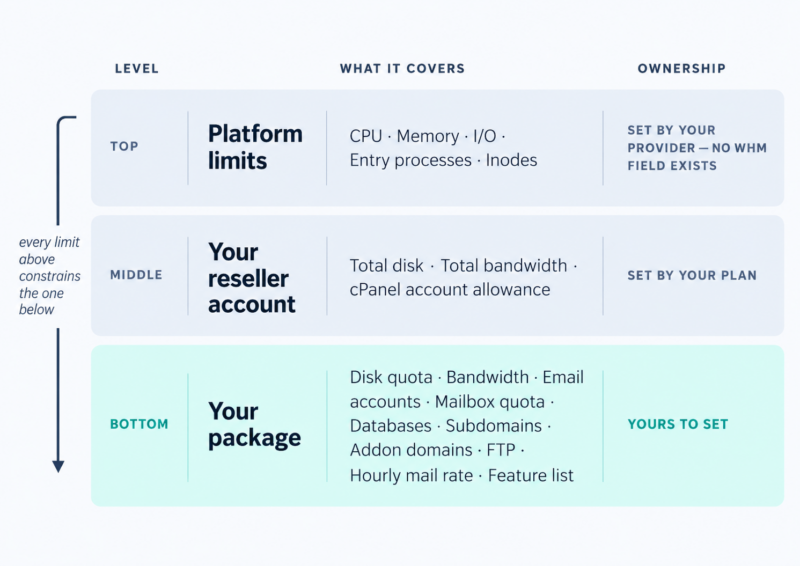
The practical consequences are worth stating plainly:
- You cannot sell “more CPU” or “more RAM” as a tier feature. Your top-tier client and your cheapest client get the same per-account resource ceiling, whatever your package says.
- You cannot fix a resource-hungry client from inside WHM. If one WooCommerce store keeps hitting the ceiling, no amount of editing its package will help.
- Inodes — the count of individual files — are capped the same way. An email-heavy client with 300,000 messages can hit that ceiling while using a fraction of their disk quota.
So the question to ask your provider before you design tiers is: when one client outgrows the platform limits, can they be uprated on their own, or does my entire account have to move up? The answers differ. ChemiCloud, for instance, sells Power Boost and Inodes Boost add-ons that apply to a single cPanel account on a reseller plan, so one busy store can be given more CPU, memory or inodes without touching anyone else. Where a provider has no per-account mechanism, your only lever is upgrading the whole reseller plan — which means your premium tier is, in practice, a promise you cannot keep. Design around whichever situation you are actually in, and if per-account performance is central to what you’re selling, weigh that against the alternatives in reseller vs shared vs VPS vs dedicated.
Decide these five things before you open WHM
1. How many packages. Fewer than you think. Every package is a separate thing to explain, price, document and support. Three is a common answer; the reasoning behind the number belongs in how many hosting tiers you should offer.
2. What a real site actually consumes. A typical small-business WordPress site — brochure pages, a blog, a contact form, a modest media library — sits comfortably around 5 GB of storage and 50 GB of monthly bandwidth. That is a useful midpoint to design from, not a ceiling. WooCommerce stores, photography portfolios and anything with a large media library need a materially higher band, and they need it on disk more than on bandwidth.
3. Unlimited, or numbers. Setting a field to unlimited does not create resources. It removes your ability to see a problem coming, and it transfers the risk from the client to you. Every unlimited field is a field you will not be alerted on. There are defensible reasons to do it anyway — that argument belongs in overselling — but do it knowingly.
4. Whether your clients are email-heavy or web-heavy. This decides two fields most people leave at default: the per-mailbox quota and the hourly outbound mail limit. Agencies hosting brochure sites and agencies hosting a 40-person office have completely different failure modes.
5. Your naming convention. Decide it now, because package names cannot be changed later. See below.
Creating a package, field by field
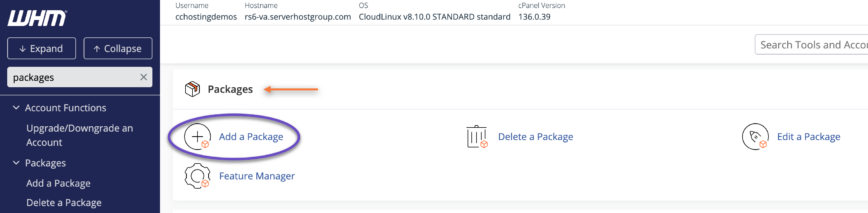
In WHM, go to Packages » Add a Package. If you can’t see it, your provider controls whether resellers get access to this interface — open a ticket.
| Field | What it does | What to do with it |
|---|---|---|
| Package Name | Identifies the package | Short, plain, permanent. Never encode price, year, speed or a client name — you cannot rename it |
| Disk Space Quota (MB) | Storage cap | Set a real number. Backups, mailboxes and media all live inside it |
| Monthly Bandwidth (MB) | Transfer cap | Generous but finite. It is your earliest signal that a site has been compromised or has gone viral |
| Max FTP Accounts | FTP users | Keep low. Most clients never create one |
| Max Email Accounts | Mailboxes | The most common upgrade request you will receive |
| Max Quota per Email Address (MB) | Cap on individual mailbox size | Raising this later does not resize mailboxes that already exist |
| Max SQL Databases | Databases, per type | One WordPress site is one database. Staging copies and multisite change the arithmetic |
| Max Sub Domains | Subdomain slots | Staging sites usually live here |
| Max Addon Domains | Additional sites in one account | This is how one client quietly hosts three businesses on a single plan |
| Max Parked Domains | Domain aliases | Low numbers are fine; most clients park one or two |
| Maximum Hourly Email by Domain Relayed | Outbound mail rate | Your fuse against a hijacked contact form. You can set it below your server’s limit but never above it |
| Max % Failed or Deferred Messages | Bad-mail throttle | Leave at the platform default unless you have a specific reason |
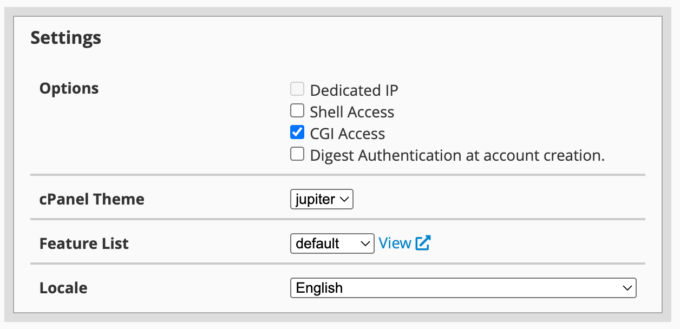
| Dedicated IP | Static IP for the account | Usually unavailable on reseller plans, and not editable after creation |
| Shell Access | SSH | Off. Turn it on per account, with a jailed shell, when someone genuinely needs it |
| CGI Access | CGI scripts | Off unless a client asks and can say why |
| cPanel Theme / Locale | Interface and language | Set the locale deliberately if you sell in a single market |
| Feature List | Which cPanel features the client sees | The lever most resellers never pull. See below |
Three things you can never change
Worth reading twice, because each one means rebuilding the package and moving accounts across:
- Package names are permanent. You cannot rename a package. A package called
business-2026orbusiness-15-dollarswill still be called that when it is neither. - The dedicated IP setting is permanent. It can’t be edited after the package is created. Changing your mind means creating a new package.
- Package extensions can’t be added or removed later through the WHM interface. That has to be decided at creation.
Feature lists, and why the default one is wrong for clients
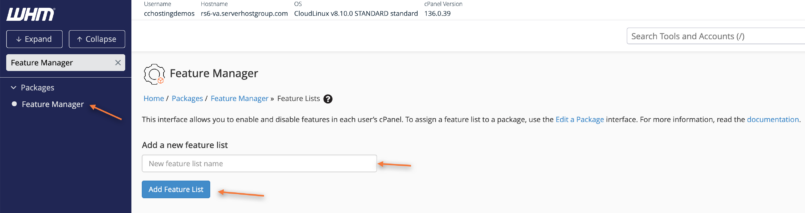
A feature list decides which tools appear in the client’s cPanel. Build one under Packages » Feature Manager before you create your packages, and assign it deliberately.
The principle is simple: every feature you leave switched on is a feature you have agreed to support. A small-business client who finds the cron job manager, the DNS zone editor or the PHP version selector will eventually use one of them, and the resulting ticket is yours. Common candidates to disable for non-technical clients are the terminal, cron jobs, DNS editing, IP blocking and anything that lets the account change its own PHP handler.
One documentation-level gotcha: the list named disabled is a server-level construct, not something you assign to an account or a package. Build your own list, give it a name that makes sense to you, and assign that.
If you’re automating (developers only)
Packages can be created and applied through the WHM API — createacct accepts a package name, so provisioning scripts and internal tooling can use packages as configuration templates without touching the interface. Package extensions add custom variables to a package, but note the constraint above: extension data on an existing package can only be changed through API calls, not through WHM. If you are templating internal client accounts rather than selling plans, this is usually the only part of packaging you need.
Before you sell it, create an account on it
Make a throwaway account on the new package, log in as that client, and look at the cPanel they will see. This takes four minutes and catches nearly every packaging error — a feature list that’s too generous, a mail quota that makes no sense, a database limit that blocks the installer.
A worked example: three packages for a 20-client book
Numbers you can start from, built on the 5 GB / 50 GB midpoint above. They are a starting point rather than a standard — your client mix decides the real values.
| Field | Essential | Business | Commerce |
|---|---|---|---|
| Disk space | 5 GB | 15 GB | 40 GB |
| Monthly bandwidth | 50 GB | 150 GB | 400 GB |
| Email accounts | 5 | 15 | 30 |
| Max quota per mailbox | 2 GB | 5 GB | 10 GB |
| SQL databases | 2 | 6 | 15 |
| Subdomains | 3 | 10 | 25 |
| Addon domains | 0 | 2 | 5 |
| Parked domains | 2 | 5 | 10 |
| FTP accounts | 1 | 3 | 5 |
| Hourly outbound mail | 100 | 250 | 500 |
| Shell / CGI / dedicated IP | Off | Off | Off |
| Feature list | Client standard | Client standard | Client standard |
The reasoning that matters:
- Essential allows zero addon domains on purpose. One account, one site. It is the cleanest upgrade trigger you will ever have — the client asks, you move them up.
- Two databases on Essential, not one, so a plugin or a staging copy doesn’t break a five-dollar-a-month site.
- Mailbox quotas rise faster than disk because email is what actually fills reseller accounts.
- Hourly mail limits rise with tier but stay finite everywhere. This is the field that saves your server’s sending reputation when a client’s form gets hijacked.
What to charge for these is a separate question with its own logic — see how to price reseller hosting plans.
Does the arithmetic add up?
Multiply the packages out against your own account’s limits before you sell any of them. Take a reseller plan with 100 GB of storage and a book of 20 clients split 12 Essential, 6 Business, 2 Commerce:
- 12 × 5 GB = 60 GB
- 6 × 15 GB = 90 GB
- 2 × 40 GB = 80 GB
- Allocated: 230 GB against a 100 GB plan
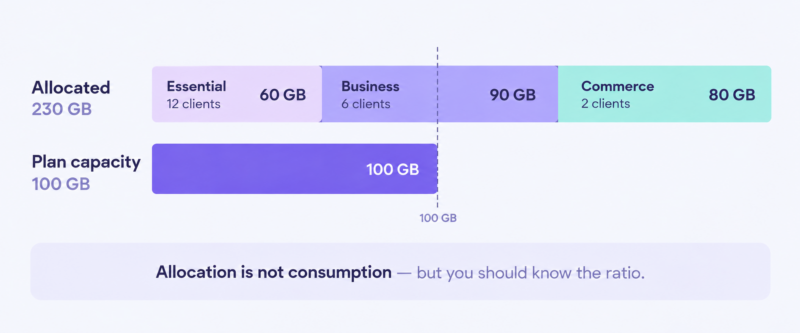
That is 2.3× your capacity, and it is completely normal. Allocation is not consumption; most clients use a small fraction of their quota, which is the assumption every hosting business on earth is built on. What matters is that you know the ratio, watch actual usage rather than allocation, and understand what happens if the ratio moves — the full argument is in overselling, and the point at which the sums stop working is covered in outgrowing reseller hosting.
If you want to see what a book like this actually earns once the plan cost, billing software and support time are in the model, run the numbers through the reseller profit calculator rather than estimating.
Connecting packages to WHMCS or Blesta
Your billing platform needs a product for every package, and the two need to stay in step.
- One package, one product. Name them identically. The moment
businessin WHM isBusiness Plusin billing, someone gets provisioned onto the wrong thing. - The package is selected in the product’s server configuration, which is what lets the platform create the cPanel account automatically when an order is paid.
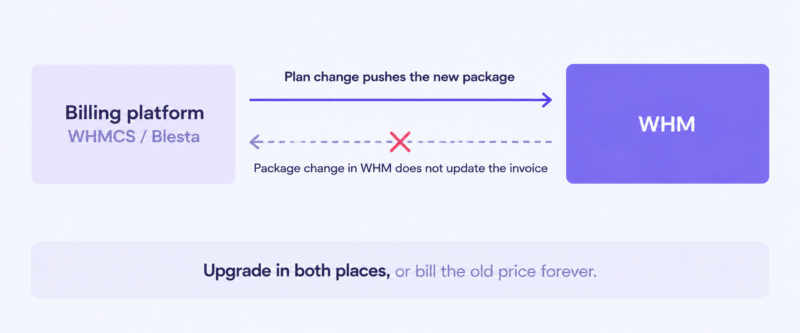
- Upgrades happen in two places. A change-of-plan in billing usually pushes the new package to WHM; a change made directly in WHM does not push back to billing. See below.
- Suspension is normally driven by billing status rather than done by hand — the mechanics of that belong to non-payment and suspensions.
Which platform to run is its own decision: WHMCS vs Blesta.
Editing a package later: what propagates, what doesn’t
Editing a package updates accounts assigned to it, but not uniformly, and this table is worth keeping:
| Change | Effect on existing accounts |
|---|---|
| Raise or lower disk / bandwidth | Applies |
| Change max email accounts, databases, subdomains, addon domains | Applies |
| Raise max quota per email address | Applies to new mailboxes only — existing mailboxes keep their size |
| Change the assigned feature list | Applies |
| Change the dedicated IP setting | Not possible — requires a new package |
| Add or remove a package extension | Not possible through WHM |
| Rename the package | Not possible |
The bigger issue is drift. Every time you modify a single account by hand — an extra 5 GB here, one more mailbox there — that account stops matching its package, and nothing in WHM flags it. A year later you have twenty accounts on three packages and no reliable idea what any given client is actually entitled to. Audit accounts against packages once a quarter and write down what you find.
Moving a client between packages
Upgrading a client is a package change on the account, applied from Account Functions » Modify an Account or through your billing platform. Higher limits take effect immediately. Two things do not take care of themselves:
- The billing record. Change the package in WHM only and the next invoice is still for the old plan. This is the single most expensive silent mistake in reseller operations — it costs money every month and nobody notices, because nothing breaks.
- Downgrades below current usage. WHM will let you assign a smaller package to an account already exceeding it. The account doesn’t shrink; it simply sits over quota, and the client discovers this when an upload fails. Check current usage before downgrading anyone.
Before you sell: a checklist
- [ ] Naming convention decided and written down — no prices, no years
- [ ] Feature list built and assigned; the default one reviewed, not assumed
- [ ] Per-mailbox quota and hourly outbound mail limit set on every package
- [ ] Dedicated IP decision made (it can’t be changed later)
- [ ] Test account created on each package, logged into as the client
- [ ] Quotas multiplied against your own plan’s limits, ratio known
- [ ] A matching product created in your billing platform, same name
- [ ] One sentence written for each package explaining who it’s for
- [ ] Quarterly account-vs-package audit in the calendar
FAQ
How many hosting packages should I create? Fewer than you’re planning to. Three tiers covers most reseller books, and each additional package adds support, documentation and pricing overhead. The full reasoning is in how many hosting tiers you should offer.
Can I rename a WHM package? No. Package names are fixed at creation. If you need a different name, create a new package with the correct name and move accounts onto it — which is why you should never put a price or a year in the name.
Can I set CPU or RAM limits per client in WHM? Not on a reseller account. CPU, memory, I/O and inodes are set by your provider at the platform level and apply to every account beneath you. Ask your provider whether individual accounts can be uprated before you promise anyone a high-performance tier.
Should I offer unlimited disk space? You can, but understand what you’re doing: unlimited doesn’t create capacity, it removes your early warning. If you go that way, monitor actual usage closely.
Packages are the part of reseller hosting you control. The resources behind them belong to your provider — which is worth checking carefully before you commit a client book to one. See what ChemiCloud’s reseller hosting plans include.