Live Chat
 Help Center

Your client forwards you an email you have never seen. It is a quota warning, sent at 3am by a machine, naming a server they have never heard of, and they want to know whether their website is about to go down.
Nothing is broken. Nothing has been hacked. You have just discovered, at the worst possible moment, that white-labelling your hosting is not something you switch on. It is a set of decisions, and one of them was made for you by a default you never looked at.
That is what this article is about. White-label hosting is a presentation layer, not a disguise. It controls what your clients see in the interfaces and messages you hand them, and it stops there. Knowing exactly where it thins is the difference between a setup that looks professional and one that embarrasses you in front of a client who is already annoyed about something else.
If you are still deciding whether to run hosting at all, start with how to start a reseller hosting business. This is for the part after that decision, when your name is going on the invoice and you want to know what is actually visible.
What white-label hosting actually covers
Three different things get called the same thing, and the confusion is where most bad decisions start.
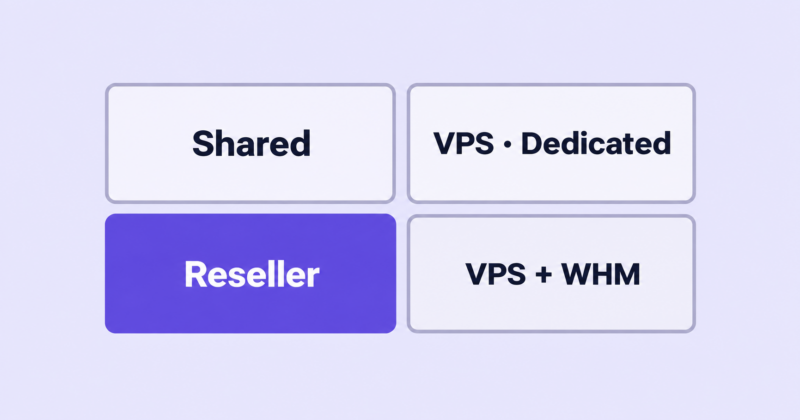
Reseller hosting is the commercial arrangement: you buy capacity wholesale, divide it into accounts and sell it retail on your own terms. It says nothing about branding. The arrangement itself is covered in what reseller hosting is.
White-labelling is the branding layer on top: your logo in the control panel, your nameservers, your billing system, your name on the invoice.
Private-label infrastructure is what people imagine they are buying when a sales page says “100% white label”. Owning the hardware, running the mail servers, holding the IP allocation. Almost nobody reselling hosting does this, and almost nobody needs to.
Everything below follows from one line. White-labelling controls what your client sees in the interfaces and messages you hand them. It does not control what the public internet says about the address their site sits on. Two surfaces, and only one of them is yours.
Why the seams matter more for an agency than for a host
A dedicated hosting company’s brand is hosting. When a seam shows there, it reads as a minor inconsistency in a product the customer already understands.
Your brand is judgement. Clients pay you because you know things they do not, and the whole relationship rests on the assumption that you have thought about the details. A visible seam does not tell your client that you resell hosting. They almost certainly assume you do, because nobody believes their web designer owns a data centre. What it tells them is that you did not know this was visible.
That distinction matters because it changes what you should actually worry about. The risk is not discovery. The risk is discovery at the wrong moment: during an outage, mid-migration, or in the middle of a billing dispute, when your client is already looking for evidence that you are not on top of things.
So the goal is not to hide anything. The goal is to make sure that nothing appears in front of a client that you did not choose to put there, and that nothing you have said is contradicted by something they can see. If you have decided hosting belongs in your service mix at all, and whether designers should resell hosting to clients covers that decision properly, then this is the work that makes it hold up.
The seam map: what your client can see, and when
| Seam | What the client sees | Who notices | Fixable? | Effort |
|---|---|---|---|---|
| System notices (quota, suspension, abuse) | Machine-written mail you never saw | Any client | Yes | Minutes |
| cPanel interface | Your logo, or a stranger’s | Any client who logs in | Depends on provider | Under an hour |
| Billing footer | That you use WHMCS or Blesta | Any client in the client area | Yes, for a monthly fee | Minutes + cost |
| Payment descriptor | A name on their bank statement | Any client, every month | Yes | Minutes |
| Default and suspension pages | Generic placeholder pages | Anyone who visits at the wrong time | Yes | Under an hour |
| Login URLs | A server hostname in a redirect or warning | Some clients | Depends on provider | Minutes |
| Nameservers | ns1.yourprovider.com | Anyone who checks | Yes | Under an hour |
| Welcome email | Whoever your provider sends it from | Every new client | Depends on provider | Verify before launch |
| Outbound mail headers | The route mail took to reach them | Technical clients | Depends on provider | None available |
| Bounce messages | A mail server’s hostname | Technical clients | Depends on provider | None available |
| IP and WHOIS lookups | Who owns the address range | Technical clients | No | — |
| SSL transparency logs | Certificate issuer and sibling hostnames | Technical clients | No | — |
| Support escalation | Your supplier’s words, pasted in | Any client, during an incident | Yes, by discipline | Ongoing |
| Simultaneous downtime | Every site you host, down at once | Clients who talk to each other | No | — |
Three of those rows say no. That is the honest shape of this: most of what a client will ever see is fixable in an afternoon, and the things that are not fixable are things you manage with a posture rather than a setting.
The seams your clients will actually notice
Email: the leak you configure yourself
This is the one to fix first, and it is not a limitation of your provider. It is a field you fill in.
When you create a cPanel account, you set a contact email address. That address receives the system-generated notices: quota warnings, suspension notices, abuse notices. Put the client’s address there and your client receives machine-written mail that you have never read, describing a problem you have not yet assessed, at exactly the moments when you most want to control the message. Put your own address there and you receive the notice, work out what it means, and tell the client in your own words.
Decide this deliberately, write the decision down, and apply it to every account you create. Almost nobody does. It is the single cheapest improvement in this article.
Check what else reaches clients directly. Some providers send a welcome email when an account is created; some do not. Ask, and if they do, read it before your first client does.
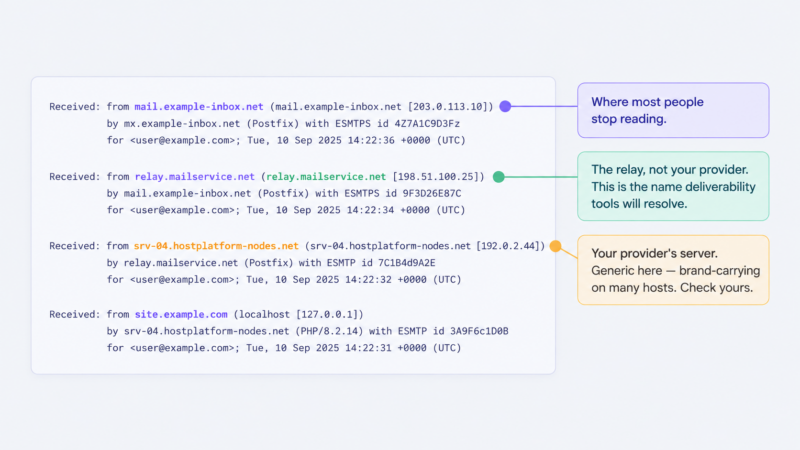
Then there is the mail your clients’ own sites send, which is where the technically curious go looking. Two things shape what they find. The server that hands off the message stamps its hostname into the headers. And many providers route outbound mail through an SMTP relay, in which case the sending address a recipient’s tools resolve belongs to the relay rather than your provider. A relay does not erase the trail; it substitutes one third party’s name for another’s, and the second one says nothing about who runs your servers.
Do not guess at any of this. Send a message from a client site to an address you control, open the full headers and read the whole chain rather than the top line. Do the same with a bounce.
cPanel: your logo, cPanel’s furniture
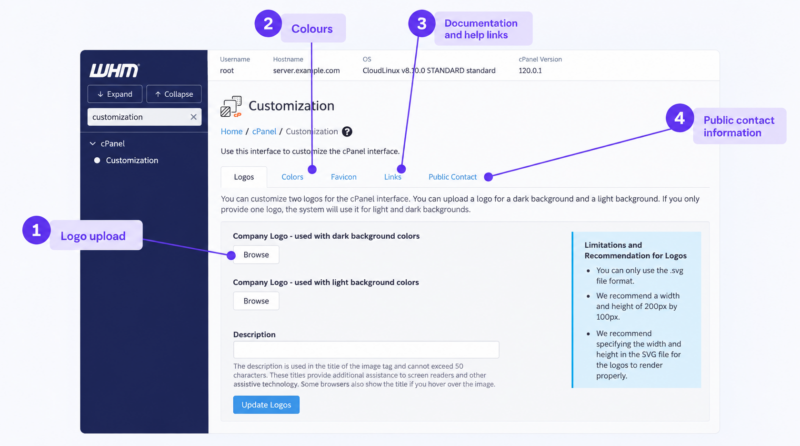
WHM’s Customization interface handles the visible branding of the cPanel accounts you create: logo, colours, favicon, the documentation and help links, and the public contact information that appears on placeholder pages. Set all of it before your first client logs in. The WHM essentials for resellers guide covers where these settings live.
Three limits worth knowing before you plan around it.
The logo has to be an SVG. Have one ready, or you will discover this at the wrong moment.
Customization changes cPanel, not WHM. That only matters if you hand a client WHM access, which is not something you should be doing.
Most importantly: your provider can switch the Customization interface off for resellers entirely. It is a permission they control, not a guarantee cPanel gives you. Confirm it is enabled before you sign up, because a plan where it is disabled cannot be branded at all.
And when you are done, the product is still called cPanel. It says so in the interface, the page titles and the documentation. You are branding the frame, not renaming the software, and no client has ever been troubled by this.
Billing: the “Powered by” line and the bank statement
Start by correcting the assumption, because it usually drives an unnecessary purchase.
A branded billing licence puts a line at the bottom of every client-area page: “Powered by WHMCompleteSolution”, linking out to WHMCS’s website. What that line reveals is the billing software, not your hosting provider. A client who clicks it learns that you use WHMCS to send invoices. They learn nothing about who runs the servers. It is roughly as damaging as a client noticing you use Xero.
Now the arithmetic, which is counter-intuitive. The free licence bundled with a reseller plan is the branded tier: it costs you nothing and carries the vendor’s name. Blesta on entry-level plans works the same way. Removing the line means paying for an unbranded tier, and WHMCS Plus runs $23.95 a month as of September 2026, with price rises most years. On our own reseller plans the included licence is the branded tier, Starter on the WHMCS plans and Blesta on Kickstart, so that is a cost you would be adding rather than one you can negotiate away.
The part nobody mentions: WHMCS no longer sells Starter directly, so buying a licence yourself gets you an unbranded tier by default. The footer exists because the licence was free.
Whether it is worth $23.95 a month is a question of scale. That is roughly $287 a year, which at a typical per-client margin is the entire profit on [PLACEHOLDER: break-even client count at calculator default margin] clients, spent on removing a link to a billing vendor’s website. Run your own numbers with the reseller profit calculator. If you have a handful of clients, leave it alone.
The second billing leak is smaller to fix and more damaging to ignore: the payment descriptor on your client’s card or bank statement. If the name that appears there does not match the name on the invoice you sent, your client sees the mismatch every single month, and eventually one of them asks their bookkeeper about it. Set the descriptor in your payment processor to your trading name. It takes two minutes.
Login URLs and your provider’s server hostnames
clientdomain.com/cpanel looks exactly the way you want it to look. What does not look that way: a client connecting directly on port 2083, a redirect that lands them on a server hostname, or a browser warning about a certificate that names a machine they do not recognise.
How bad this is has almost nothing to do with you. It turns on two choices your provider made: whether their server hostnames carry their brand, and whether the WHOIS on the hostname domain is public. Generic hostnames on a privately registered domain show your client an unfamiliar string. Branded hostnames show your client a competitor’s name.
Both take two minutes to check. Look up the hostname of the server your account sits on, then run a WHOIS on that domain. Do it before you sign up, not after you have migrated twenty sites.
What you control is what you tell clients: document one login URL, use it everywhere, never mention the alternatives.
Nameservers and the obvious lookup
Private nameservers put ns1.youragency.com where your provider’s nameservers used to be. It is the single most visible change you can make, and it closes the check that a mildly curious client would actually run.
It does not close the deliberate one. The glue records behind those nameservers point at addresses in your provider’s range, so a WHOIS or ASN lookup still arrives at the same place. Think of private nameservers as closing the casual check rather than the determined one, and set them up on day one anyway. The full procedure is in the guide to setting up private nameservers.
Default, error and suspension pages
These are the pages nobody thinks about because you never see them yourself: the placeholder on a parked domain, the page a visitor gets when an account is suspended, the default index on a new account, the server signature on a plain 404.
They are public, they are indexable, and they surface at precisely the moments you would rather your client’s customers saw your name than a generic one. Most of them are driven by the public contact information and page settings in WHM, which makes them a half-hour job once and never again.
The seams only a technical client will find
Some clients have an in-house developer, or a friend who is one. That person will find the following, and no reseller setup at any price will stop them.
- IP and reverse-DNS lookups. The address a site resolves to sits inside an allocation that belongs to someone, and that ownership is public.
- WHOIS on the nameserver addresses. Private nameservers do not change who owns the IPs behind them.
- SSL certificate transparency logs. Every certificate issued is published, and searchable by issuer and hostname.
- Mail header chains. Readable by anyone who opens the source of an email.
- Shared IP neighbours. Reverse-IP tools list other sites on the same address.
- Auto-installer and toolkit branding. Installers and site-management tools carry their vendors’ names inside cPanel.
- Browser extensions that fingerprint a stack. One click, no expertise required.
A word on dedicated IPs, because they get sold as the fix for this. For white-label purposes they achieve nothing: the address still sits inside your provider’s allocation and ASN, so every lookup that would have found them still does. You have bought a quieter address on the same block. There are real arguments either way, and we have been through them elsewhere, but anonymity is not among them.
The right response to this whole category is not a fix. It is a posture, and that is the next section.
The seams you can’t close, and shouldn’t try to
Escalation. When something breaks at the infrastructure level, you file a ticket and wait like everyone else. The most common self-inflicted seam in this entire article is pasting your supplier’s reply to your client verbatim, complete with their signature, their ticket number and their phrasing. Translate, do not forward. “The storage node backing your account is being rebuilt, here is what that means for you” is your voice. Their words are theirs.
Simultaneous downtime. When your provider has a bad day, every site you host goes down at the same moment, and your clients talk to each other. There is no configuration that hides this, only a communication plan you wrote before you needed it. That is worth preparing properly: see handling downtime and what to tell clients.
The status page. Sending a client to your provider’s status page hands them the provider’s name, their incident history and their social media mentions in one click. Keep your own incident communication, even if it is a single page on your own site that you update by hand.
Response times. Your provider may answer tickets at 4am. You do not. An upstream service level does not transfer to you, and promising one you cannot personally staff is the fastest way to turn a small outage into a lost client.
All of which points at the thing underneath. White-labelling controls presentation. It does not transfer accountability, and accountability is what your client is actually buying from you.
How much white-labelling is enough?
Level one: minimum viable. Private nameservers, cPanel branding and contact details, system notices routed to you, default and suspension pages replaced, billing on your own subdomain. Enough for any client who logs into cPanel roughly once a year, which is most of them. It takes an afternoon and costs nothing beyond the plan.
Level two: solid. Adds an unbranded billing licence, a payment descriptor that matches your invoices, your own documentation for common tasks, your own incident communication, and transactional mail you control. Worth reaching when hosting is a real line of revenue rather than a convenience you offer existing clients.
Level three: past the point of return, for most agencies. A full documentation library, your own monitoring and reporting, bespoke theming. There is a point where maintaining the presentation costs more than the revenue it protects, and a point beyond that where what you want is your own infrastructure rather than a better disguise. If you are there, the question has changed: see when to move from reseller hosting to a VPS.
| What you set up | Recurring cost | Right for | |
|---|---|---|---|
| Minimum viable | Nameservers, cPanel branding, notice routing, default and suspension pages, billing subdomain | None beyond the plan | Anyone hosting client sites at all |
| Solid | The above, plus unbranded billing, matched payment descriptor, own docs, own incident comms, controlled transactional mail | ~$25/mo, plus your time | Hosting as a real revenue line |
| Past the point of return | Full docs library, own monitoring and reporting, bespoke theming | Significant, and ongoing | Almost nobody reselling |
Most readers should stop at level one, add level two when the client count justifies it, and price the difference deliberately. How you build that into what you charge is covered in how to price reseller hosting plans.
What to say when a client asks who hosts their site
You will be asked. Have an answer ready that you would be comfortable with them repeating.
The casual version, from a non-technical client. “We host it on infrastructure we manage for you, so support comes through us rather than through a support queue somewhere.” True, complete, and it answers the question they were actually asking, which is who to call.
The direct version: “are you actually hosting this yourself?” “We run the hosting. The hardware is in a data centre we work with, the same way your accountant does not print their own cheques. Everything on your side of it is ours.” Do not bluff here. A client who asks this directly is checking whether you will be straight with them.
The procurement version, where they need the supplier named. Name them. If a compliance process, an insurer or an in-house developer needs to know whose infrastructure the data sits on, that is a legitimate question with a one-word answer, and refusing costs you far more than answering. Nothing about white-labelling requires you to lie to a client who asks directly.
Your contract should say the same thing your mouth does: that you may use subcontractors and infrastructure partners to deliver the service, and that you remain responsible for delivery. The guide to terms of service and acceptable use for a small host covers the wording. If the conversation you are dreading is with clients who currently buy hosting themselves, that is its own project: telling existing clients you are taking over their hosting.
What to check before you put your name on it
Before your first client:
- Private nameservers configured and resolving
- cPanel logo (SVG), colours, favicon and documentation URL set
- Public contact information set to your details
- Default placeholder page replaced
- Suspension page replaced
- Billing system on your own subdomain
- Payment descriptor matches the name on your invoices
- A written policy for which contact email goes on new cPanel accounts
After your first account exists:
- Open a real cPanel account as your client sees it and read every screen
- Send a test email from a hosted site and read the full headers
- Trigger a bounce and read what comes back
- Trigger a quota warning and confirm where it lands
- Look up your provider’s server hostname, then run a WHOIS on that domain
- Read the welcome email you send and click every link in it
The two items most people have never done are opening a real account as the client, and triggering a notice to see who receives it. Both take ten minutes and both find something.
What to look for in a provider if white-label matters to you
Seven questions. Ask them before you sign up, because most of them cannot be fixed afterwards.
- Is WHM’s Customization interface enabled for resellers, or switched off?
- Do your server hostnames carry your brand, and is the WHOIS on the hostname domain public or private?
- Who receives quota, suspension and abuse notices, and can I set that per account?
- Do you ever email my end clients directly, and if so, when and saying what?
- Is the included billing licence branded or unbranded, and what does the upgrade cost?
- Is outbound mail relayed, and what appears in the headers?
- Are the default and suspension pages editable?
A provider who can answer all seven quickly has thought about resellers. A provider who cannot has not, and you will find that out later in a more expensive way.
Common questions
Can clients tell I’m reselling? A client who looks will find out, and most assume it already. What they should not find is a contradiction between what you told them and what they see. That is the standard worth holding yourself to, rather than invisibility.
Do I need private nameservers to white-label? They are the most visible single change you can make and they take under an hour, so yes, set them up. They close the obvious check rather than every check.
Can I remove the “Powered by WHMCS” footer? Only by moving to an unbranded licence tier, which is a monthly cost. Before you do, note that the footer identifies your billing software, not your hosting provider.
Do I have to tell clients I use a hosting provider? No, and you should never deny it either. Say it plainly if asked, put a subcontracting clause in your contract, and the question stops being awkward.
Reselling works when the presentation is consistent and the accountability is real. Most of the seams above close in an afternoon; the ones that do not are handled by how you communicate rather than by what you configure.
If you want to see which of these a provider closes for you by default, our reseller hosting plans are a reasonable place to start asking the seven questions above.