Live Chat
 Help Center

A client forwards you an email from someone pitching them a website redesign. Halfway down, the pitch mentions that their current site is hosted with a company your client has never heard of — because whoever wrote it ran one lookup on the domain and read the answer straight off the screen.
Nothing broke. No site went down. But the line on your invoice that says Hosting & maintenance — $45/month just became a question you have to answer.
Private nameservers are the fix for that particular problem. They replace your host’s nameservers with your own — ns1.youragency.com and ns2.youragency.com instead of someone else’s brand — so a lookup on any client domain returns you. The configuration takes about twenty minutes. Rolling it out across clients you already host takes longer and deserves more care, which is most of what this guide covers.
If you’re earlier than this and still working out whether to resell hosting at all, start with how to start a reseller hosting business and come back when you have an account to configure.
Table of Contents
- What private nameservers actually are
- What private nameservers hide — and what they don’t
- Do you actually need them?
- Choosing the domain your nameservers live on
- Setting up private nameservers, step by step
- Moving existing client domains across
- What changes once DNS carries your name
- Does this lock you into your host?
- When it doesn’t work: symptoms and causes
- Before you switch a single client
- Frequently asked questions
- Your nameservers, your clients
What private nameservers actually are
Where your host’s name is visible right now
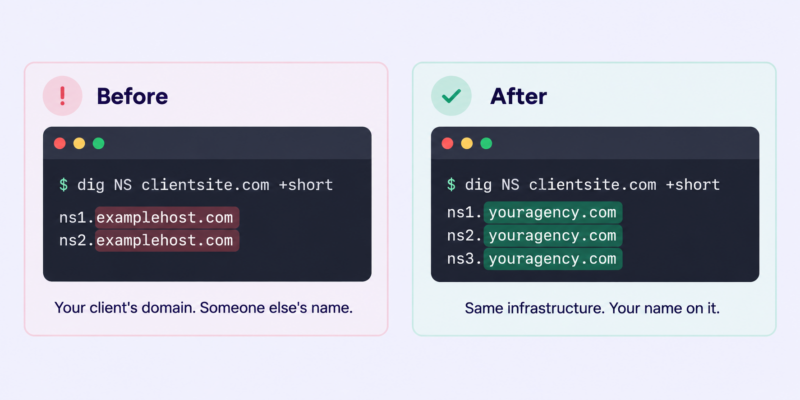
Every domain has a set of nameservers recorded at the registry — the authoritative answer to “who holds the DNS for this domain?” When your client’s domain sits on your reseller account and you haven’t changed anything, that answer is your host’s: something like ns1.examplehost.com and ns2.examplehost.com.
That record is public. Anyone can query it: a curious client, a competing agency, a developer the client hired for something else. It’s the single most visible seam in an otherwise white-label setup, because it’s the only one that shows up without anybody logging into anything.
Private nameservers replace those hostnames with hostnames on a domain you own. The DNS is still served by the same infrastructure. The name on it changes.
Glue records, in one paragraph
There’s a bootstrapping problem hiding in this. To find ns1.youragency.com, a resolver has to ask the nameservers for youragency.com — which are ns1.youragency.com and ns2.youragency.com. To break the loop, the registry stores the nameserver’s IP address alongside the delegation itself. That stored address is a glue record, and creating one is the step people miss. Registrars sell it under at least four names: glue records, child nameservers, host records, or private nameservers.
That’s as much DNS theory as this needs. Two things have to exist: the glue at the registry, and matching A records in your own zone.
What private nameservers hide — and what they don’t
This is worth being straight about, because most pages on this topic imply that vanity nameservers make your upstream host invisible. They don’t.
| Signal | Fixed by private nameservers? |
|---|---|
| Nameserver lookup on a client domain | Yes — this is the entire point |
| WHOIS on the client’s domain | Not applicable — that shows the registrar, not the host |
| The cPanel login URL you send clients | No — needs a branded hostname, separate job |
| cPanel interface branding and theme | No — controlled by your host |
| Reverse DNS on the server IP | No — the IP block still belongs to your host |
| Email headers from your billing system | No — that’s a WHMCS/Blesta configuration |
| Shared IP reputation and server neighbours | No |
What private nameservers defeat is casual inspection. Casual inspection is also the inspection that actually happens — the client who gets curious, the rival who spends thirty seconds, the developer who checks where DNS points before quoting. A determined technical audit will still find your host in about two minutes, and no reseller setup on earth prevents that.
If your commercial position depends on a client never being able to discover your upstream provider, the problem isn’t your DNS configuration. Most agencies don’t need that anyway: “we manage your hosting on infrastructure we’ve selected and support” is both true and defensible. Private nameservers make that sentence look consistent from the outside.
For the rest of the white-label surface — login URLs, panel branding, billing email, the places clients actually spend time — see white-label hosting: where the seams actually show.
Do you actually need them?
Three situations, three different answers.
You bundle hosting into a retainer and never itemise it. Low urgency. Clients who don’t think of themselves as buying hosting rarely go looking for who provides it. Worth doing when you have a spare morning; not worth blocking anything else on.
You sell hosting as a named product with its own invoice line. Do this before your next billing run. The gap between Northgate Hosting — £15/month and a completely different company’s nameservers is precisely what erodes the credibility of that line item, and hosting line items are already the first thing clients question.
You’re planning to change provider within the next year. Do it first, before you onboard anyone else. The reasoning is in the section on lock-in below, and it’s the strongest practical argument in this article.
And the honest negative case: if you host three sites, have no hosting brand, and don’t intend to sell hosting as a product, this is twenty minutes better spent elsewhere. Nothing bad happens if you skip it. Come back at ten clients, or the first time you write “hosting” on an invoice.
Choosing the domain your nameservers live on
Your nameservers live on a domain you control. Which domain is a decision with consequences.
Your agency domain (ns1.youragency.com) is one less thing to renew and immediately recognisable to clients. A separate hosting-brand domain (ns1.northgatehosting.com) reads more like a hosting company, survives an agency rebrand, and can be sold with the hosting book later if it ever comes to that.
Either works. What doesn’t work:
Never use a client’s domain. It happens — usually with the first client, usually because their domain was the one already on the account. It hands that client the ability to break DNS for every other client you host, and it makes an ordinary offboarding into an emergency.
The renewal risk is the real one. If the nameserver domain expires, DNS stops resolving for every client on it, simultaneously, with no warning. That is the worst outage available to a small host and it’s entirely self-inflicted. Before you point a single client at it:
- Registrar lock on, auto-renew on
- Payment card that isn’t about to expire, and a second one on file
- Registered to the business, not to a freelancer’s personal account
- Renewal date in whatever system you actually check
Use ns1, ns2, ns3 as the hostnames. Nothing requires it; everyone expects it.
Setting up private nameservers, step by step
Five steps. None of them are difficult; the order matters more than the individual clicks.
Step 1: Get the nameserver IPs from your host
On a reseller account you don’t own nameserver infrastructure. Your host does, and they’ll give you the IP addresses to point your hostnames at — usually in the welcome email, sometimes in the client area, always available from support if you’ve lost it. On ChemiCloud reseller accounts there are three, and they’re published in the private nameservers KB article as well.
Don’t copy IP addresses out of a guide like this one. Infrastructure changes; a stale IP in a bookmarked article is how people end up debugging DNS at midnight. Take them from your host’s current documentation or your own welcome email.
One thing worth checking before you compare reseller plans on price: whether your host charges for this. Private nameservers on a reseller account point at the platform’s shared nameserver IPs, so there is no technical reason a dedicated IP should be required — but some providers bundle the two and sell them together. ChemiCloud includes private nameservers on every reseller plan; a dedicated IP is available as an optional add-on and isn’t needed for nameserver branding (if you’re weighing that separately, dedicated vs shared IP addresses covers where a dedicated IP does and doesn’t earn its cost). If a competing plan looks cheaper, check which side of that line it sits on before you decide.
Step 2: Register the nameservers at your registrar
This creates the glue at the registry. Where it lives depends on who you registered the domain with:
| Registrar | Where to look | What it’s called |
|---|---|---|
| ChemiCloud | Domains → Manage Domain → Private Nameservers | Private Nameservers |
| Namecheap | Domain List → Advanced DNS | Personal DNS Server |
| GoDaddy | Domain settings → Manage DNS → Hostnames | Hostnames |
| Cloudflare Registrar | Not self-service — see below | Child nameservers |
| ccTLD registries (.co.uk, .de, .com.au) | Varies; sometimes registrar-submitted | Host records / glue |
Registrar interfaces verified September 2026.
Cloudflare Registrar is a genuine obstacle, and worth knowing before you move a domain there. There’s no dashboard or API option for creating child nameservers yourself. Cloudflare’s documented route is Custom Nameservers, which requires contacting Support and sits behind Business or Enterprise plans depending on which variant you need. Ordinary glue records pointing at third-party cPanel infrastructure aren’t documented as supported at all — you’d need Support to confirm they’ll create them. Cloudflare Registrar also requires the domain itself to use Cloudflare’s nameservers. If your nameserver domain is at Cloudflare Registrar, plan on moving it somewhere with self-service host records.
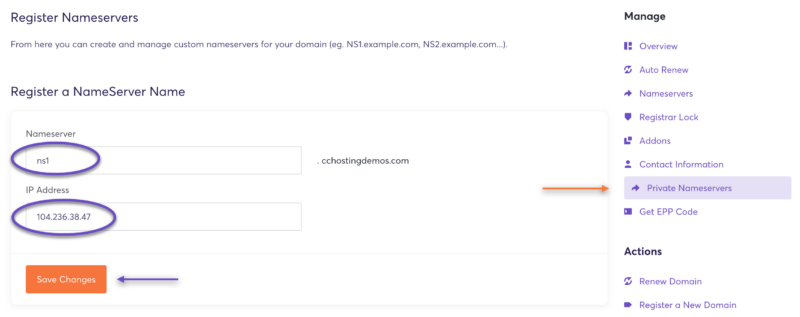
Register all three. Two is the minimum that most registries accept; a third costs nothing and gives you one more authoritative answer.
Step 3: Create the A records in your DNS zone
The glue answers the referral. Your own zone has to answer the authoritative query, and if the two disagree you get intermittent, maddening failures that look like propagation delay but aren’t.
In WHM, open DNS Zone Manager, select your nameserver domain, and add A records for ns1, ns2 and ns3 pointing at the same IPs you registered in step 1.
If the nameserver domain’s DNS isn’t hosted on your reseller account, add the same records wherever it is.
Step 4: Set them as the default in WHM
Basic WebHost Manager Setup → scroll to the nameserver section → choose Explicitly Set the Nameservers → enter your three → save.
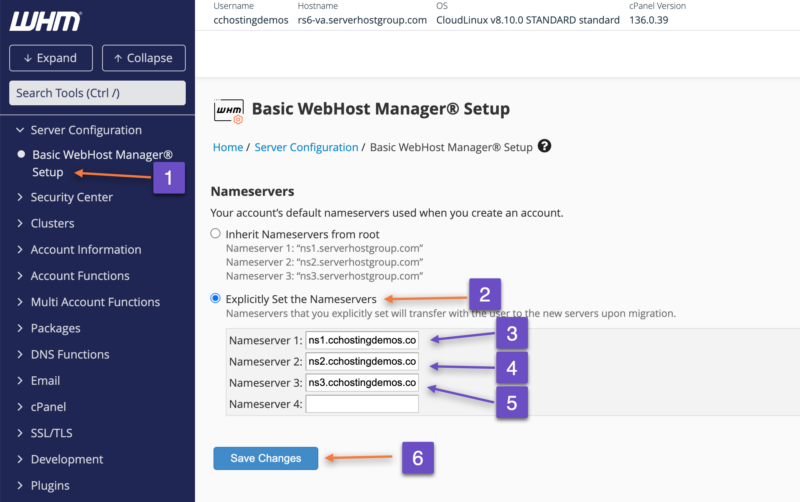
Two things nobody tells you about this screen:
It applies to new accounts only. Every cPanel account you’ve already created keeps whatever nameservers it was built with. This is the single most common source of “I set it up but it didn’t work” — the setting is correct, it just doesn’t reach backwards. Existing clients are the next section.
Some hosts disable this interface for resellers. It’s a permission the provider controls. ChemiCloud leaves it enabled; if you’re elsewhere and the screen isn’t there, that’s a support ticket rather than a limitation of your account.
If you’re new to WHM generally, cPanel & WHM for resellers covers the interfaces you’ll actually use.
Step 5: Wait, then verify properly
“Wait 24 hours” is where most guides stop. Verify in your Terminal instead — it takes a minute and tells you which of the three steps failed.
dig NS youragency.com +short
Should return your three nameservers.
dig A ns1.youragency.com +short
Should return the IP you registered. Repeat for ns2 and ns3.
dig +trace clientdomain.com
Shows the full delegation path, including whether the registry is handing out glue. This is the one that proves the registrar step worked.
No terminal? An online DNS propagation checker will do the first two, and most registrars will refuse to save a host record that doesn’t resolve, which is a crude verification in itself.
Test with your own domain first. Always.
Moving existing client domains across
Configuration was the easy part. This is where people either roll it out carefully or take down a client’s email.
1. Lower TTLs 24–48 hours ahead. On the records you’re about to move. This shrinks the window where half the internet has the old answer.
2. Check the destination zone has everything. Before switching nameservers on a domain, open its DNS zone on your reseller account and confirm it holds every record currently in use — MX records, SPF, DKIM, DMARC, any TXT verification records for Google Workspace or Microsoft 365, any subdomain pointing at something external. Email is what breaks, not websites. Websites are usually already pointing at your server, so the switch is invisible. Mail routing lives entirely in DNS, and a missing MX record means mail stops the moment the new nameservers take effect.
3. Switch one low-risk domain first. Yours. Then a client site with no email attached.
4. Verify before batching. Site loads, mail sends, mail receives. Send a test message in both directions.
5. Batch in small groups. Five or ten at a time, not forty. If something’s wrong with your zone template, you want to find out on a small batch.
6. Know the rollback. Switching back at the registrar works, but it isn’t instant — .com delegation records are cached for up to two days. Rollback is a slow reverse, not an undo button. This is another argument for small batches.
Two situations that catch people out:
Clients on Cloudflare or external DNS. If a client’s domain uses Cloudflare’s nameservers, your nameservers are never consulted. Nothing changes for them, and the white-label benefit doesn’t apply — their DNS is Cloudflare’s, and the fact that your server sits behind it is visible to anyone checking the origin. Leave them alone unless there’s a reason to move them.
Clients who hold their own registrar login. You can’t make this change without them, which means it becomes a conversation. Telling clients you’re taking over their hosting covers how to have it without making it sound like a favour you’re asking.
If you’re also moving sites from another host rather than just repointing DNS, that’s a different and larger procedure — see migrating client sites without downtime.
What changes once DNS carries your name
You’ve taken ownership of something. Worth knowing what.
You are now the first call for anything DNS-shaped. Including things that aren’t your fault and aren’t your job: a client’s marketing agency needs a TXT record for a verification, someone’s setting up a new email platform, a Shopify store needs a subdomain pointed at it. Previously these people found their own way. Now they email you, because your name is on the nameservers.
This is a small, permanent increase in a specific kind of ticket. It’s not a reason to skip private nameservers — it’s a reason to have a saved reply and to decide in advance whether adding a record for a client’s other supplier is included in the retainer or billed.
Email authentication becomes yours too. SPF, DKIM and DMARC live in DNS. Deliverability questions arrive with the records.
Your host’s outages are now your outages. When the DNS infrastructure has a problem, your clients see your nameservers failing. You can’t forward them a status page belonging to a company they’ve never heard of, which means you need your own way of communicating during an incident — handling downtime covers what that looks like in practice.
Does this lock you into your host?
Almost everyone assumes yes. It’s the opposite, and this is the argument that should move you if nothing else has.
On your host’s nameservers, changing provider means every client domain has to be repointed — which means contacting every client whose registrar login you don’t hold, explaining why, and waiting for them to act. In practice that’s what keeps small hosts on providers they’ve outgrown. The migration isn’t technically hard; it’s socially hard, forty times over.
On private nameservers, you update the glue records to point at the new host’s IPs and update the A records in your zone. Client domains don’t change. Most clients never learn a migration happened.
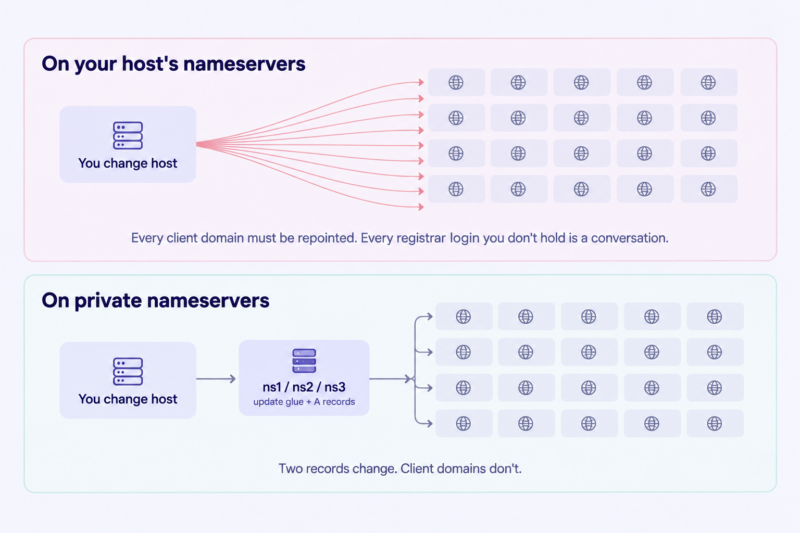
Two honest caveats. Registry-level nameserver records cache for up to two days, so a provider move needs both platforms serving the same sites for a period rather than a clean cutover — plan for overlap and pay for a month of both. And this only works if you genuinely control the nameserver domain, which is the third reason not to put it on a client’s domain.
The same continuity applies to growth. Adding a second reseller account, or moving up to a VPS later, doesn’t have to disturb client domains if your nameservers stay constant. Reseller vs VPS vs dedicated covers where that upgrade path leads, and outgrowing reseller hosting covers when to take it.
When it doesn’t work: symptoms and causes
| Symptom | Likely cause |
|---|---|
| Registrar rejects the nameserver | Glue record missing, or being created on the wrong domain — host records must be created on the domain the hostname belongs to |
| Registrar rejects the IP | Some registries validate that the hostname resolves first; create the A record, wait, retry |
| Sites resolve for you but not for others | Local resolver cache. Test from a different network before assuming |
| A records exist but lookups fail | Glue never registered — the registry has nothing to hand out. dig +trace confirms |
| New accounts still show host nameservers | WHM default was set after those accounts were created. Fix the zones individually |
| Email stopped after the switch | MX, SPF or DKIM records weren’t in the destination zone before cutover |
dig NS still returns old values after 48 hours | Registry TTL, or the change never committed at the registrar. Check the registrar first |
Before you switch a single client
- [ ] Nameserver domain is registrar-locked with auto-renew on and a valid card
- [ ] Domain registered to the business, not a personal account
- [ ] Nameserver IPs confirmed from your host’s current documentation
- [ ] All three nameservers registered as host records at the registrar
- [ ] Matching A records created in the DNS zone
- [ ] WHM default set to explicitly use your nameservers
- [ ]
dig NS,dig Aanddig +traceall return what you expect - [ ] Your own domain switched and running for at least a day
- [ ] TTLs lowered on the next batch
- [ ] MX, SPF, DKIM and TXT records verified in each destination zone
- [ ] Rollback path understood, including its two-day tail
Frequently asked questions
Do I need a dedicated IP for private nameservers? No. On a reseller account your nameservers point at your host’s shared nameserver IPs, which serve DNS for many resellers at once. Some providers bundle a dedicated IP with private nameservers as a paid package, but the requirement is commercial rather than technical.
How many nameservers do I need? Two is the minimum most registries accept. Three is better and usually free — it gives resolvers an additional authoritative source if one is unreachable. Use however many IP addresses your host provides.
Can I use private nameservers with Cloudflare? Not together on the same domain. If a client’s domain uses Cloudflare’s nameservers, Cloudflare is authoritative and yours are never queried. You can host the site on your reseller account behind Cloudflare — you just don’t get the nameserver branding for that domain.
Will private nameservers make sites faster? No. Identical infrastructure, identical resolution path, different hostnames. Anyone selling private nameservers on performance grounds is describing something else.
What happens if my nameserver domain expires? DNS stops resolving for every client using those nameservers, at the same time. Sites and email both go down until the domain is restored and caches clear. This is why the renewal safeguards above aren’t optional.
Can I change hosts later without asking clients to do anything? Yes — that’s the main practical benefit. You repoint the glue records and your zone’s A records; client domains stay as they are. Allow a two-day overlap where both platforms serve the sites, because registry-level records cache for that long.
Your nameservers, your clients
Private nameservers are twenty minutes of configuration that removes the most visible sign that you’re not the hosting company — and, more usefully, makes you portable for the rest of your business’s life. The branding is the reason people do it. The portability is the reason it’s worth doing early.
ChemiCloud’s reseller hosting plans include private nameservers on every tier, with full WHM access and no dedicated IP required to use them.
Next: white-label hosting — where the seams actually show, for everything nameservers don’t cover.