Live Chat
 Help Center

You have the reseller account. WHM is configured, the packages are built, and the only thing standing between you and a live hosting business is an empty field on a pricing page.
It is the hardest number in the business to get right, and the hardest one to change afterwards. Set it too low and you spend the next three years discovering that you built a support obligation rather than a revenue stream, with no way to correct it that doesn’t involve a difficult email to every client you have. Set it without understanding what sits underneath it and you won’t be able to defend it the first time somebody asks.
This article is about the price you set for your clients. If you’re still working out what reseller plans themselves cost to buy, that comparison is here. And if you’re earlier in the process than pricing, the whole sequence is covered in how to start a reseller hosting business.
What follows is a method rather than a price list. Anyone who publishes a figure has to defend it against a market they can’t see, and your costs, your clients and your tolerance for support calls are not theirs. But the arithmetic is knowable, and once you have it you’ll stop guessing.
Why most reseller pricing is set wrong
Three patterns account for nearly all of it.
Priced off a competitor’s retail page. You found a host charging $4.99 a month and worked backwards from there. That number is an output of a business with several hundred thousand accounts, fully automated provisioning and a support operation sized accordingly. Their price is a function of their scale. It is not available to you, and copying it just means you’ve adopted their economics without their volume.
Priced off cost, then stopped. Better instinct, incomplete execution. Your cost tells you where the floor is. It tells you nothing about what the service is worth to the person buying it, and for most resellers those two numbers are separated by a factor of five or more.
Priced for the easy client. The model works beautifully for eleven brochure sites that nobody touches. Then the twelfth client arrives with a WooCommerce store, no staging environment and a habit of editing theme files at midnight, and the margin from the other eleven disappears into their support tickets.
Work out your real cost per account
Everything downstream depends on this number, and almost nobody calculates it properly. Your cost per account is not your plan price divided by the maximum accounts the plan allows. It’s your plan price divided by the accounts you’ll realistically run, plus every other cash line you’ve forgotten.
The cost lines people forget
| Cost line | How to estimate it | Notes |
|---|---|---|
| Reseller plan | Plan cost ÷ accounts you’ll realistically run | Use the renewal rate, not the promotional rate |
| Billing software | Licence cost ÷ accounts | Zero if your plan includes a licence at the tier you need |
| Payment processing | ~2.9% + $0.30 per invoice (illustrative, September 2026) | Hits harder on monthly billing than annual |
| Backups beyond included retention | Per account, or a flat tool cost | Only if you’re promising more than your provider gives |
| Premium SSL or email add-ons | Per account | Usually better charged through than absorbed |
| Domain registration, if you bundle it | At cost, plus renewal exposure | Registry prices rise and you’ve promised a fixed bundle |
| Migration labour at onboarding | One-off, spread over expected client life | Zero if your provider handles migrations — see below |
Two of these deserve attention because they catch people out.
Use the renewal rate. Promotional pricing on reseller plans is almost always first-term only. If you build your model on the intro rate, your margin looks healthy for twelve months and then quietly collapses at renewal, at exactly the point when you have the most clients and the least appetite for a pricing conversation. Model the regular rate and treat the first-term discount as a windfall, not a foundation.
Payment processing is not rounding. At $25 a month, processing costs roughly $1.03 per account per invoice — about 4% of the sale. Bill monthly and that’s $12.30 a year per client. Bill annually and it’s $9.00. The difference is small per account and meaningful across a book.
How many accounts will actually fit
This is the number that drives everything, and the one people overstate most.
Your plan’s account limit is rarely the binding constraint. Disk, inodes and actual resource consumption get there first, and they get there unevenly, because a portfolio of client sites is never a portfolio of equivalent sites. Five brochure sites and one busy store are not six accounts in any sense that matters to your capacity planning.
A few practical rules:
- Ignore anything described as unlimited for planning purposes. It’s a marketing term, not a capacity figure.
- Plan for 60–70% of nominal capacity. Not because providers overstate, but because one heavy site consuming a disproportionate share is the normal case, not the exception. Leaving headroom means a single client’s growth doesn’t force an emergency plan upgrade halfway through your billing year.
- Check whether your provider splits plans by profile. Several offer the same plan at two ratios — more storage with fewer accounts, or more accounts with less storage. Picking the wrong one is a common way to hit a ceiling far earlier than the price suggested you would. If you’re running many small client sites, the account-weighted variant is usually the right call; if you’re running fewer, larger sites, it isn’t.
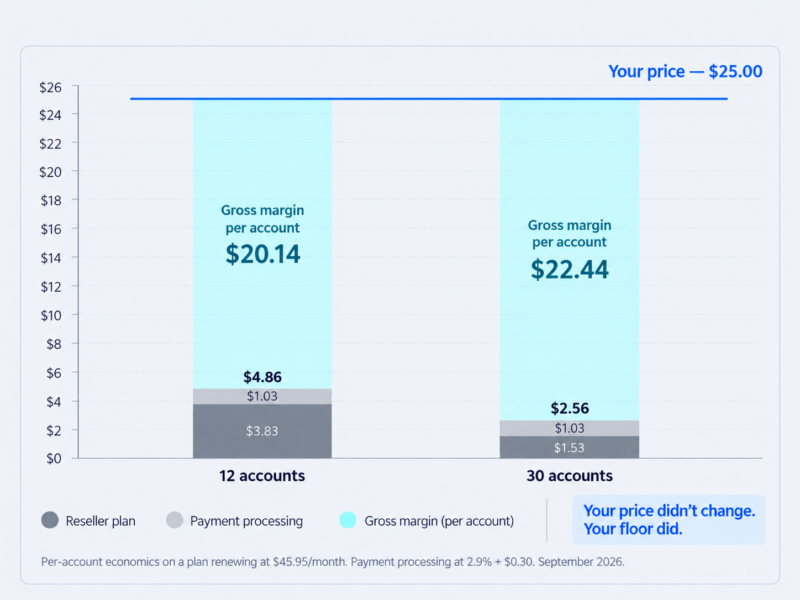
The practical effect on your floor is large. At twelve accounts on a plan renewing at $45.95, your plan cost alone is $3.83 per account. At thirty accounts it’s $1.53. At sixty it’s $0.77. Density is the single biggest lever you have on your own cost base, which is why the first year of a reseller business feels so much worse than the third.
For the mechanics of what actually constrains an account in WHM, the reseller’s guide to cPanel and WHM goes through the limits in detail.
Your time isn’t a cost line — it’s a rate check
Here’s a deliberate choice, and it’s worth understanding why.
If you deduct your own support time as a cost, every small reseller book looks unprofitable, and you’ll draw the wrong conclusion from your own spreadsheet. A designer spending three hours a month on hosting support at a $75 billable rate has “spent” $225 against maybe $300 of margin, and the arithmetic says quit.
That framing is misleading for two reasons. Those hours are frequently not new — if you already field “my site is down” calls for free, taking over hosting puts a price on work you were doing anyway rather than adding it. And the hours are not fungible; they’re small, scattered and rarely displacing billable design work hour for hour.
So calculate profit on cash costs only, then divide by your support hours to get an effective hourly rate. That number tells you the truth without distorting the profit figure:
If your effective hourly rate is above your billable rate, hosting is paying better than your core work, per hour spent. If it’s below, either your price is too low or your inclusions are too generous. Those are the only two levers.
Three ways to set the price, and when each one works
| Method | How you get the number | Works when | Fails when |
|---|---|---|---|
| Cost-plus | Unit cost × a target multiple | Establishing a floor; selling to price-led buyers | Used alone — it prices the commodity, not the service |
| Market-anchored | Benchmarked against comparable providers | You sell into a defined niche with visible comparables | Your comparables have scale you don’t |
| Value-based | Priced against what the client avoids | Existing client relationships; managed care plans | You can’t articulate the outcome in a sentence |
Cost-plus is where you start and where you stop calculating. Take your unit cost, apply a multiple, and you have a number you will never actually charge. Its job is to tell you when you’re underwater, not what to put on the page.
Market-anchored is a sanity check. It’s useful when you sell into a specific niche — hosting for dental practices, for photographers, for trade associations — because the comparables are visible and the buyers genuinely compare. It’s dangerous as a primary method, because the businesses you’re benchmarking against mostly aren’t operating your business.
Value-based is where the money is for anyone with an existing client book. You are not pricing disk space. You’re pricing the fact that a problem the client used to own now belongs to somebody else. That’s worth a multiple of the infrastructure underneath it, and it’s the only method that survives a conversation about why you cost more than the alternative.
The short version, and the only line from this article worth memorising:
Cost-plus sets the floor. Value-based sets the price. Market-anchored checks your work.
You’re not competing with $2.95 shared hosting
Your client will find the cheap plan. Someone always does, usually the client who is most price-sensitive and least profitable. Pretending the comparison doesn’t exist is how you lose the conversation.
The reframe is straightforward, and it’s true, which helps.
That $2.95 plan is a price for storage and bandwidth. It is a correct price for storage and bandwidth, which are genuinely close to worthless. What it doesn’t include is anybody who knows anything about your client’s site. It doesn’t include a person who answers when the contact form stops working, or who already knows which plugin caused it last time, or who notices the SSL renewal failed before the browser warnings start.
What your client is actually buying is the removal of a job from their list. One invoice. One person to call. No vendor relationship to maintain, no renewal to forget, no half-hour on hold with a support queue explaining what WordPress is.
Something close to this, in your own words, handles it:
“You can absolutely host it yourself for less — the hosting itself is cheap. What you’re paying me for is that it’s covered. If something breaks, you email me and it’s dealt with, usually before you notice. If you’d rather manage it directly I’ll help you set it up, but then it’s yours.”
Two things that do a lot of work there: the offer is real, and you’ve named the trade honestly. Clients who take the cheap option after hearing that were never going to be good hosting clients. Clients who don’t have just agreed with your framing, which makes the price a detail. The fuller version of this conversation, for clients already hosting elsewhere, is covered in telling existing clients you’re taking over their hosting.
Decide what’s included before you decide the price
Your inclusions determine profitability more reliably than your price does. Every item in the “included” column is a promise you fund out of margin, permanently, for every client.
| Request | Include | Bill separately | Consider declining |
|---|---|---|---|
| Initial migration | ✓ | If it’s a large multi-site move | |
| SSL provisioning and renewal | ✓ | ||
| Routine restore from backup | ✓ (one per quarter) | Beyond the allowance | |
| Client deleted their own site | ✓ | ||
| Malware cleanup | ✓ | Complex reinfection → specialist | |
| Email hosting and deliverability | Decide explicitly | ✓ | ✓ — see below |
| DNS changes for third-party tools | ✓ (bounded) | ||
| Plugin updates, content edits, site changes | ✓ (care plan) | ||
| Out-of-hours response | ✓ (named tier only) |
On migrations. Whether you charge an onboarding fee depends entirely on whether migration is labour you’re funding. Check your provider before you decide: ChemiCloud includes free, done-for-you migrations on every reseller plan, including moving a whole existing reseller account across from another host, which takes onboarding out of your cost model altogether and lets you offer free migration as a closing lever without paying for it. If your provider doesn’t do that, price onboarding separately, because a twenty-site agency migration is a week of unbilled work and it will not be the last one.
On email. This is the most common unprofitable inclusion in small hosting, and it deserves a decision rather than a default. Email generates support tickets at several times the rate of web hosting, most of them about deliverability problems you don’t control and can’t fix. Plenty of competent small hosts decline email entirely and point clients at a dedicated provider. If you do include it, price it as a separate line so you can see what it’s costing you.
On backups and restores. Give an allowance rather than an open commitment. “One restore per quarter included” is generous, sounds generous, and stops the client who treats your backups as a substitute for staging. The question of who is actually responsible when a client destroys their own site is a longer one, covered in backups and who’s responsible.
Price for support load, not disk space
Disk is the cheapest thing you sell and the only thing most resellers differentiate on. Two accounts on identical storage can differ by an order of magnitude in what they cost you to support, and storage tells you nothing about which is which.
This has a direct consequence for how you structure tiers: differentiate on entitlement, not just resources. Response time, included support hours, restore allowance, whether out-of-hours contact is on the table. Those are the things that vary with what a client actually costs you, and they’re the things a client with a demanding site will happily pay more for, because they know they’re demanding.
It also matters because you usually can’t engineer your way out of a heavy client. On most reseller platforms you can increase the resources allocated to an individual account — through add-ons or by moving them to a larger package — but you cannot cap one, because per-account resource limits sit with the provider rather than with you. The heavy client is therefore a pricing problem and a relationship problem, not a technical one. You price for it, you move them to a tier that reflects it, or you help them find somewhere else to be.
How many tiers to run and what should separate them is a question in its own right, covered in how many hosting tiers should you offer. What matters for pricing is that at least one dimension of difference between your tiers is a support commitment, and what hosting support load actually looks like has the underlying numbers.
Billing cycle, terms, and the clauses that protect the price
Annual beats monthly for most resellers with existing clients. It cuts payment processing by roughly a quarter, it removes eleven opportunities a year for a client to reconsider, and it aligns naturally with the domain renewal they already expect. The cost is a higher barrier at signup, which matters if you’re selling cold and matters very little if you’re converting clients who already trust you.
Watch what a longer term actually buys you. Providers discount long commitments in two different ways, and only one of them helps your model. Some cut the introductory price, which flatters year one and changes nothing afterwards. Others cut the regular rate, which lowers your cost floor for as long as you stay. Check which one you’re being offered, because only the second is still doing anything for you in year two.
A setup or onboarding fee is justified when onboarding is genuinely laborious — a large migration, DNS work across multiple vendors, email reconfiguration for a team. It is not justified as a general revenue top-up, and on a small monthly plan it depresses conversion more than it earns.
Build in a price review clause now. A single sentence in your terms saying prices are reviewed annually costs nothing at signup, because nobody objects to it in the abstract, and it converts a future confrontation into an expected event. This is the cheapest thing in this article and one of the most valuable. If you’re already past that point, raising hosting prices on existing clients deals with the harder version.
Decide your payment failure policy before you need it. How many days, how many reminders, when suspension happens, and what the client sees. Writing it down in advance is what allows you to apply it calmly. The terms language belongs in your terms of service and AUP; the mechanics of actually getting paid are in non-payment, suspensions and getting paid.
One more, and it’s the one people bundle away by accident: if hosting sits inside a monthly retainer with no line of its own, you have nothing to raise, nothing to report on, and no visibility into whether it makes money. Hosting inside a retainer versus billed separately covers when that’s the right call anyway.
Run your own numbers
Before you publish anything, put your own figures through the reseller profit calculator. Have these to hand: how many accounts you’ll actually run, your intended price, your plan’s renewal rate, a realistic estimate of monthly support hours, and your own billable rate.
The point isn’t to discover your price. It’s to find out whether the price you already have in mind survives contact with the arithmetic.
Here’s the shape of it at two densities, on a plan renewing at $45.95 a month, selling at $25 per account:
| 12 accounts | 30 accounts | |
|---|---|---|
| Revenue | $300.00 | $750.00 |
| Reseller plan | −$45.95 | −$45.95 |
| Payment processing | −$12.30 | −$30.75 |
| Gross margin | $241.75 | $673.30 |
| Cost per account | $4.86 | $2.56 |
| Support hours (est.) | 2.5 | 6.0 |
| Effective hourly rate | $97/hr | $112/hr |
The price didn’t change. The business did.
Two worked examples
A designer with 12 existing client sites
Twelve active clients, all on WordPress sites you built, all currently paying somebody else somewhere between $10 and $30 a month for hosting they don’t think about.
Assumptions: 12 accounts at $25 a month. Plan renewing at $45.95 (a first-term promotional rate would improve year one; don’t build on it). Billing software included at the plan tier. Payment processing at 2.9% + $0.30, billed monthly. Two and a half hours a month of support that’s genuinely additional to what you already do. Your time at $75 an hour.
| Monthly | Annual | |
|---|---|---|
| Revenue (12 × $25) | $300.00 | $3,600 |
| Reseller plan | −$45.95 | −$551 |
| Billing software | $0 | $0 |
| Payment processing | −$12.30 | −$148 |
| Gross margin | $241.75 | $2,901 |
| Your time (2.5 hrs × $75) | −$187.50 | −$2,250 |
| Net after time | $54.25 | $651 |
| Effective hourly rate | $97/hr |
The effective hourly rate is the number that matters, and at $97 against a $75 billable rate, hosting is paying better than your design work per hour spent. The net-after-time figure of $54 a month looks unimpressive and slightly misses the point — it’s what’s left after paying yourself at full rate for work you were largely doing anyway.
What this table doesn’t capture, and both favour doing it: a client whose site, domain and hosting all sit with you does not casually drift to another designer, and the book itself becomes an asset with a resale value. The wider case for persona-one operators is in should web designers resell hosting to their clients, and the full year-by-year model is in how much you can actually make reselling web hosting.
Starting from zero
Different arithmetic, and it’s worth being honest about the shape.
With no existing clients, you’re acquiring from scratch, competing on visibility rather than relationship, and your density is terrible for the first year. At four accounts, your plan alone costs $11.49 per account per month. Your floor is high precisely when your bargaining position is weakest, which is exactly when the temptation to compete on price is strongest.
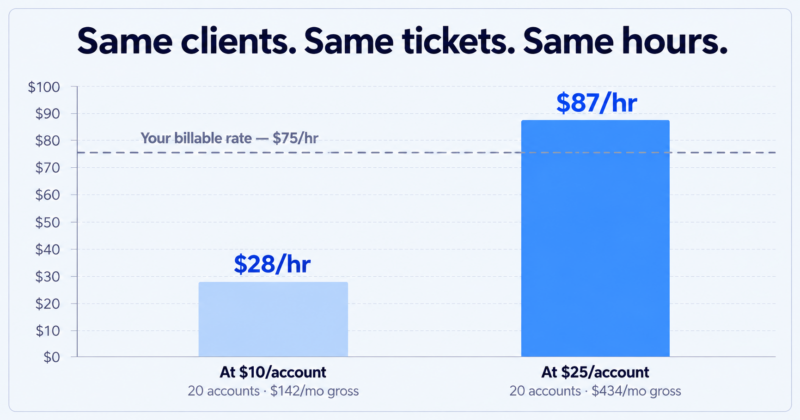
Here’s why that temptation is the trap. Take twenty accounts, the same support load, and two different prices:
| At $10/account | At $25/account | |
|---|---|---|
| Revenue | $200.00 | $500.00 |
| Reseller plan | −$45.95 | −$45.95 |
| Payment processing | −$11.80 | −$20.50 |
| Gross margin | $142.25 | $433.55 |
| Support hours (est.) | 5.0 | 5.0 |
| Effective hourly rate | $28/hr | $87/hr |
Same clients, same tickets, same hours. The only difference is the number on the invoice, and it’s the difference between a business and a hobby that pays below minimum wage in several countries.
Churn makes it worse rather than better. At an assumed 18% annual churn [placeholder — replace with measured retention data from E6], twenty accounts lose between three and four clients a year, so you’re acquiring four just to stand still. At $10 a client, the margin on a replacement account takes most of a year to cover the effort of winning it. At $25 it takes a couple of months.
The conclusion isn’t “don’t start from zero.” It’s that starting from zero and pricing at the bottom of the market is the combination that doesn’t work, and that most people who quit around month four quit because of the second decision rather than the first. Sell to a defined niche where you can justify a real price, and the arithmetic above becomes survivable. Why niche hosting beats generic hosting is the longer argument.
Pricing mistakes that cost the most
- Pricing off disk space. The cheapest input, doing all the differentiating.
- Building the model on a promotional rate. Year two arrives on schedule.
- Forgetting payment processing. Roughly 4% of a $25 monthly sale, invisible until you add it up.
- Including email without deciding to. The highest-ticket, lowest-margin thing in small hosting.
- No restore allowance. Every restore is free forever, including the fifth one this month.
- Bundling a domain at a fixed price. Registry prices rise; your bundle doesn’t.
- Hosting invisible inside a project fee. Nothing to report on, nothing to raise, no idea whether it works.
- Never raising prices at all. The default outcome, and the most expensive one on this list.
Before you publish your prices
- [ ] Unit cost calculated at realistic density, not maximum accounts
- [ ] Renewal rate used, not the promotional rate
- [ ] Payment processing included in the model
- [ ] Floor price identified — and never quoted to anyone
- [ ] Inclusions written down, with allowances rather than open commitments
- [ ] At least one tier difference is a support entitlement, not a resource limit
- [ ] Billing cycle chosen deliberately, with processing costs modelled both ways
- [ ] Price review clause in your terms
- [ ] Payment failure and suspension policy written down
- [ ] Effective hourly rate checked against your own billable rate
- [ ] Numbers re-run at two and three times your current account count
Common questions
How much should I charge clients for web hosting?
Work it out rather than copying it. Establish your cost per account at realistic density, then price against what the client avoids by using you rather than against what infrastructure costs. Hosting sold to existing design clients as a managed service consistently supports a multiple of hosting sold cold to strangers, for identical underlying resources.
What’s a reasonable markup on reseller hosting?
Markup is the wrong frame, because it anchors you to a cost base that’s close to negligible at any reasonable density. A useful test is the effective hourly rate: gross margin divided by the support hours you actually spend. If that figure sits comfortably above your billable rate, the price is defensible regardless of what multiple of cost it represents.
Should I bill hosting monthly or annually?
Annually, for most resellers with an existing client base. It reduces payment processing by around a quarter, removes eleven annual opportunities for a client to reconsider, and fits alongside the domain renewal they already expect. Monthly lowers the barrier for cold sales and raises your administrative load.
Your price is only as good as the cost floor underneath it, and that floor is set largely by what your provider bundles in — billing software, migrations, backup retention, whether the account limits are real. See what our reseller hosting plans include, or run your figures through the profit calculator first and come back with a number.