Live Chat
 Help Center

You’ve built a hosting package, multiplied it by the number of clients you have or hope to have, and the total comes to several times the storage your reseller plan actually includes. Every plan you compared said “overselling enabled”, and at least one forum thread you read used the word as an accusation.
So which is it: a normal feature, or the thing bad hosts do?
Both, depending on whether you can show your numbers. This page gives you the test rather than a verdict. It sits under the wider guide to starting a reseller hosting business, and it’s written mostly for people selling hosting packages to clients they don’t already know. If you host sites you built for your own clients, you probably know every one of those accounts by name, and the monthly check near the end is the only part you need.
Table of Contents
- The short answer
- Three things people mean by “overselling”
- How overselling works on a reseller account
- Why almost every reseller oversells
- When overselling is defensible: four conditions
- Two books, same question
- When it stops being defensible
- What happens when you hit the ceiling
- When your provider is the one overselling
- A monthly overselling check
- FAQ
The short answer
Overselling means promising your clients more disk space and bandwidth in total than your plan contains, because most accounts never use their full quota. On a reseller plan it’s a setting in WHM: instead of adding up the quotas you’ve handed out, it adds up what your accounts actually use and checks that against your plan.
It’s standard, and it’s defensible when four things are true. You measure real usage. Your biggest clients would still fit if they filled their quotas. You’ve decided what you’ll do before you reach the ceiling. And you’d honour every quota you’ve promised. It stops being defensible when any of those is missing, and “unlimited” hosting fails the last one by design.
Three things people mean by “overselling”
Most arguments about overselling are two people talking about different things. There are three, and they have different owners and different risks.
| Who’s doing it | What’s oversold | Who carries the risk | Where it’s covered | |
|---|---|---|---|---|
| Your packages | You, in WHM | Disk space and bandwidth promised to clients vs what your plan includes | You first, then your clients | Most of this page |
| Your provider’s server | Your host | CPU, memory and disk speed shared across every account on the server | Everyone on that server | When your provider is the one overselling |
| “Unlimited” plans | Whoever sells them | Everything, implicitly, bounded by a fair-use clause | The client who takes the promise literally | When it stops being defensible |
The first is a decision you make. The second is one you choose a provider on. The third is one you can decline.
How overselling works on a reseller account
What you can oversell
Disk space and bandwidth. Without overselling, WHM treats every quota you hand out as spent: give ten clients 10 GB each and you’ve used 100 GB of your plan, even if their sites use 8 GB between them. With overselling allowed, WHM counts what’s actually on the disk and what actually went over the wire, and only stops you when that reaches your plan’s limit.
You set quotas through packages. How to build them is covered in how to create hosting packages in WHM, and where usage shows up in WHM is part of cPanel and WHM for resellers.
What you can’t
Three things don’t bend, whatever your packages say.
The number of cPanel accounts. Your plan allows a fixed count. Overselling doesn’t create more.
Each account’s CPU and memory. These are set per account by the platform, not shared out by you. A client can be well inside their disk quota and still hit a CPU or memory ceiling on a busy day.
Inodes. Every file, folder and email counts as one, and each account has a cap. Hit it and uploads fail, email can stop arriving and the site may start returning errors — with gigabytes of disk quota still unused.
This is the part most readers miss. The limits most likely to hurt a busy account aren’t the ones overselling touches. Overselling is a decision about storage and bandwidth. It isn’t a decision about performance.
On ChemiCloud’s reseller hosting plans, overselling is enabled on every tier, so WHM measures what your accounts actually use against your plan’s storage and bandwidth rather than what you’ve promised. You’re warned before you reach the plan’s limit; at the storage limit, new accounts can’t be created until you move up a tier. Overselling doesn’t extend to the number of cPanel accounts, which is fixed per plan, or to each account’s own limits — 2 CPU, 3 GB of memory and 250,000 inodes per cPanel account (Verified as of September 2026) — which are raised account by account through paid add-ons, not something you allocate yourself.
Why almost every reseller oversells
Because most sites are small. A typical small WordPress brochure site sits in low single-digit gigabytes, email included, and stays there for years. If you sized every package for the worst case, you’d either give clients quotas so small they look unserious next to every competitor, or leave most of the storage you pay for sitting empty.
Overselling is what lets you fill the plan. And filling the plan is what brings your cost per account down: the same monthly bill spread over fifty clients instead of twenty. The reseller hosting profit calculator shows what that does to your margin as the account count rises.
The usual comparison is airlines, which sell more seats than the plane holds because some passengers never turn up. It’s a fair comparison with one important difference. An airline can bump a passenger. You can’t bump a site. When an airline gets it wrong, one person has a bad day. When a reseller hits the ceiling, every account on the plan shares the problem at once. That asymmetry is why the next section matters more in hosting than it does in the industries the analogy comes from.
When overselling is defensible: four conditions
1. You measure what’s used, not what’s promised
The only number that matters is real usage against your plan’s ceiling.
WHM’s account list shows disk used per account, and its bandwidth view shows each account’s transfer for the month. Add them up, compare them with your plan, and write the figure down. Monthly is enough for most books. If you host online shops, or clients who treat their mailbox as an archive, check weekly.
If you can’t say what your real usage was last month, you’re not overselling. You’re hoping.
2. Your biggest clients still fit
Run the biggest-three test. Take your three largest accounts. Assume each one fills its full quota tomorrow. Add the difference to today’s real usage. If the total still sits below your trigger (condition 3), your overselling is sound.
Why three and not one? Because accounts grow in clusters. A client adds a second site. A shop imports a new catalogue. A backup plugin starts keeping thirty copies instead of three. It’s rarely one account on its own that tips you over.
3. You act before the ceiling, not at it
Pick a trigger below 100%, and decide now what you’ll do when you cross it.
A reasonable rule of thumb is to act at about three-quarters of your plan’s storage. There’s nothing magic about 75%. It’s there because every fix takes time: a plan upgrade needs deciding, moving a client needs a conversation, and cleaning up an account needs the client’s agreement. Usage doesn’t pause while you do any of that.
Decide the response in advance. The options, cheapest first, are further down under what happens when you hit the ceiling.
4. You’d honour what you promised
If any single client used their full quota, you’d let them. No surprise email, no fair-use argument, no suspension.
If you wouldn’t, the quota isn’t a promise. Make it smaller.
This also answers the question of whether to tell clients you oversell. You don’t need to publish your ratio. What you do need is terms that state each quota as a real limit and say what happens when an account outgrows it — terms of service and AUP for a small host covers how to write that.
Two books, same question
Here are two resellers. The plan figures are real ChemiCloud reseller plans as of September 2026. The clients and usage are illustrative.
| Book A — brochure sites | Book B — online shops | |
|---|---|---|
| Plan | Storage-optimised Grow: 120 GB, 60 accounts | Storage-optimised Kickstart: 60 GB, 40 accounts |
| Clients | 55 | 10 |
| Quota per client | 6 GB | 9 GB |
| Promised in total | 330 GB | 90 GB |
| Promised vs plan | 2.75 : 1 | 1.5 : 1 |
| Actually used today | 72 GB (60%) | 48 GB (80%) |
| Three largest filled to quota | 78 GB (65%) | 54 GB (90%) |
| Verdict | Defensible | Not defensible |
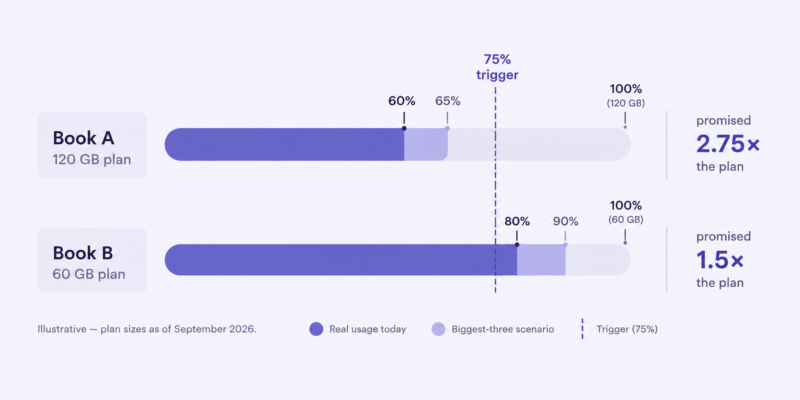
Book A oversells nearly twice as hard and is in better shape. Its fifty-five small sites stay small, and even if the three largest filled their quotas tomorrow it would sit well under a 75% trigger.
Book B oversells far less and is already past the trigger. Ten shops, three of them large and growing, dominate the total. Shops accumulate product images, order data, logs and often their own backups, and they tend to grow together. If the three largest filled their quotas, Book B would be at 90% of the plan.
Book B’s owner should act this month. Clearing out the shops’ locally stored backups may free more room than anything else. After that: move up a tier, switch to a plan shape that fits the book better, or move the two largest stores onto a plan of their own.
The ratio is the number everyone asks about, and it’s the wrong number. Headroom is the right one. Where the ratio does matter is when you set the quotas in the first place, which is a capacity decision, not a marketing one — how many hosting tiers you should offer works through it.
When it stops being defensible
Selling “unlimited”. Every unlimited plan has a fair-use clause, so the promise is written to be broken for the one client who takes it literally. For a small host it’s worse than that: “unlimited” attracts exactly the accounts that make overselling unsafe. Sell real quotas and write down what happens when an account outgrows them.
Quotas chosen by the pricing page. A number picked because it sounded competitive isn’t overselling by decision. It’s overselling by accident, and it’s the version that ends in a rushed migration.
A book dominated by one kind of heavy account. Shops, media-heavy portfolios, course platforms. A few of these can outweigh fifty brochure sites, and they grow at the same time.
No monitoring. See condition 1. Without a monthly figure, none of the other conditions can be checked.
Using overselling to put off an upgrade you already need. If you’re past your trigger every month, the plan is too small. The answer is a bigger plan, or eventually the question of whether you’ve outgrown reseller hosting altogether, not a tighter squeeze.
Where the disk actually goes. Before you conclude that you need a bigger plan, look for the usual culprits. Most ceilings are reached by these rather than by websites:
- Email. Years of mail, never archived, on accounts nobody thinks of as large.
- Backup plugins writing to the account itself. Your provider’s own backups usually sit outside your storage. A plugin keeping thirty copies inside the account doesn’t.
- Logs and cache directories that nobody has cleared since the site launched.
- Staging copies that became permanent.
- Abandoned installs — the test WordPress site from two redesigns ago.
What happens when you hit the ceiling
With overselling allowed, WHM stops you creating new accounts, or enlarging existing ones, once real usage reaches your plan’s limits. Individual accounts still run into their own quotas as usual. What that means in practice is a client who can’t upload images, email bouncing from a full mailbox, and a new sale you can’t set up until you’ve made room.
Providers differ on what they do beyond that — whether they warn you first, and what happens to bandwidth at the limit. Find out what yours does before you need to know.
Your options, cheapest and least disruptive first:
- Clean up the disk-eaters listed above.
- Tighten packages for new clients and leave existing ones alone.
- Upgrade the plan, or change its shape. Most providers let you move up a tier, or between plans weighted towards storage and plans weighted towards account count, without migrating anything. Check that yours does.
- Move a heavy client onto a plan of their own.
- Add a second reseller account under the same nameservers, which is covered in the upgrade section of reseller vs shared vs VPS vs dedicated hosting.
- Ask whether you’ve outgrown reseller hosting.
When your provider is the one overselling
Every shared server hosts more accounts than it could serve if all of them peaked at the same moment. That’s what “shared” means. What separates providers is how densely they fill each server, whether each account is isolated from its neighbours, whether the limits are stated, and whether you’re told when something goes wrong. The line to draw is between sharing a server and overcrowding one.
Signs of an oversold server
- Slowness that follows the clock, not your traffic. Measure server response time on the same page at a quiet hour and a busy hour, every day for a week. A pattern that tracks the time of day rather than your own visitors points at the server.
- High server load when nothing has changed on your accounts.
- Limits enforced without being stated, or tightened without notice.
- A provider that can’t tell you each account’s CPU, memory, disk speed and inode limits.
- “Unlimited” reseller plans at a price that couldn’t possibly support the word.
Rule out the ordinary causes first. A heavy plugin, a bot crawling the site or a client’s own traffic spike all look like an overcrowded server from the outside.
Questions to ask before you move
- What are the per-account limits for CPU, memory, disk speed, processes and inodes, and are they published?
- How are accounts isolated from each other?
- Is overselling enabled on the reseller plan, and what happens at the plan’s limit — for storage and for bandwidth?
- Do your backups count towards my storage?
- What does it cost to raise one account’s resources?
- How are incidents and maintenance communicated, and where?
- Can I move up a plan, or change its shape, mid-term without a migration?
- Is migrating a whole reseller account included, and how is it scheduled?
Audit your own book before migrating it
If you’re moving fifty or two hundred accounts, the question isn’t only whether the new provider oversells. It’s whether your overselling survives the move.
Export real usage per account. Run the biggest-three test against the new plan’s storage, not the old one. Clean up the disk-eaters before you migrate rather than after — otherwise you’re paying, in time or money, to move data nobody wants. And check inode counts account by account: a book that fits the new plan by disk space can still fail it on file count. The mechanics of the move itself are covered in migrating client sites to your reseller account.
A monthly overselling check
Five minutes, once a month:
- [ ] Real usage vs plan. Total disk and bandwidth, as a percentage of the plan.
- [ ] Your three largest accounts. Which ones, and are they growing?
- [ ] The biggest-three test. Still under your trigger?
- [ ] Accounts near their own quota. Each one is a support ticket waiting to happen — what hosting support load actually looks like covers where those tickets come from.
- [ ] Anything unexpected. A mailbox that doubled, a backup folder that appeared, a staging site nobody mentioned.
FAQ
Is overselling a scam? No. It’s how shared hosting stays affordable, and every reseller plan is built around it. It becomes a problem when it’s unmeasured, or when it rests on a promise you wouldn’t keep.
What’s a safe overselling ratio? There isn’t one, and anyone who quotes you a number doesn’t know your accounts. A book of brochure sites promised nearly three times its plan can be safer than a book of online shops promised one and a half times its plan. Run the biggest-three test instead.
Is overselling the same as unlimited hosting? No. Overselling promises specific quotas that add up to more than you have. Unlimited promises no quota at all and relies on a fair-use clause to stop anyone taking it literally.
Should I tell my clients I oversell? You don’t need to publish your ratio. Your terms should state each quota as a real limit and say what happens when an account outgrows it.
Does overselling slow sites down? Overselling disk space and bandwidth on your plan doesn’t. Speed depends on CPU, memory and disk performance, which are set per account. An overcrowded server can slow sites down, which is a question about your provider rather than your packages.
Can I oversell CPU or memory on a reseller plan? Generally not. They’re set per account by the provider, and raising them for one account is usually a paid option rather than something you allocate.
Setting up your packages? The quota is where every overselling decision starts: how many hosting tiers you should offer covers how to set it from real usage.
Moving an existing book? Run the audit above, then move: migrating client sites to your reseller account covers the migration.
When you’re comparing plans, compare their storage and account count with what your accounts actually use, not with what you’ve promised.
See ChemiCloud’s reseller hosting plans.