Live Chat
 Help Center

Yes, raise it. Annually, by a small amount, on a date your terms already name.
If you’ve never done it, the first one isn’t an event to survive — it’s a structural fix. You’re not putting a price up once. You’re installing the thing that means you never have to think about this again.
Two kinds of reader arrive here. Some of you are planning: renewal season, working out whether and by how much. Some of you have just watched an upstream cost step up and want permission to pass it on. Both get the same answer, and both get the part every other article on this subject leaves out — the risk is measurable before you send anything, and when a price increase goes wrong it almost always goes wrong in the billing system rather than in the conversation.
If the question is what to charge rather than how to change it, how to price reseller hosting plans builds the number from your actual costs, and the guide to starting a reseller hosting business is the whole picture.
Table of Contents
- The short answer: small, annual, and on a date you can point to
- Check that the price is the problem first
- What you can afford to lose
- How much, and how often
- What your terms need to say
- The mechanics: changing a price your billing system already knows
- Grandfathering: a decision with an end date
- The announcement
- Handling the replies
- Raising the price on a bundled retainer
- Repricing a whole book: 50 accounts and up
- Price-increase mistakes worth avoiding
- Frequently asked questions
The short answer: small, annual, and on a date you can point to
Raise prices once a year, by 3–8%, effective at each client’s renewal date, with notice that arrives before the invoice does. If you’ve never raised prices and you’re visibly underpriced, do one larger correction first — then start the annual habit.
Three reasons that works. A small annual increase sits below the threshold at which people go shopping. An annual cadence means no single increase has to carry four years of catch-up. And a named date in your terms turns “you’re putting my price up” into “this is the annual review”, which is a different conversation with the same arithmetic in it.
What clients object to is almost never the amount. It’s the surprise.
One group should not do this yet: if you’re currently failing to deliver what the client already pays for — unanswered emails, a backlog of updates, an outage last month you never followed up on — fix that first. An increase lands on the service you gave them last month, not the one you intend to give them.
Check that the price is the problem first
Most people arriving here have a margin problem and have assumed the fix is the client’s price. Sometimes it is. Often something cheaper is available, and it’s worth ten minutes before you commit to a conversation you can’t take back.
The three things that actually squeezed you
Your upstream cost stepped up at renewal. Reseller plans across the industry advertise a promotional rate for the first term and renew at roughly double. This is the single most common trigger for a reseller price increase and most people haven’t consciously registered that it happened — hosting inside a retainer or billed separately works through what that does to a price you set in year one.
Support time grew and the price didn’t. The cost that never appears on an invoice. Clients accumulate small requests, you absorb them, and two years later the same fee buys four times the attention.
Scope crept. You’re doing content edits, plugin fixes and DNS changes that were never in the deal. Read this one honestly, because it isn’t a pricing problem — it’s a scope problem. Raise the price without naming the scope and you’ll do the same work for more money and still resent it.
The cheaper levers you may not have pulled
Four, in rough order of how fast they work.
Charge for the out-of-scope work. Fastest fix available, and it needs no announcement to anybody.
Tighten what’s included at renewal. A defined allowance — two content edits a month, not an open door — costs the client nothing they were using and caps what you’re exposed to.
Fix the structure, not the number. If one client consumes three clients’ worth of resources, that’s a plan or a one-off, not a general increase. How many hosting plans you should offer covers where the boundaries go.
Check your own cost floor before you blame it. This one is worth doing with real numbers, because the answer surprises people. A mid-range reseller plan at its regular rate — not its promotional one — spread across the accounts it holds puts the hosting input at well under a dollar per client per month. On a plan billing $45.95 a month across 60 cPanel accounts, that’s about 77¢ each. (Figures verified 12 September 2026.)
Which means: if the margin on a $35 client is uncomfortable, your hosting bill is not what’s doing it. Your time is. Switching provider to fix a margin problem is almost always the wrong lever — the right ones are scope, structure and price. The reseller profit calculator will run the same arithmetic against whatever plan you’re actually on.
If you’ve checked all four and the price is still wrong, the price is wrong. Raise it.
What you can afford to lose
Here’s the part nobody does, and it’s the reason a price increase feels more dangerous than it is.
Raise your price by p and you can lose p ÷ (1 + p) of your clients before you’re worse off than you started. That’s the whole mechanism. At a 15% increase you can lose one client in eight and break even.
The break-even table
| Increase | Break-even loss | On 15 clients | On 60 | On 180 |
|---|---|---|---|---|
| 5% | 4.8% | under 1 | 2 | 8 |
| 10% | 9.1% | 1 | 5 | 16 |
| 15% | 13.0% | 1 | 7 | 23 |
| 20% | 16.7% | 2 | 10 | 30 |
| 25% | 20.0% | 3 | 12 | 36 |
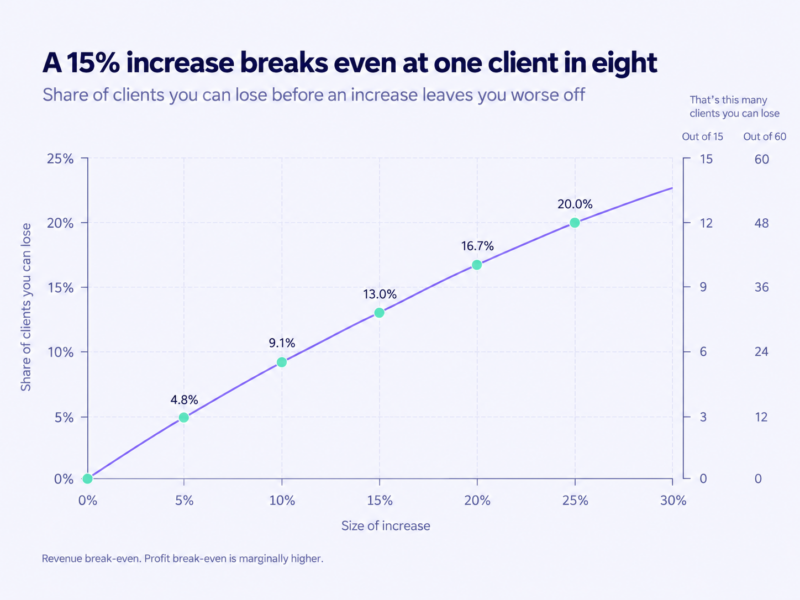
These are revenue break-even, and they’re a floor rather than a target — lose exactly this many and you’re precisely where you started, having done all the work. Round the fractions down: at fifteen clients a single departure is already 6.7% of your revenue, so the small-book rows move in whole clients and you should read them conservatively.
What the table is really for is the sentence you say to yourself before you send anything: I am prepared to lose two of these people. Decide that number in advance and the replies, whatever they are, arrive at a decision that’s already been made.
For what the increase does across a whole operation rather than per client, how much you can actually make reselling web hosting runs the full model.
Why the real number is slightly higher than the table says
Two adjustments, both honest, and neither as large as you’d hope.
A departing client takes their cash cost with them — their share of your reseller plan, any add-on you were buying for them. So the profit break-even sits a little above the revenue one. Only a little: at a 15% increase on a $35 client, revenue break-even is 13.0% and profit break-even is 13.3%. A third of a percentage point. That’s what a 77¢ input does to the arithmetic, and it’s a better argument for the cost-floor point above than it is for raising prices.
The client who leaves also stops consuming hours, and that one doesn’t show up as a cost at all — it shows up as a better effective hourly rate on the clients who stay. The version worth holding onto: the client who leaves over a 10% increase was usually costing you more per hour of attention than the ones who didn’t.
Which clients actually leave
Test this against your own ledger rather than taking it from me, because it takes ten minutes and it’s your ledger that matters.
The clients most likely to leave over a small increase are usually the oldest-priced, the most price-sensitive and the most support-heavy — frequently the same three people. Which means the departures tend to improve the average rather than damage it.
Sometimes you lose a good one. There’s no technique that prevents that, and the only defence is that you decided the number in advance and it was the right number.
How much, and how often
The size of the increase
Ranges, with the reasoning, because a single number would be wrong for most of you:
- 3–8% as the annual habit. Small enough that nobody re-evaluates their supplier over it.
- 10–20% as a one-off correction where the price is demonstrably behind.
- Above 25%, only where the service itself has materially changed — and then present it as a new arrangement rather than an increase, because that’s what it is.
Then round. Move to a clean number the client can hold in their head, and never publish a price ending in an odd cent because your billing system produced it that way. A price ending in .00 reads as a decision. One ending in .37 reads as an accident, and accidents invite questions.
Uniform uplift, or convergence to your list price
| Approach | How it works | Suits | What breaks it |
|---|---|---|---|
| Uniform uplift | Everyone goes up the same percentage | Small books, prices already roughly consistent | Preserves every existing inconsistency, including the ones you regret |
| Convergence to list | Legacy prices move toward your current published price, in one or two steps | Mixed legacy pricing | Some clients face a much larger jump than others, which needs staging |
| Cohort at renewal | Each client moves at their own renewal date, to the then-current price | Anyone billing on mixed dates | Takes twelve months to complete, and two clients can compare invoices in the meantime |
The default for a mixed book is convergence to list; for a consistent one, a uniform uplift. Either way, cohort-at-renewal is the delivery mechanism — it’s the only sequence that doesn’t require you to break your own terms.
Catching up after years of not raising anything
If your oldest client is on a price you’re embarrassed by, don’t try to recover four years in one step. Two increases, six or twelve months apart, the first one larger, both announced with the review cadence stated so the second isn’t a shock.
You’re allowed to do it in stages. “In stages” has to mean two dated steps, though, not an indefinite intention — an intention is how you end up here again in 2029.
One thing worth saying plainly, because it’s the real blocker for a lot of people: your cheapest client is usually your first client, which tangles the price up with loyalty. The discount was a decision you made once, when you had no idea what support would cost you. It’s been compounding quietly ever since. Ending it isn’t a betrayal. It is, however, a conversation to have on the phone rather than by email.
What your terms need to say
Five things, and this is a list of topics rather than a contract:
- A price-review clause — that prices may change, how much notice you give, and when reviews happen.
- The notice period, in days, as a number.
- That the new price takes effect at the next renewal, not mid-term.
- The client’s right to cancel before the new price applies, and what happens to their site if they do — hosting inside a retainer or billed separately sets out the three endings, and one of them should be named in your terms already.
- Whether add-ons and pass-throughs — domains, premium plugins, licences — can move separately.
Something close to this is the shape of the clause: “We review our prices annually. If a price changes, we’ll tell you at least 30 days before it takes effect, and the new price applies from your next renewal date. You can cancel before then under the terms below.”
Have your own terms checked by someone qualified — notice requirements vary and consumer clients are often treated differently from business ones, which makes this one of the few places worth ten minutes of a lawyer’s time. Terms of service and AUP for a small host covers everything else those terms should contain.
If your terms say nothing about price at all, you can still raise it. You just have to give more notice and a clearer reason — and add the clause in the same pass, so the next one is routine.
The mechanics: changing a price your billing system already knows
Every template post on this subject assumes that announcing the increase is the increase. It isn’t. This is the part that actually fails.
Existing services don’t reprice themselves
Editing the price on a product in your billing system changes what new clients pay. Existing services keep the price they were sold at, because the price lives on the service, not on the product.
In WHMCS this is explicit enough that a bulk pricing tool ships with the product for exactly this reason; individual services can also be updated one at a time, with a recalculation on save. Blesta handles it differently, through per-service changes rather than a single sweep. Find out how your platform does it before you announce anything, because the announcement commits you to a date you then have to hit across every service — and WHMCS versus Blesta is worth reading if you’re still choosing.
Two warnings that are worth their own sentences. A bulk update generally isn’t reversible, so run it against a small group first and check the result. And filter by status, or you’ll sweep up cancelled and expired services and generate invoices for people who left.
Payment mandates that can’t be edited
This is the trap, and it’s the reason to read this section before you pick a date.
Payment methods fall into two kinds.
Stored mandates — a card on file, a direct-debit style agreement, a billing agreement — let you charge whatever the invoice says. The increase needs nothing from the client.
Fixed-amount subscriptions have the amount baked in at creation. Changing the price means cancelling the subscription and the client setting up a new one. Which means the increase now requires an action from every client on that payment method, plus a follow-up for everyone who doesn’t get round to it.
Before you announce, count how many clients are on the second kind. That number is your real workload, and it’s the one that turns a clean increase into six weeks of chasing. Gateway behaviour changes, so check what yours does now rather than what it did in 2022 — and what happens when those payments fail is non-payment, suspensions and getting paid.
Sequencing: notice has to beat the invoice
Billing systems generate renewal invoices in advance. WHMCS defaults to 14 days and lets you set it per billing cycle; whatever yours is set to, it is the real deadline. If your notice period is shorter than your invoice lead time, the client receives an invoice at the new price before they receive the email explaining it, and you’ve turned a routine change into a billing error they discovered first.
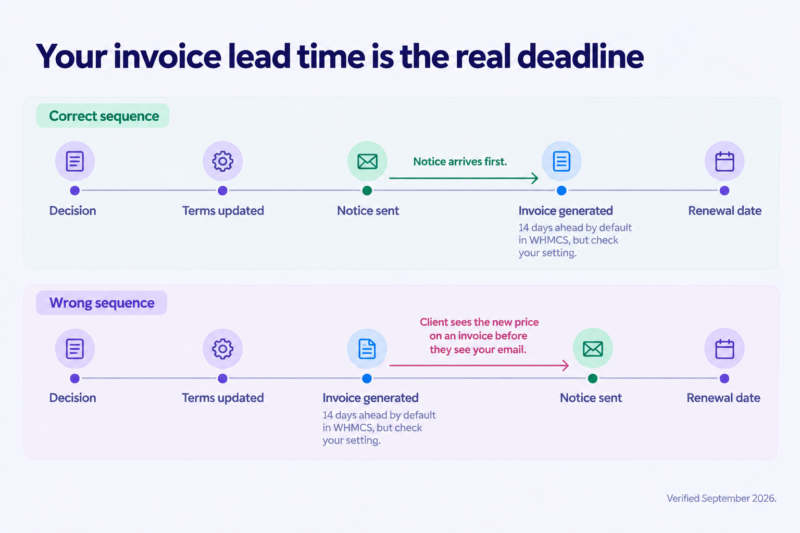
The order, and it’s worth following it literally:
- Check your invoice lead time.
- Decide the effective date.
- Update your terms.
- Send the notices.
- Update the services, individually or in bulk.
- Verify the first few invoices by hand.
- Chase the mandate re-authorisations.
Grandfathering: a decision with an end date
Holding a legacy price is a legitimate tool and a terrible default.
It’s legitimate when you name the end date at the moment you grant it: your current price holds through 2027. It becomes a liability when it’s silent, because a silent grandfathered price becomes a permanent one — and the client never knows they’re on it, which means you’re not even getting goodwill for the money.
A discount nobody knows they have is pure cost.
Three rules. Grant it once, in writing, with a date. Never grant it in the same message that announces the increase — that reads as an opening offer. And keep a list, because the thing that makes a legacy price permanent is forgetting it exists. Closing an old plan to new signups and letting it age out is a related but different move, covered in how many hosting plans you should offer.
The announcement
Timing, channel and who gets a phone call
Notice needs to be long enough to beat the invoice and let them plan, short enough that they don’t spend two months thinking about it. Thirty to sixty days is the practical band.
Email for everyone, because it’s the record. But a phone call or a real conversation first for the small number where the increase is large, the relationship is old, or the client is a meaningful share of your revenue. You know which ones those are.
Never announce to a group in a way that lets two clients compare terms.
The four things the message has to contain
- The new price, in numbers, and the old one.
- The date it takes effect — a specific date, not “your next renewal” unless you also state that date.
- A reason, in one sentence. One.
- What they should do (usually nothing) and what happens if they want to talk.
Example wording
A shape, not a template. Six lines is plenty:
Hi [name],
A quick note about your hosting. From 1 November, your monthly plan goes from $30 to $35. Your renewal on 14 November will be the first invoice at the new rate.
I review pricing once a year, in October. This is the first change since you joined in 2022, and it brings you onto the same rate as everyone else on the same plan.
Nothing to do at your end — your payment method covers it. If you’d like to talk it through, call me any time this week.
Two variations you’ll need. The bundled-retainer version raises one number and doesn’t break out the hosting line, for reasons below. The large-correction version pairs the increase with something genuinely added, and says what it is in the same sentence as the number.
What not to say
- Don’t blame your provider by name.
- Don’t say “we’ve absorbed these costs for years” — it tells them you were mispriced and invites them to ask why that’s their problem.
- Don’t offer a discount in the same message.
- Don’t send it from a no-reply address.
- Don’t bury it in a newsletter.
Handling the replies
Decide your fallback before you send. That’s the whole section. If you haven’t decided what you’ll say to the first person who pushes back, the increase is a negotiation that opens on receipt.
The negotiation ask
The answer that works is a trade, not a discount. The old price is available with a smaller scope. Or the new price can start one cycle later. Or an annual prepayment gets a stated reduction.
Never simply cave to the first person who asks, because the terms you give them are the terms you’ve given everyone who eventually finds out.
The client who says no
Some will. The posture is calm and pre-decided: the new price is the price, here’s the cancellation path, here’s what happens to your site.
Before you accept the cancellation, offer the downgrade. A client refusing a maintenance price will often stay happily as hosting-only — which turns a cancellation into a smaller invoice, and is the third of the three endings rather than the first.
The client you should let go
A small number of clients cost more in attention than they contribute. A price increase is also a filter, and losing them at a price increase is the cheapest exit either of you will ever get.
Handle the departure properly — export window, domain, timeline, all of it — because a bad ending outlives the revenue. The transfer-out policy is the checklist, and migrating client sites without downtime is the mechanics.
Raising the price on a bundled retainer
Four differences, and they mostly make it easier rather than harder.
You raise one number, and you do not itemise the hosting component to justify it. Itemising recreates exactly the comparable price the bundle exists to avoid — the argument is worked through in full in hosting inside a retainer and it’s the single most common own goal here.
Your reason sentence can point at the whole service rather than at a cost line, which is a better sentence anyway. The annual review clause is the thing you’re now cashing in; if it isn’t in the retainer, add it in the same message. And if the increase is large, pair it with one addition that costs you little and is visible monthly.
Repricing a whole book: 50 accounts and up
If you’re running 50 to 300 accounts across several legacy prices, the work is different in kind, not just in volume. Repricing a book is a project with a plan, not an afternoon.
Segment before you decide anything. Group by current price, plan, payment method and renewal month. You make decisions about segments, not about clients.
Stage by renewal month, so the replies and the mandate re-authorisations arrive in twelve manageable batches rather than one week of chaos.
Do the largest jumps first, while you still have the attention to handle them properly, and keep each batch small enough that you could phone everyone in it.
Plan for the support spike. Questions cluster in the days after each batch. Don’t schedule anything else that week.
Verify the first invoices of every batch by hand. One wrong recurring amount replicated across sixty services is a considerably worse problem than the one you set out to fix.
Reprice before you migrate, or well after. Doing both in the same month means every service complaint becomes a price complaint, and you won’t be able to tell which is which. If a provider move is on the table, reseller vs shared vs VPS vs dedicated covers the decision, and outgrowing reseller hosting covers the version where you’ve hit a ceiling rather than a price problem.
One more reason to do this properly: a cleanly repriced, consistently documented book is worth more than a tangled one if you ever sell it.
Price-increase mistakes worth avoiding
- Announcing before you know how your billing system applies the change
- Notice shorter than your invoice lead time
- Raising the price on a service you’re currently failing to deliver
- A reason paragraph where a reason sentence would do
- Grandfathering without an end date
- Discounting for the first client who pushes back
- Itemising hosting inside a bundled retainer to justify the increase
- Waiting four years and then trying to recover it in one step
- Doing it to 180 clients in one afternoon
- Letting the increase pass without adding the review clause that makes the next one routine
Frequently asked questions
How much notice should you give before raising hosting prices? Longer than your billing system’s invoice lead time, which is the constraint most people miss — 30 to 60 days is the practical band. If your terms already state a notice period, that’s your floor, not your target.
How much should you raise hosting prices by? 3–8% as an annual habit. A larger one-off correction of 10–20% if you’re visibly behind, and above 25% only when the service itself has changed enough that you’re presenting a new arrangement rather than an increase.
Can you raise the price if your contract doesn’t mention it? Yes, with more notice and a clearer reason — and add the price-review clause at the same time, so the next increase is routine rather than a repeat of this one.
Should you raise prices for all clients or only the underpriced ones? Both approaches are defensible. Converge legacy prices toward your current one rather than applying a flat percentage that preserves every inconsistency, and assume that two clients will eventually compare invoices, because they will.
If the new price is still guesswork, build it from your actual costs rather than from a percentage. How to price reseller hosting plans constructs the unit cost from your plan and shows what margin each client actually leaves you.
One thing worth checking before you set a number you intend to hold for a year: every price you charge sits on top of what your own reseller plan costs at renewal, not at signup. It’s worth comparing reseller hosting plans on that basis, since that figure is the floor under everything above it.