Live Chat
 Help Center

A client’s annual renewal fails in October. Your billing system does exactly what it was told: a reminder, then three overdue notices, all sent to the address on the account, which belongs to an office manager who left in the spring. Fourteen days after the due date, on a Friday afternoon, the site is suspended. The owner finds out from a customer.
Everything that happens next — the phone call, your tone, whether the site is back in ten minutes or ten days — was settled months earlier by settings you chose, or didn’t.
This is the part of running a hosting business nobody enjoys, and it is mostly admin. A ladder of dated reminders, one human decision before anything is switched off, a backup taken first, and suspension used as a pause — never as deletion, and never as leverage. How to start a reseller hosting business is the whole picture; this is the chapter on getting paid.
If a client has just gone quiet on you, start with the four kinds of non-payer below and read through to the conversation — should web designers resell hosting to their clients is the wider version of the relationship question underneath it. If you’re setting up before your first late payment, start at getting paid before it’s a problem.
Table of Contents
- The short answer
- Four kinds of non-payer
- Getting paid before it’s a problem
- The non-payment ladder
- What suspension does to a client’s site
- The conversation
- The line you shouldn’t cross: hosting as leverage
- The other ladder: when your own payment fails
- Chargebacks and disputes
- When to stop chasing
- Mistakes worth avoiding
- Frequently asked questions
The short answer
- Most late payments are mistakes. Treat the first one as a card problem until it turns out to be something else.
- Decide the dates in advance — reminder, final notice, suspension, deletion — and put them in your terms of service before you need them.
- Let the billing system send the reminders. If you know the client, keep a person in front of the suspension.
- Back up before you suspend. Suspended accounts often stop being backed up.
- Suspend, don’t delete, and only for the hosting debt. Suspension is reversible and proportionate. Deletion and leverage are neither.
- Check your own payment method first. Every client you host depends on it.
If you have a handful of clients who all pay annually from a card on file, this is a small problem: set the ladder up once and leave it. Two things nobody can skip at any size — a working payment method on your own account, and a backup habit.
Four kinds of non-payer
The same missed payment has four different causes, and they need different responses. The standard failure of an automated setup is treating all four as the last one.
| Kind | What’s actually happening | What usually fixes it | What makes it worse |
|---|---|---|---|
| Forgot | Expired card, changed bank, reminders landing in an inbox nobody reads | A reminder that reaches a person; a phone call | Suspending before anyone has actually spoken to them |
| Can’t pay | Cash trouble, a business having a bad quarter | Options: a short delay, a plan, a smaller plan, a clean exit | Silence on both sides, then a sudden takedown |
| Won’t pay | Unhappy with you, disputing something, or already leaving | Separating the complaint from the invoice; a clear date | Using the site to win the argument |
| Gone | Business closed, owner unreachable, site abandoned | Running the ladder to its end, with notice to every address you have | Deleting early, before the ladder has run |
The ladder is the same for all four. What changes is what you say, and whether you pause it.
The first kind is by far the most common, in hosting as in every business that bills on a subscription. The second tends to arrive in clusters rather than one at a time — a niche that has a bad year has it all at once, which why niche hosting beats generic hosting covers from the other side. The fourth is disproportionately the stranger who signed up for something free, which is one reason finding your first hosting clients argues against open-ended free offers. Clients lost this way — to a failed payment rather than a decision to leave — are a kind of churn of their own, and why hosting clients leave puts them in context.
Getting paid before it’s a problem
Most of your non-payment risk is removed before an invoice is ever late, by three unglamorous choices.
Take payment before you provision
Hosting is billed in advance, and a new account is created after the first payment clears, not before. That single rule removes the worst version of the problem: someone who uses the hosting for a month and was never going to pay for it.
If you’re taking on clients you don’t know, run your billing system’s fraud checks at order and don’t create an account by hand for an order that failed them. If you’re moving existing clients across, the equivalent moment is the move itself — collect a payment method as part of taking over their hosting, not in a follow-up email three weeks later.
Payment methods that collect themselves, and the ones that don’t
Payment methods split into two kinds, and the split decides how much chasing you do.
A card or mandate stored with a payment gateway can be charged automatically on the due date and retried if it fails. Anything the client has to initiate — a bank transfer, a one-off payment link, a subscription created with a fixed amount — waits for them to act. The second kind is where most “forgot” cases come from, and moving a client from the second kind to the first is the most valuable billing chore you can do this month. Fixed-amount subscriptions have a particular failure mode when prices change, which raising hosting prices on existing clients covers.
Two settings to switch on while you’re there. Card retries, so a card that fails on the due date is tried again on a schedule; know what the schedule is, because it’s part of your ladder whether you think of it that way or not. And card-expiry warnings, because an expiring card is the most predictable non-payment there is.
Fewer invoices, fewer failures
Billing clients annually gives each one a single chance a year to fail instead of twelve. That’s the case for annual billing that has nothing to do with discounts.
Bundling hosting into a retainer also cuts the invoice count, but it couples the site to the whole relationship: when a bundled payment fails, the site is downstream of it. Hosting inside a retainer vs billed separately sets out when that trade is worth making.
Late fees are available in every billing system and they’re an option, not a recommendation. They have to be in your terms. Whether and how you can charge them depends on where you and your clients are, and on whether the client is a business or a consumer. And with a small book of clients you know personally, a late fee often costs more goodwill than it recovers.
The non-payment ladder
Your ladder has four rungs — reminder, final notice, suspension, deletion — and every rung has a date. The dates count from the invoice due date, they’re written in your terms, and they’re configured in your billing system so nobody has to remember them.
An example ladder, day by day
The day numbers below are an example to adapt, not a standard. What matters is the order, and one rule that isn’t optional: the deletion date comes before the account’s last provider backup ages out. At many providers, suspended accounts aren’t backed up at all, and after a few weeks no restore point remains — check yours, and set the deletion date inside that window.
| Day | What happens | Who does it | What the client sees |
|---|---|---|---|
| −14 | Invoice issued | Billing system | Invoice email |
| −7 | Reminder; stored card charged if you charge early | Billing system | A reminder, or a receipt |
| 0 | Due date; charge attempted or retried | Billing system | A receipt, or a failure notice |
| +3 | First overdue notice | Billing system | A short, factual email |
| +7 | Second overdue notice — and a phone call | Billing system and you | A conversation with a person |
| +10 | Final notice, naming the suspension date | Billing system | A date they can act on |
| +14 | Full backup taken and downloaded, then account suspended | You decide; the billing system executes | A suspended page; email affected |
| +14 to +35 | Weekly contact; account restored automatically on payment | Billing system and you | Can pay and be back online in minutes |
| +35 | Deletion notice with an offer to export their data | You | A last chance to take everything |
| +42 | Account deleted | You | — |
The phone call is on the ladder. Put it in your calendar the same way the emails are in the billing system.
Setting it up in your billing system
WHMCS and Blesta both have the settings a ladder needs; in WHMCS they sit together under Automation Settings. The ones that matter, and what to do with each:
- When invoices are generated before the due date. This is your real deadline for everything upstream of it.
- A reminder before the due date, and up to three overdue notices after it. Use all three.
- Automatic suspension, and after how many days. See the next section on whether to switch it on.
- Automatic unsuspension on payment. Switch it on. It’s the setting that turns suspension from a punishment into a pause: a client who pays at midnight is back online at midnight, not when you wake up.
- Automatic termination, and after how many days. The setting to be most careful with. Either set it long — after the backup and the deletion notice — or leave it off and delete by hand on the ladder’s date.
- Late fee, if you use one.
- Per-client overrides. When you agree an extension with a client, WHMCS lets you override auto-suspension on that one service until a date you set, so the ladder pauses deliberately instead of drifting.
Which platform to run in the first place is a separate decision, covered in WHMCS vs Blesta. This section is only about what the numbers should be.
Automate the reminders, decide the suspension
For a small book of clients you know, automatic reminders are right and automatic suspension usually isn’t. You should see a suspension coming, make the call, and then either let it happen or pause it on purpose. If you run a larger book of clients you’ve never met, full automation is reasonable.
Either way, suspend through the billing system, not by hand in WHM. A suspension the billing system doesn’t know about won’t lift automatically when the client pays, and you’ll have two records that disagree. The WHM tool is there for the exceptions — cPanel & WHM for resellers covers where it is — but it shouldn’t be how the ladder runs.
What suspension does to a client’s site
Suspension is a bigger event for the client than most resellers intend, because it switches off more than the website. In the order they’ll notice:
- The website is replaced by a suspension page. By default it’s a plain server page. You can replace it with your own in WHM’s Web Template Editor, and it’s worth doing before you ever need it: a bare “account suspended” page, seen by your client’s customers, is the most visible seam in a white-label setup. White-label hosting covers the others.
- Email is the part clients care about most and understand least. Mailbox access and sending stop. What happens to incoming mail depends on how your provider’s mail server is configured — it may be held, delivered or refused. Find out before you suspend anyone, and say which in the final notice.
- Logins, FTP, databases and scheduled tasks stop. Nothing is deleted.
- Backups may stop. See below.
Suspension for non-payment is also a different process from suspension for abuse, which runs on your provider’s clock rather than yours and can happen without notice — when a client site gets compromised covers that one.
None of that is a reason to avoid suspending. It’s a reason to do it on a date the client was told about three times, with the email consequences spelled out.
Take a backup before you suspend
At many providers, suspended accounts are excluded from scheduled backups, so every day an account stays suspended, its most recent restore point gets older — and eventually disappears. Generate a full account backup immediately before you suspend, download it, keep it somewhere other than the hosting account, and hold it until the account is either restored or deleted after notice. Backups, and who’s responsible when a client deletes their site covers what a backup should contain and how restores work.
The conversation
Most of this never becomes a confrontation. It becomes one when it’s improvised — a sudden takedown, an early deletion, an argument conducted by invoice. Take those off the table and what’s left is a phone call.
Call before you suspend
At the second overdue notice, call. It resolves most “forgot” cases in a minute and brings the other three kinds to the surface early, while there’s still time to do something about them.
Three rules. Call about the invoice, not the relationship. Say the date. Ask what would help. If it turns out to be a card problem, stay on the line while they fix it.
When they can’t pay
The options, roughly in order of what they cost you:
- A short delay, with a new date, in writing. Pause the ladder deliberately — this is what the per-client override is for — rather than letting it drift.
- A payment plan for what’s owed: small, dated, and conditional on the current period being paid on time.
- A smaller plan, if you offer one, which is one of the quieter reasons how many hosting tiers you should offer matters.
- A clean exit. They settle what they can, receive their backup, and move. Sometimes the best outcome available is a former client who speaks well of you.
None of these is charity. Each is cheaper than the dispute that follows a takedown the client didn’t see coming.
What to say at each stage
Three messages do most of the work. The structure matters more than the wording.
The first overdue notice assumes a mistake. What’s owed, how to pay, and nothing else. “Your hosting renewal didn’t go through — usually an expired card. You can update it here.”
The final notice gives a date and explains it. What happens on that date — the site and the email — what doesn’t happen, and how to stop it. “If it’s still unpaid on the 14th, the site and mailboxes will be paused. Nothing will be deleted, and paying brings everything back straight away.”
The suspension notice is calm and specific. That it happened, that everything is preserved, how to restore it in minutes, and the date after which data will be deleted.
All three only work if they reach someone. Your hosting terms of service should make keeping a working contact address the client’s job; before the final notice, check that the address on file is still read by a person, and use every other channel you have.
The line you shouldn’t cross: hosting as leverage
Look for advice on this and you’ll find forum threads telling you to take the site down, change the password and keep the domain. It feels decisive. It is also the version of events in which you end up spending more time, money or reputation than the invoice was worth. Three lines not to cross.
Don’t suspend hosting over a debt that isn’t for hosting. An unpaid redesign invoice and a paid-up hosting account are two separate matters. Switching off a site the client has paid to host, in order to collect for something else, turns a dispute about a debt into a dispute about who took a business offline — and you’re the one who did. Whether your agreements would allow it at all depends on what they say and where you are, which is a question for someone qualified locally, not for a forum thread.
Don’t hold the domain. If you control the client’s domain, letting it lapse or refusing to release it to force payment is the fastest route to the ugliest ending in this business. The client should own their own domain registration; if they don’t yet, fixing that is worth more than any leverage it gives you.
Don’t delete in anger, or early. Deletion is irreversible, and it destroys the one thing a client who pays next week will need. Run the ladder to its date, with notice and an offer to export.
The forum threads’ favourite argument — who actually owns the site’s code, design and content — is a contract question, and the answer changes from one agreement and one country to the next. This article doesn’t settle it, and neither will a stranger with strong opinions.
The other ladder: when your own payment fails
Every client you host sits behind one invoice: yours, to your provider. Your provider has a ladder too, and it’s shorter than the one you give your clients — measured in days, not weeks — because their customer is you, not your clients. When a reseller plan is suspended for non-payment, every client account under it is suspended with it. If your billing system is installed on the same account, your billing portal goes down too, at the moment you’d most want it.
At ChemiCloud, for example, as of September 2026: renewals are charged to a stored card a week before the due date, on the due date, and three days after; only stored cards are collected automatically; an unpaid plan has a one-day grace period after the due date before it can be suspended, and can be terminated fourteen days after the due date. That’s all in the terms of service, and worth ten minutes whoever your provider is. If you can see a problem coming, talk to billing before the due date — extensions are considered case by case, not promised.
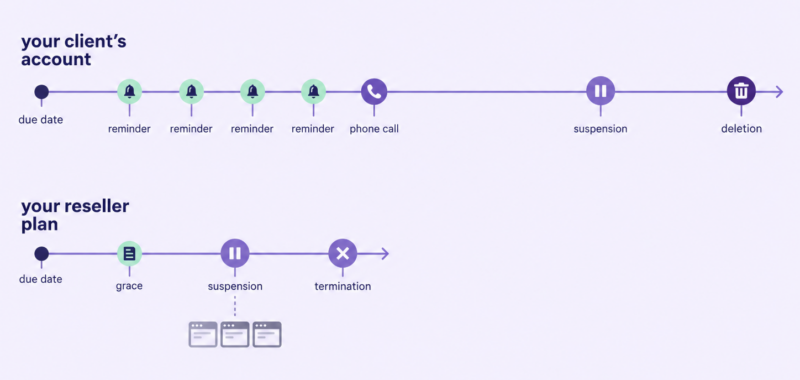
Your clients get weeks. You get about a day. Three things follow.
Your clients’ non-payment doesn’t touch your account — your cash flow might. If your renewal is funded by clients’ payments arriving first, one bad month puts you into your provider’s ladder. Keep enough margin that it never depends on who paid you this week.
Your card is a single point of failure for your whole book. Use a card with headroom, keep a second payment method on file, and put your own renewal date in your own calendar, not only in your provider’s reminder emails.
Pay early, and consider a buffer. Don’t pay on the retry schedule. Many providers let you hold account credit that’s applied to the next invoice automatically; a small balance there is the cheapest insurance on this page.
This is the ladder your own should always finish inside — and the simplest way to make sure it does is never to enter it.
Chargebacks and disputes
A chargeback reverses a payment you thought was settled. Most billing systems can treat a reversal as unpaid, which puts the service back on the ladder automatically; check that yours is set to do that.
Respond through the payment provider’s dispute process, with the invoice and the version of your terms the client accepted — which is one of the practical reasons to be able to show which version they agreed to, and when. Don’t escalate outside that process. And treat a chargeback from a client with no complaint on file as the “won’t pay” kind, not the “forgot” kind.
When to stop chasing
Most small hosting debts aren’t worth formal collection. Two or three months of hosting is usually less than the time it takes to pursue. The best outcome is often an export, a deletion date and a closed file.
Formal routes exist, and they’re local. Formal demand letters, small-claims processes and collection agencies exist in most places and work differently everywhere. If the amount justifies it, that’s the point to ask someone who knows how it works where you are.
Close cleanly. A deletion notice with an export offer and a date. Deletion on that date. A note on the client’s record. And if they come back, payment in advance.
This article describes common practice for small hosts; it isn’t legal advice, and anything involving recovering money through a formal process is worth checking with someone qualified locally.
Mistakes worth avoiding
- No dates decided in advance, so every late payment is a fresh decision.
- Reminders going to an address nobody reads.
- Automatic suspension for a client you’d rather have phoned.
- Suspending by hand in WHM, so the billing system can’t lift it on payment.
- Suspending without a backup, then leaving the account suspended for months.
- Deleting before the ladder’s end, or without offering an export.
- Switching off a site over a project invoice.
- Holding a client’s domain as leverage.
- Letting your own card expire.
- Never suspending anyone, so the clause in your terms stops meaning anything.
Frequently asked questions
Can I take down a client’s website if they don’t pay for hosting? For unpaid hosting, suspending the account on the dates your terms set out, after notice, is the normal remedy. Suspend rather than delete, restore it as soon as they pay, and don’t use it to collect debts that aren’t for hosting.
What happens to email when a hosting account is suspended? Mailbox access and sending stop. What happens to incoming mail depends on how your provider’s mail server is configured — it may be held, delivered or refused — so check before you suspend anyone, and tell the client in the final notice.
How long should I wait before suspending a hosting client? Long enough for at least two reminders and a phone call — day fourteen in the example ladder above — and short enough that you can still delete the account, if it comes to that, before its last backup ages out.
Should I charge a late fee for hosting? You can if your terms say so and it’s permitted where you and your clients are. With a small book of clients you know, a late fee often costs more goodwill than it recovers.
Your ladder only works if the client agreed to it. The dates above belong in your terms before the first invoice goes out, alongside what happens when a client leaves and what you’ll suspend without warning. Terms of service and AUP for a small host covers what the rest of that document should say.
And before you commit to a provider: the grace period and retry schedule above you are part of what you’re buying. Read the late-payment clause before you sign up for a reseller hosting plan, not after your card expires.