Live Chat
 Help Center

You’ve decided to resell hosting. Now three products want to become the system your business runs on — the thing that takes the order, creates the cPanel account, sends the invoice, chases the payment and eventually suspends the client who stops paying.
Most comparisons of these three start by assuming you’re buying one. This one starts a step earlier, because a meaningful number of people reading this don’t need a billing platform yet, and nobody ever tells them.
After that, the numbers. Billing software is the largest fixed monthly cost most small hosting operations carry, and the three platforms price it in three completely different ways. That difference matters far more than any feature grid, and it’s where we’ll spend most of our time.
If you haven’t worked through the wider decision yet, start with our guide to starting a reseller hosting business and come back.
Do you actually need a billing platform yet?
A billing platform replaces four manual jobs: raising invoices, creating hosting accounts, chasing late payments, and suspending or terminating accounts when people stop paying.
If you’re a designer with fourteen client sites on annual billing, already invoicing through Xero or FreeAgent, you are not obviously losing that trade. Creating a cPanel account by hand in WHM takes about two minutes and you do it four times a year. Fourteen renewal invoices a year is a calendar reminder, not an operational problem.
Four things flip the answer:
- You move to monthly billing. Chasing thirty small invoices a month by hand is a job. Chasing thirty a year isn’t.
- You want people to be able to buy without talking to you. That needs a cart, a payment page and automatic provisioning — the whole chain.
- You want hosting to be an asset rather than a habit. A hosting book with clean records, automated renewals and documented process is something you can hand over, delegate or sell. A folder of invoices and a WHM login is not. (See selling a hosting book of business).
- You start selling domains, SSL or licences alongside hosting. Renewal dates multiply, they fall on different days, and a missed domain renewal is a much worse phone call than a missed invoice.
None of that applies? Then the honest answer is that hosting billed quietly inside a retainer may never need any of this. That’s a legitimate way to run it, and we’ve written about the trade-offs in hosting inside a retainer vs billed separately.
There is now a fourth option, though, and it changes this calculation: one of the three platforms below is free at the scale most freelancers operate at. If the only thing stopping you was the cost of finding out, that reason is gone.
What a billing platform actually does — and what it doesn’t
All three do the same core set of things:
- An order form and cart that takes payment and then creates the cPanel account in your WHM automatically
- Recurring invoicing, with tax handling and multiple currencies
- Automated reminders, overdue handling, suspension and termination
- A client area under your own branding
- Support ticketing
- Domain registrar integration
What none of them do, and what people are consistently surprised by:
- They are not accounting software. They won’t file your VAT or replace your bookkeeper. You’ll still export to Xero or QuickBooks.
- They don’t monitor, back up or secure client sites. That’s your host’s job and yours.
- They don’t reduce support load — they route it. The tickets still arrive; they just arrive somewhere organised.
- They won’t fix an oversold reseller account. If your underlying platform is slow, better billing software makes the complaints easier to file, not fewer.
Provisioning is where the platform meets the control panel, so it helps to already understand what you actually do inside WHM before you configure any of this.
WHMCS vs Blesta vs Upmind: The three platforms at a glance
| WHMCS | Blesta | Upmind | |
|---|---|---|---|
| Where it runs | Your server | Your server | Their infrastructure (SaaS) |
| Priced by | Number of active clients | Flat — unlimited clients | Free tier, then usage tiers |
| Entry cost | $34.95/mo | $17.95/mo, or buy outright | Free |
| Free tier | No | 30-day trial | Yes, with limits |
| Source code access | No | Nearly all of it | No |
| Module ecosystem | Largest by far | Moderate to Growing | Growing |
| Known for | Being the default | Flat pricing, code access | Free start, modern interface |
One structural fact decides most of this before anyone looks at features: WHMCS charges you for having customers, Blesta charges the same whether you have five or five thousand, and Upmind charges nothing until you cross its limits. Everything below follows from that.
WHMCS: the default — and what the default now costs
WHMCS is what most hosting businesses run, including most of ours. It has been the industry standard for long enough that “billing software” and “WHMCS” are used interchangeably in hosting forums.
How WHMCS pricing works in 2026
It’s a monthly lease, priced by how many active clients you have. There is no perpetual licence any more.
| Licence | Active clients | Monthly |
|---|---|---|
| Plus | 250 | $34.95 |
| Professional | 500 | $54.95 |
| Business 1000 | 1,000 | $84.95 |
| Business 2500 | 2,500 | $179.95 |
| Business 5000 | 5,000 | $284.95 |
| Business 10000 | 10,000 | $399.95 |
Vendor list pricing, 10 September 2026.
Two things to understand about that table.
The trajectory. The entry tier was $18.95 a month in 2023, $24.95 in 2024, $29.95 in 2025 and $34.95 in 2026 — an increase in each of the last three Januaries, and 84% over three years. WHMCS is a WebPros product, the same group that owns cPanel, and anyone who has watched cPanel licence costs over the same period will recognise the pattern. That’s not an accusation; it’s a planning input. Budget for the next one.
Inactive clients still count. An active client is one with at least one active or suspended product, service, add-on or domain attached. A reseller with 260 client records — sixty of whom churned two years ago and were never cleaned out — is paying for the next tier up because of dead records. Housekeeping has a direct monthly value here.
Where WHMCS earns it
The ecosystem, and it isn’t close. Registrars, payment gateways, control panels and third-party developers build the WHMCS integration first and everything else later. If your plan depends on a specific niche integration — a regional payment method, an unusual registrar, a particular provisioning target — WHMCS is very likely the only one that already has it.
There’s a second, less obvious value: every forum answer, tutorial and freelance developer in the hosting world assumes WHMCS. When something breaks at eleven at night, that matters. When you need to hire someone for six hours of configuration work, it matters more.
Where it doesn’t
The pricing curve punishes exactly the growth you’re working toward. Every hundred clients you add is progress everywhere in your business except this line item, where it’s a step change waiting to happen. Priority support sits behind the Business tier, which is a long way up from where most resellers start.
And structurally: you’re renting the system your revenue runs through, from a market-dominant vendor that has raised the price annually. That’s a manageable risk, not a disqualifying one — but it should be a conscious choice rather than a default.
Blesta: flat pricing and source code you can read
Blesta has been around since 2007 and is developed by Phillips Data. Its entire commercial argument is one sentence: every licence includes unlimited clients and unlimited staff.
| Licence | Cost |
|---|---|
| Monthly, branded | $17.95/mo |
| Monthly, unbranded | $20.95/mo |
| Monthly, Flex (not IP-locked) | $23.95/mo |
| Owned, branded | $350 once |
| Owned, unbranded | $425 once |
| Owned Lifetime | $1,295 once |
Vendor list pricing, 10 September 2026. Monthly licences include support and updates. Owned licences include one year, then $62/year optional — the licence keeps working if you don’t renew.
At thirty clients Blesta costs about half what WHMCS does. At eight hundred it’s a fifth. The gap never stops widening, because one side scales and the other doesn’t.
The owned licence deserves a moment. Buy the branded version at $350 and you’ve spent less than three years of the monthly lease and roughly ten months of WHMCS Plus. After that you own it. In a market where every other tool has moved to rent, that’s unusual enough to be worth considering even if you’d otherwise prefer WHMCS.
On the “it looks dated” objection: Blesta 6.0 shipped in August 2026 with a completely rebuilt admin interface and an optional AI add-on for ticket handling. If you’ve seen a screenshot of Blesta from a review written in 2023, you have seen a different product. Look at the current one before you decide.
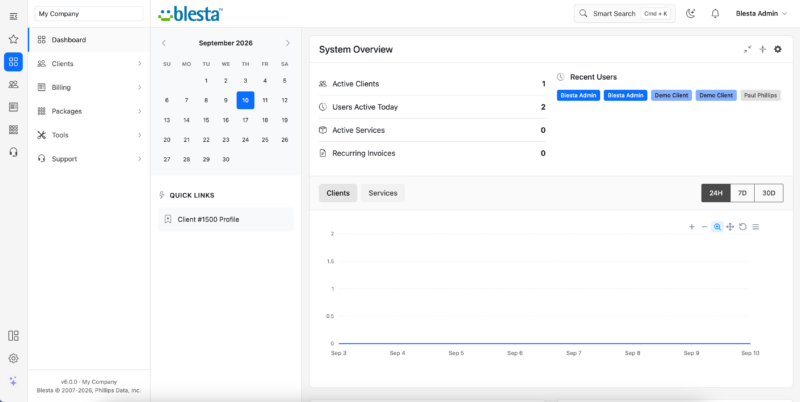
Where it’s genuinely weaker: the module library is smaller, so more integrations need building or paying for. The community is smaller, so there are fewer forum answers when you’re stuck. Fewer vendors ship a Blesta module on launch day.
One more data point on pricing behaviour: Blesta held its monthly price at $12.95 from 2013 until an increase that took effect in January 2026. Thirteen years. Set that against three consecutive January increases elsewhere and you have a reasonable basis for forecasting what each vendor will do next.
Upmind: free to start, hosted by someone else
Upmind is the structural outlier. It’s SaaS — you don’t install it, patch it, back it up or move it between servers. You also can’t self-host it, read its source or take the installation with you.
The free tier is not a trial. It covers:
- Up to 50 clients with active services
- Up to 50 paid invoices per month
- 2 payment methods
- 2 provisioning configurations (a WHM/cPanel connection and a domain registrar, for instance)
- 1 brand
- 1 staff user
For a freelancer with twenty-two client sites, that is the whole business, at no cost, indefinitely. For a two-person agency, the single staff user is the limit that bites first — and it’s the one nobody mentions in comparison posts.
Upmind takes no percentage of your transactions. You pay standard gateway fees to Stripe or PayPal and nothing to Upmind until you outgrow the free tier, at which point paid plans scale from there.
Is it a serious product? It runs billing for hosting.com, Velia.net and World Host Group, and the Enhance control panel uses its billing APIs. This is not a side project.
The trade-offs are real:
- Client-area customisation is more constrained than a self-hosted platform where you own the templates. If your whole pitch is design, look hard at this before committing — it’s a white-label seam, and we’ve written about where those seams show.
- Their outage is your outage. Your clients’ payment pages go down with their platform, and you have no server to log into.
- The exit is different. With Blesta or WHMCS you always hold the database. With SaaS you’re using an export tool you don’t control. Not a dealbreaker — but check the export before you have 200 clients, not after.
What each one costs over three years
This is the comparison nobody publishes, so here it is.
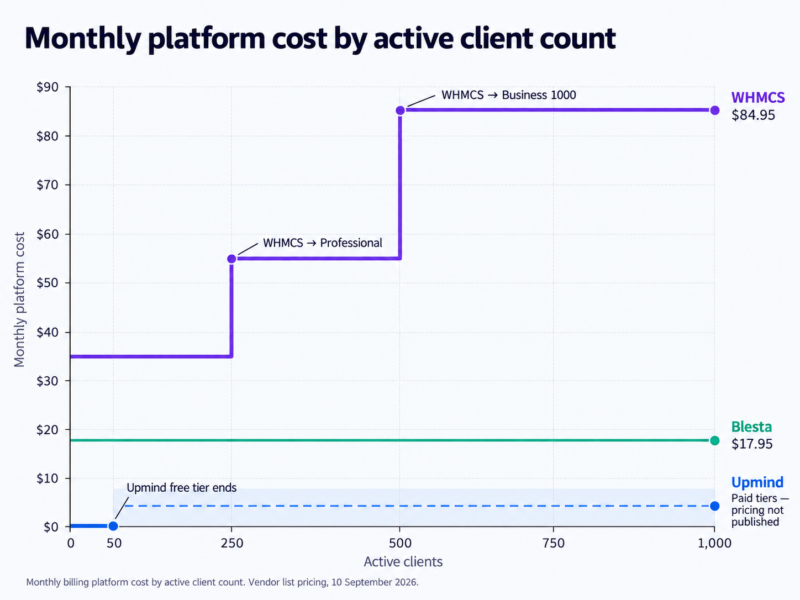
| At 25 clients | Monthly | 36 months |
|---|---|---|
| WHMCS Plus | $34.95 | $1,258 |
| Blesta, monthly branded | $17.95 | $646 |
| Blesta, owned branded | — | $474 (incl. 2 support renewals) |
| Upmind | $0 | $0 |
| At 250 clients | Monthly | 36 months |
|---|---|---|
| WHMCS Plus | $34.95 | $1,258 |
| Blesta, monthly branded | $17.95 | $646 |
| Blesta, owned branded | — | $474 |
| Upmind | Paid tier | Paid tier |
| At 500 clients | Monthly | 36 months |
|---|---|---|
| WHMCS Professional | $54.95 | $1,978 |
| Blesta, any licence | $17.95 | $646 |
| Blesta, owned branded | — | $474 |
| Upmind | Paid tier | Paid tier |
Based on list pricing at 10 September 2026, held flat. WHMCS has raised prices in each of the last three years, so the three-year figures for that column are almost certainly understated.
Three observations.
At twenty-five clients, the spread runs from nothing to about $35 a month. On a small book that is not a rounding error. A designer with 22 sites at $15 a month is grossing $330; WHMCS Plus is 10.6% of that before a single other cost. Blesta monthly is 5.4%. Upmind is nothing.
At five hundred clients the difference is roughly $1,300 over three years — real money, but by then it’s a small fraction of revenue and the ecosystem argument may well be worth more than the saving.
And the licence isn’t the whole cost. Add your time to install and configure, and the cost of moving if you choose wrong. Both are covered below.
To see how a fixed monthly cost like this interacts with your own client count and pricing, run the numbers in our reseller profit calculator — or read what resellers actually earn first.
The differences that actually decide it
Feature-parity tables are mostly theatre. Five things genuinely differ.
Provisioning: how well it talks to WHM
All three integrate natively with cPanel/WHM, Plesk and DirectAdmin. That’s table stakes. What varies is how cleanly your billing packages map to WHM packages, how loudly a failed provision announces itself, and whether suspension and termination genuinely happen without you. Get this wrong and you’ll discover it the first time someone pays and nothing appears.
Whichever you pick, set your packages up properly first — see creating hosting packages in WHM
What your clients see
The client area is the most visible part of your white-label setup, alongside your nameservers. Self-hosted platforms give you template-level control: you can rebuild the thing. Upmind gives you configuration-level control — colours, fonts, checkout flow, your own domain — which is enough for most and not enough for a design-led agency.
All three support a custom domain for the portal. All three offer branding removal, at different prices. If you’re building a properly invisible setup, pair this with private nameservers
The support desk question
All three bundle ticketing. The real question is whether you want hosting support living in the same system as your design-project conversations. Plenty of agencies already run a helpdesk they like and simply switch the bundled one off. That’s a valid configuration in all three — you don’t have to use everything you’re given.
Modules, extensions and the ecosystem gap
WHMCS wins on breadth, unambiguously. But breadth isn’t the test. The test is: write down the three integrations you actually need — your registrar, your payment gateway, your control panel — and confirm all three exist on each platform before you decide. Most people need four modules, not four hundred, and all three platforms cover the common ones.
Where your data lives, and how hard it is to leave
Self-hosted means your server, your database, your backups, your responsibility for patching. SaaS means their infrastructure, their uptime, their export tooling, and one fewer thing to maintain at 2am. Both are legitimate. Pick the one whose failure mode you’d rather own.
One asymmetry worth knowing: an owned Blesta licence keeps running if you stop paying. A lapsed monthly lease does not.
Which one fits your situation
| Your situation | Start with | Why |
|---|---|---|
| Under 15 sites, annual billing, invoicing you already like | Nothing yet | The setup costs more than it saves |
| Designer, 20–50 sites, wants automation without spend | Upmind free tier | Your whole business fits inside the free limits |
| Building a hosting brand, expect to pass 500 clients | Blesta | Flat pricing; the curve never catches you |
| You need one specific niche integration | WHMCS | Ecosystem breadth decides it on its own |
| You have a developer and want to customise deeply | Blesta | You can read and change the source |
| You never want to maintain a billing software | Upmind | Nothing to maintain |
| Your host bundles a licence at the tier you want | The bundled one | Free beats marginally better |
Worth saying plainly: on our own reseller platform, most people choose WHMCS. That runs against a fair amount of the arithmetic above, and it’s worth understanding why rather than dismissing it. Familiarity is worth money. So is the fact that every tutorial, every forum thread and every contractor assumes WHMCS. If you’re running the business alone, “the one everyone else uses” has genuine operational value that doesn’t show up in a pricing table.
And a second thing worth saying, given we sell hosting: at fewer than fifty clients, the free option is a real answer, not a consolation prize. If Upmind’s free tier covers you, use it and spend the difference on something that grows the business.
Try all three before you commit
The three platforms are wildly unequal in how easily you can evaluate them, and the ranking is the reverse of their market share.
| How you try it | Cost to look | |
|---|---|---|
| Blesta | Public live demo, plus a full 30-day free trial you install yourself — no account, no card | Free |
| Upmind | Sign up for the free tier and use it for real. Guided demos available by booking with their team | Free |
| WHMCS | No trial licence programme exists. Officially: buy it and use the 30-day money-back guarantee. Otherwise, a demo install run by someone else | Free via demo, or buy-then-refund |
We run a WHMCS demo install at whmcs-demo.com with both admin and client-side logins — credentials are on the login page. It exists because WHMCS doesn’t offer a trial and people reasonably want to see the thing before paying for it.
Disclosure: we sell WHMCS licences and we run that demo install. It’s also why this article shows you the arithmetic rather than just telling you what to buy.
Whichever you trial, do one thing: put one real client with one real invoice through it, end to end, before you decide. Almost every complaint people have three months after switching would have surfaced in that first hour.
What if your host includes a licence?
Plenty of reseller hosts bundle a billing licence with their plans. It’s worth understanding what you’re being given, because the answers vary a lot.
Ask four questions: which tier, branded or unbranded, does it survive if you leave, and does the bundle quietly make the platform decision for you? That last one catches people out — most hosts bundle exactly one platform, so accepting the freebie is choosing.
Worth knowing generally: these licences are normally only available alongside an active hosting account, so licence shopping isn’t really separable from choosing a host. You’re picking both at once whether you meant to or not.
Our own reseller plans from Grow upwards include a free licence for either WHMCS or Blesta — so reading this article and then acting on it either way is actually possible. The licence is the Starter tier for WHMCS, which covers 250 clients and carries a WHMCS linkback in your client area; unbranded starts at $23.95 a month through us. The bundled Blesta licence is branded too, though Blesta’s branding is a small footer link rather than a client-area mark — a lighter seam if that matters to you.
That’s the full picture, including the part that isn’t flattering. Given the licence is often the single biggest fixed monthly cost of a small hosting operation, it’s worth putting into your comparison properly rather than treating “free licence” as a tick.
Switching later: what it actually involves
Most people overweight this decision by an order of magnitude. At fifteen clients, switching platforms is an afternoon.
What usually transfers: clients, services, invoice history, credentials. What usually doesn’t: ticket history, custom fields and anything module-specific. Plan to keep the old system read-only for a few months rather than expecting a perfect copy.
If you’d rather not do it yourself, Blesta publishes fixed prices for migrating from WHMCS — $200 for a standard migration, $750 for large or complex data, as of September 2026. That’s the most concrete answer available to “how bad is this really,” and it’s less than a year of the licence difference.
The SaaS asymmetry applies here too: leaving a self-hosted platform means moving a database you already hold. Leaving SaaS means using the export tools provided. Check what those produce before you’re relying on them.
Before you migrate:
- Export and archive everything from the old system first, including tickets
- Reconcile client records — don’t carry dead accounts across
- Move billing before or after a renewal cycle, never during
- Test provisioning with one account before pointing real orders at it
- Keep both systems running in parallel for one full billing cycle
- Tell clients before the portal changes, not after — see telling clients about the change
This is billing-platform migration. Moving client sites is a different job entirely, covered in migrating client sites without downtime.
Common questions
Is Blesta a serious alternative or a budget option? Serious. It’s been developed continuously since 2007, version 6.0 shipped in August 2026 with a rebuilt interface, and it runs real hosting businesses. The lower price reflects a different pricing model, not a lesser product. Its genuine disadvantage is ecosystem size, not quality.
Can I run a real business on Upmind’s free plan? Yes, within the limits — 50 clients with active services, 50 paid invoices a month, one staff user. Plenty of freelance operations never exceed that. Check the staff-user limit against your plans for next year, not this one.
Do I need a billing platform at all? Not necessarily. Under roughly fifteen clients on annual billing, with an invoicing system you already use, manual works. Monthly billing, self-service signup or domain reselling change the answer.
What happens to my clients if I stop paying for my licence? With a monthly lease — WHMCS, or Blesta monthly — the software stops working, and your client area and payment pages go with it. With an owned Blesta licence it keeps running indefinitely. With Upmind you drop back to free-tier limits rather than losing access. This is a real difference and worth thinking about before a bad month, not during one.
Can I run the billing platform on the same reseller account I’m selling from? Technically yes, and many people do. It’s worth being aware that your billing system then depends on the same account it’s provisioning into — so a problem with that account takes out your ability to bill while you’re fixing it. Some resellers keep billing on a separate small hosting account for exactly this reason.
Once you’ve chosen a platform, the next question is what you’re running it on. ChemiCloud’s reseller hosting plans include a free WHMCS or Blesta licence from Grow upwards, so the choice you just made stays yours.