Live Chat
 Help Center

The phone goes at twenty past eight. A client says their website has disappeared, and they’re certain they didn’t touch anything.
Two thoughts arrive together. The host has backups. And, a second later, is this my fault? Both have more complicated answers than they should, and the worst time to work them out is while that client is still on the line.
The short version: your provider’s backups are a genuinely useful safety net, but they aren’t a promise you can pass on. Who’s responsible for a deleted site is decided by what you agreed before it was deleted. The job of putting it back lands on you almost every time. This page is about settling all three in advance — part of the operating side of how to start a reseller hosting business, and the part most people leave until the call comes.
If it’s happening right now, skip to the restore runbook. If you already run a hosting book and you’re weighing a move, the provider checklist is near the end.
Table of Contents
- The short answer
- Three layers of backup, and which one is yours
- What your provider’s “daily backups” actually cover
- Who’s responsible when…
- A backup setup you control
- The restore runbook: when a client says the site is gone
- Should clients be able to restore their own backups?
- Writing it down, and deciding what a restore costs
- Before you move: backup questions to ask a provider
- Mistakes worth avoiding
- Frequently asked questions
The short answer
- Your provider’s backups are theirs. Use them. Don’t promise them.
- Keep at least one copy of every client account that lives somewhere other than that account, and other than your provider.
- Retention is how far back you can reach. Match it to how long problems take to notice, not to how often backups run.
- Who caused it, who’s responsible, and who pays are three different questions. Answer the last two in writing before anything goes wrong.
- A backup you have never restored is a hope, not a backup. Test one.
Two readers can relax a little. If every client site is a brochure that rarely changes, you hold a copy away from your provider, and you’ve written down what a restore costs, you’re already ahead of most small hosts — the rest of this page is refinement. And if a client insists on handling their own backups, let them: write that down, and keep your own copy anyway, for your sake rather than theirs.
Three layers of backup, and which one is yours
Every hosted client site can be covered by up to three sets of copies. Most small hosts run only the first and describe it to clients as if it were the second.
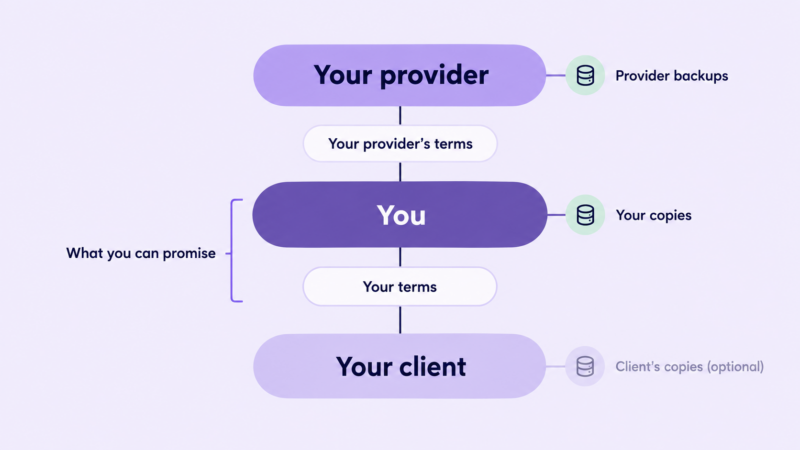
Your provider’s backups
Taken automatically, stored away from the server, and in a reseller setup usually restorable from WHM, from the client’s own cPanel, or by asking support. They exist first so your provider can recover its platform, which is why the terms around them are cautious.
The agreement that governs them is between your provider and you. Your client isn’t a party to it and, if you sell under your own brand, probably doesn’t know it exists — one of the places where white-label hosting shows its seams.
Your own copies
Taken on a schedule you set, stored somewhere you control and can reach even if your provider account is unavailable, and kept for as long as you decide. This is the only layer you can honestly make promises about, because it’s the only one you run.
The agreement that governs it is the one between you and your client — your terms of service.
Your client’s copies
Optional, and worth having when the client is technical or has their own reasons to keep an archive. Never a substitute for yours: a copy you have never seen is not one you can restore on their behalf.
What governs it is whatever you agreed. “The client is responsible for their own backups” is a perfectly legitimate position, provided it’s written down and the client has read it.
What your provider’s “daily backups” actually cover
The feature list says daily backups. The terms say what that commits your provider to. Read the second before you repeat the first to anyone.
Read the terms before the feature list
Provider backup terms tend to say the same few things: the backups exist for the provider’s administrative purposes, there’s no warranty they’ll be available or complete, and customers should keep their own copies. That isn’t evasion. It’s an accurate description of a system built to recover a server, which happens to be restorable one account at a time.
Our own is a fair example. On ChemiCloud’s reseller plans, every client cPanel account is backed up daily to off-site storage with 30 days of restore points, and you can restore a client account yourself or have our support team do it. Our terms still say those backups exist for our administrative purposes, aren’t guaranteed, and that customers should keep their own copies. That isn’t a contradiction. It’s the right way to read any provider’s backups, ours included: use them, and don’t promise them.
What’s usually left out
Every provider publishes, somewhere, a list of what its backups skip. Find yours. These are the gaps that catch people most often:
- Archive files, including backups other tools saved inside the account. Providers commonly exclude compressed archives and database dumps from their own backup runs. The consequence is easy to miss: a backup plugin that writes its archives into the client’s own account is neither off-site nor, on many platforms, backed up. It disappears with the account it was meant to protect.
- Cache, logs and temporary folders. Harmless omissions, but nobody should expect them back.
- Mail in Trash, Spam and Junk, and often Drafts. A client who deleted an email may not get it back even inside the retention window.
- Suspended accounts. Some providers stop backing up a suspended account altogether and don’t keep the restore points it already had. Leave a client suspended for a month and there may be nothing left to restore (more on that under non-payment, suspensions and getting paid).
- Deleted accounts. Backups of a terminated account are typically kept for a limited window set by the provider, then removed. Whether you can restore one yourself or only by ticket varies. ChemiCloud orphan-backup window and reseller restore path for terminated accounts.
- Very large or file-heavy accounts. Some providers back these up less often, or not in full. Ask.
Retention is a look-back limit, not a safety margin
Thirty restore points sounds like a comfortable cushion. What it actually means is that the oldest copy is about a month old, and anything that went wrong before then — and was noticed after — has nowhere to come back from.
Problems are noticed late more often than people expect. A page removed from a section nobody visits. A plugin that quietly damaged a database table weeks ago. A compromise that sat unnoticed before it did anything visible — the reason when a client site gets compromised spends time on finding a clean restore point. A client who hasn’t looked at their own site since spring.

So choose how far back your own copies reach by how long your clients take to notice things, not by how often your provider’s backups run. For most small hosts that means keeping a handful of older copies — monthly is the usual rhythm — well past the provider’s window. That’s where your own layer earns its keep: it reaches back to the problems the provider’s layer can’t.
Who’s responsible when…
When a site disappears, three questions get tangled together.
Who caused it? A matter of fact, and often unknowable in the first hour. Who’s responsible for putting it back? Whatever your agreement says. If it says nothing, your client will assume you are — and in practice, you will be. Who pays for the time? Whatever you decided in advance. If you decided nothing, you do.
One thing holds in every case below. Your provider’s obligations run to you, not to your client. From your client’s side of the invoice, you are the host, whoever pressed the button. Providers treat it the same way from the other direction: notices about a resold account go to the reseller, and so does the responsibility for sorting it out. That’s a description of how the relationship works, not a legal opinion — what your agreement says settles the argument, and what those words mean where you operate is a question for a lawyer. If this is the worry stopping you taking on client hosting at all, should web designers resell hosting to their clients weighs it against the rest.
| # | What happened | Usually caused by | Who does the fix | What the cost depends on | What saves you |
|---|---|---|---|---|---|
| 1 | Client deleted a page, file or post | Client | You, or the client if they can restore | Whether restores are included in your terms | A granular restore and a written restore policy |
| 2 | Client deleted or reinstalled the whole site | Client | You | Your terms, and how recent the last good copy is | Your own copy, and a tested restore |
| 3 | Client restored an old backup and lost newer data, including email | Client, using a self-service tool | You | Whether you allowed self-service restores | Restricting self-service restores, or explaining them |
| 4 | An update broke the site | You, under a maintenance plan, or the client | You | Who ran the update, and what your maintenance terms say | A copy taken before every update you run |
| 5 | You terminated the wrong account, or a cancelled client came back | You | You | Usually yours to absorb | A copy before any termination, and knowing your provider’s deleted-account window |
| 6 | Emails deleted, or lost from Trash or Spam | Client | You, where possible | Whether mail is part of your promise at all | Saying exactly what mail backups cover |
| 7 | Site compromised and files damaged | An attacker, often via something out of date | You | Your security and maintenance terms | A clean restore point from before the compromise |
| 8 | Account suspended for weeks, then the client paid | Non-payment | You | Your non-payment terms | A full copy taken before you suspend |
| 9 | Provider-side failure | Your provider | Your provider restores; you communicate | Your provider’s terms, and then yours | Your own copy, held somewhere else |
Row 9 is the only one where your provider does the heavy lifting, and it’s the rarest. Rows 1 to 8 are the ones that turn up in a small host’s week — a pattern that what hosting support load actually looks like covers from the ticket side.
When the client deleted it
Rows 1, 2, 3 and 6. The instinct is to point at the client, and the instinct is wrong — not because they didn’t do it, but because it doesn’t help. What helps is having written down, before it happened, that restores inside a stated window are included (or billed), and then following that without drama.
Row 3 deserves a sentence of its own. A full-account restore usually replaces everything in the account with the old copy, email included, unless the tool offers a merge option and someone chooses it. A client who “just went back to last Tuesday” has also deleted everything that arrived since last Tuesday. It’s the most avoidable loss on the list.
When you deleted it
Rows 4 and 5. These are yours to fix and usually yours to absorb, and the habits that prevent them cost minutes: a copy before every update you run, and a full copy before any termination, downgrade or migration. Know how long your provider keeps backups of a deleted account before you delete one — it’s the single fact that decides whether row 5 is an inconvenience or a disaster.
When something else did
Rows 7, 8 and 9. Each has its own process elsewhere, so this is only the backup angle. A compromise needs cleaning before anything is restored — when a client site gets compromised covers the order — and the only backup point here is that a restore point is useful only if it predates the problem. A suspension needs a copy taken before you press the button, because the provider’s backups may stop the moment you do. And a provider failure is your provider’s to recover — what you control is what you tell clients, which handling downtime: a communication plan sets out, and whether you hold a copy that lets you act instead of wait.
A backup setup you control
None of this needs a particular product. It needs four decisions.
What a backup has to contain
A full cPanel account backup: files, databases, email, DNS zone, cron jobs and account settings, in a format any cPanel host can restore. That’s the thing to keep, and it’s also the thing to hand a departing client.
A zip of the site folder is not a backup of the site. Neither is a database dump on its own. A WordPress-only plugin backup usually leaves out email and account settings — fine as an extra, not as the whole. And a full account backup covers the client who isn’t on WordPress at all, which is its quiet advantage over anything tied to one CMS.
Where it has to live
Not inside the account it protects. It may be skipped by your provider’s backups, it eats the client’s disk and file quotas, and it vanishes with the account. Many providers also clear out large local backup files on sight.
Not only with your provider, and not in a spare cPanel account on your own plan. That’s still your provider, and most hosting terms forbid using hosting space as backup storage anyway. If your provider account is ever suspended, compromised or unreachable, you need a copy you can get to without it.
Somewhere a compromised client account can’t reach. If the credentials that write the backup can also delete it, an attacker who gets in can take both.
The mechanics are ordinary. Provider backup tools generally let you download a full account backup on demand.
How often, and for how long
A starting point, not a standard. Adjust once you know your clients.
| Client site | Your own full copy | Keep | Also |
|---|---|---|---|
| Brochure site, rarely edited | Weekly | The last few weekly copies, plus monthly copies for several months | A copy before any change you make |
| Content site, edited most weeks | Daily or weekly | Recent daily copies, plus monthly copies for several months | A copy before updates |
| Store, booking or membership site | Daily, and the database more often if orders are frequent | Recent daily copies, plus monthly copies for several months | A copy before every update and before any restore |
The rule behind the table fits on one line: frequency follows how often the site changes; retention follows how long problems take to notice. The monthly copies kept for months are where your layer adds the most, because they reach past your provider’s window.
Test the restore, not the backup
Almost nobody does this, and on a reseller plan it costs very little. Keep one spare cPanel account slot as a restore test account. Once a quarter, take a real client’s backup, put it into that account — unpack the files, import the database — and check three things: the site loads on a temporary address, a login works, and the mail folders are in the archive.
Then delete the copy. Keep the test account off public DNS while it’s in use, and don’t leave client data sitting in it between tests; it’s a test bench, not storage.
It’s the only way to find out a backup is incomplete before a client does. The first test usually turns something up.
The restore runbook: when a client says the site is gone
- Don’t restore anything yet. A full restore replaces everything since the restore point. If the client has access to a restore tool, ask them not to touch it.
- Find out what’s missing, and when it last looked right. That answer picks the restore point.
- Find out what’s changed since then that must be kept. Orders, form entries, new posts, email. This decides whether you restore everything or only part.
- Choose the layer that has the right point. Your provider’s, if it’s inside the window. Yours, if it isn’t. Your client’s, if they have one.
- Restore the smallest thing that fixes it. A file, a folder, one database or one mailbox before a whole account.
- If you’re not sure which copy is right, try it in your test account first and compare.
- Before any full restore, take a copy of the broken state. It takes minutes, and it’s the only way back if the restore makes things worse.
- Tell the client what was restored, from when, and what was lost between that point and now. Specifically, in writing.
- Log it. Date, what happened, how old the restore point was, how long it took. That log becomes your evidence when you price restores, and your picture of where support time goes.
- Fix the cause. Who had admin access, which update ran, what permission allowed it. Then bill or don’t, as your terms say.
Most restores are routine once steps one to three are done. Steps one to three are where the extra damage happens.
Should clients be able to restore their own backups?
Providers often put a backup tool inside each client’s cPanel. Depending on how it’s set up, a client may be able to download a backup, restore individual files or databases, or restore the entire account. That’s a real decision, and it’s yours to make deliberately rather than inherit.
Leave it on. Fewer restore requests, and competent clients fix their own mistakes quickly. You accept row 3.
Restrict it. Allow downloads and granular restores, but not whole-account restores — where your provider’s setup lets you control that.
Turn it off. Handle every restore yourself. More requests, full control.
For most design and agency clients, restrict or off is the better default. The clients most likely to press a whole-account restore button are the ones least likely to know what it replaces. Whatever you choose, tell clients what they can do and what it does, and put it in your written promise. Feature access is set per package, and creating hosting packages in WHM covers where.
Writing it down, and deciding what a restore costs
A backup promise that exists only in your head is one your client will fill in for you, generously.
What to decide and write down
- Which layers exist. Yours, described precisely. Your provider’s, described without promising it. Your client’s, if they keep one.
- How often your copies run and how far back they reach. Never more than you control.
- What’s included. Site files, databases, email — and which mail folders — and DNS.
- What isn’t. Anything the client keeps elsewhere, mail in Trash and Spam, anything older than your retention.
- Who can restore. You only, or the client too, and what they can restore.
- How quickly you’ll restore, in business hours you can meet during a bad week.
- What a restore costs. Included up to a limit, or billed.
- What happens to backups during a suspension and after cancellation.
- What a departing client receives. A full account backup any cPanel host can restore. Hosting inside a retainer or billed separately sets out the three ways a hosting relationship can end, telling existing clients you’re taking over their hosting covers promising this at the start, and migrating client sites without downtime covers handing it over.
Where these decisions live in your paperwork is a job for your terms of service and AUP. The decisions themselves are the hard part, and they’re only yours to make.
What a restore costs
Three models work.
Included in hosting, up to a stated number of restores a year. Simple, and it makes backups a visible part of what the client is paying for.
Included in a maintenance retainer. The natural home for designers, since the same person who runs updates is the one most likely to need to roll one back.
Billed per restore. Clean, and fair only if the client knew the price beforehand.
Backups and restores are among the few hosting entitlements clients actually feel, which is why they’re one of the stronger differences between plans when you’re deciding how many hosting plans to offer. The figure itself belongs with the rest of your pricing in how to price reseller hosting plans. And your own backup storage is a real monthly cost: add it as a line when you run your numbers through the reseller profit calculator.
Before you move: backup questions to ask a provider
If you already run a hosting book, the time to find the gaps in a new provider’s backups is before the migration, not after. Ten questions, and any decent provider will answer them all:
- How often are client accounts backed up, and how many restore points are kept?
- Where are the backups stored — on the same server, or somewhere else?
- Can I restore a client account myself from WHM, or only by ticket? How quickly at three in the morning?
- Can I restore part of an account: one file, one database, one mailbox?
- What’s excluded — file types, mail folders, large or file-heavy accounts?
- Are suspended accounts backed up, and are their existing restore points kept?
- When I terminate an account, how long are its backups kept, and can I restore it myself?
- What can my clients see and do in the backup tool, and can I change that?
- Can I send copies to my own storage from inside the panel?
- What do the terms actually commit you to?
Questions 1 and 7 tell you how much you could lose (your recovery point). Questions 3 and 4 tell you how long getting it back takes (your recovery time). Whatever the answers, decide which gaps your own layer will cover before you move a single account, and keep your old provider’s archives until the new setup has passed a restore test.
Mistakes worth avoiding
- Promising your provider’s retention as if it were yours.
- Storing plugin backups inside the account they protect.
- Using a spare hosting account as your backup storage.
- Never having restored a single backup.
- Restoring a whole account to fix one page.
- Terminating an account without taking a copy first.
- Letting a suspension run past the backup window.
- Leaving whole-account self-restore switched on without telling clients what it does.
- Writing “we keep backups” and nothing else.
- Handing a departing client a zip of the theme folder.
- Assuming that who caused it settles who pays.
Frequently asked questions
Does reseller hosting include backups? Usually, at the provider level. Those backups are typically described as not guaranteed, and they aren’t something you can promise clients unless you also keep your own copies.
Is my hosting provider responsible for my clients’ backups? Your provider’s obligations run to you, not to your clients, and its terms usually disclaim any guarantee. Your clients’ arrangement is with you, so what you’ve promised them is what counts.
How far back can I restore a deleted site? As far as the oldest restore point in any layer you hold. Your provider’s window sets one limit; your own older copies can extend it. Anything older than all of them is gone.
What happens to backups when I delete a client’s cPanel account? They’re usually kept for a limited window set by your provider and then removed. Take a full copy before you terminate anything, and find out that window before you need it.
Should I charge clients for restoring a backup? Either answer is defensible: included up to a limit, part of a retainer, or billed per restore. What isn’t defensible is deciding after the request arrives.
You’ve decided what you’ll promise. The next job is putting it where clients will read it — terms of service and AUP for a small host covers the backup, suspension and exit sections, and why a promise you can’t fund is worse than none.
One thing to check whichever provider you use: the backup questions worth asking — how far back restores reach, who can run them, and what happens to backups of suspended and deleted accounts — matter more than the headline price. They’re worth answering before you choose a reseller hosting plan, not after your first restore.