Live Chat
 Help Center

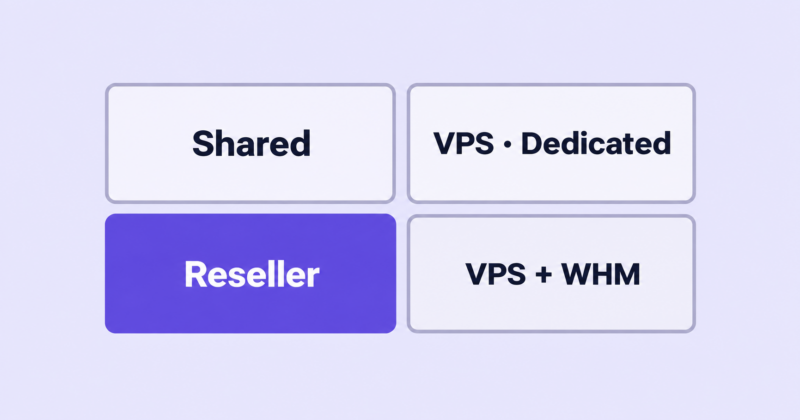
Buy a reseller hosting plan and you get handed two control panels, a set of nameservers, and very little explanation of which parts of the interface you’re allowed to touch.
The gap between “you get WHM” and knowing what WHM actually does for you is where most new resellers lose their first month. This guide covers the real division of labour: what you administer, what your clients see, and what stays locked behind root access that you will never have on a reseller plan. If you’re still deciding whether to resell at all, start with our guide to starting a reseller hosting business and come back here once you’re pricing plans.
The short version: a reseller account gives you genuine control over accounts, packages, DNS and branding, and no control at all over the server itself. Whether that’s a limitation or a feature depends entirely on what your clients need.
Table of Contents
- cPanel vs WHM: the difference that actually matters
- What you can do in a reseller WHM
- What you can’t do without root access
- The WHM screens you’ll actually use
- Packages vs Feature Lists
- Resource limits, and what “unlimited” really means
- Who pays for the cPanel licence?
- Automation: API access and billing integration
- Security and access hygiene
- Where the reseller model runs out
- Is cPanel the only option?
- Before you buy: questions to ask your host
- Your first week in WHM
- Frequently asked questions
- Next steps
cPanel vs WHM: the difference that actually matters
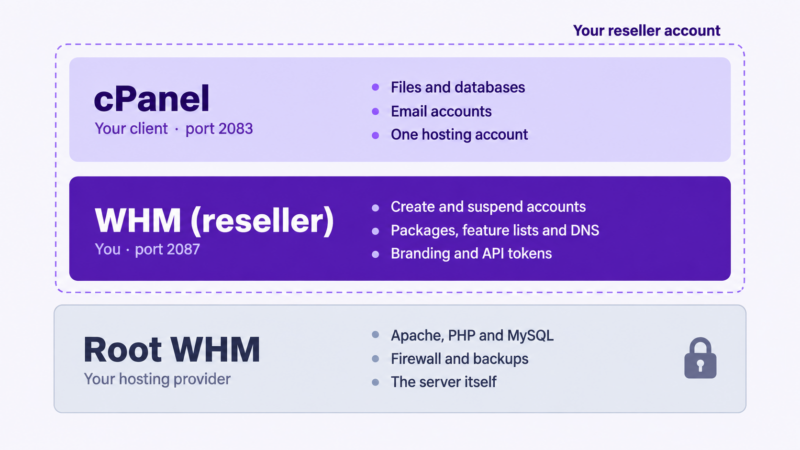
cPanel is the interface for a single hosting account. WHM is the interface for administering many hosting accounts. Your clients log into cPanel and see one website. You log into WHM and see all of them.
There are three layers, and knowing which one you occupy explains almost every “why can’t I do this?” moment.
cPanel: what your clients see
One cPanel account is one hosting account. Inside it, the account holder manages files, email addresses, databases, subdomains, SSL, cron jobs and backups for their own sites. They access it at yourdomain.com:2083 or through whatever branded URL you set up.
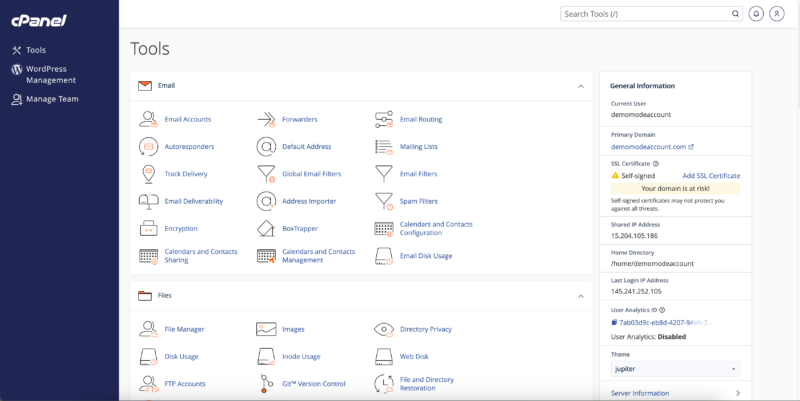
Clients never see WHM. As far as they’re concerned, cPanel is the hosting.
WHM: what you see
WHM (Web Host Manager) runs on port 2087. It’s where you create accounts, assign them to packages, suspend them for non-payment, reset passwords, edit DNS and pull sites in from other hosts.
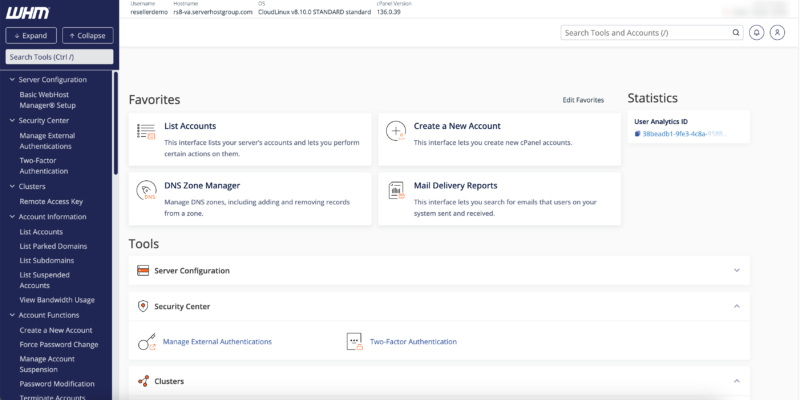
Here’s the part that catches people out: the WHM you get as a reseller is the same application the server administrator uses, with most of it removed. A root-level WHM exposes over 200 interfaces. A reseller WHM exposes roughly thirty. This is why generic WHM tutorials mislead so badly. You’ll follow along, hit a menu that isn’t in your sidebar, and assume you’ve broken something.
You haven’t. You just don’t have root.
Root: the layer above you
Root is the server administrator’s account, held by your hosting provider. Root configures Apache, compiles PHP, installs system packages, sets firewall rules, tunes MySQL and decides the backup policy.
You are a tenant with administrative rights over your own portion of the server. Your provider is the landlord. That relationship defines everything below.
What you can do in a reseller WHM
Your exact permissions depend on the ACLs (access control lists) your provider enables, and they vary between hosts. This is close to the standard set.
| Capability | What it covers |
|---|---|
| Create accounts | New cPanel accounts, assigned to a package, with their own domain and login |
| Modify accounts | Change domain, contact email, package, quotas, shell access |
| Suspend & unsuspend | Non-payment, abuse, or holding an account during a dispute |
| Terminate accounts | With or without keeping the DNS zone |
| Change passwords | Reset a client’s cPanel password without needing the old one |
| Log in as any account | Enter any client’s cPanel directly from WHM, no password required |
| Build packages | Define the resource allocations your plans sell |
| Build feature lists | Control which tools appear inside the client’s cPanel |
| Edit DNS zones | Add, edit, reset and delete zones for domains you host |
| Private nameservers | Register and use ns1.yourbrand.com and ns2.yourbrand.com instead of your host’s |
| Transfer accounts in (root) | Pull accounts from another cPanel server, or restore cpmove archives. |
| Create sub-resellers (root) | Grant a subset of your own permissions to another account. |
| Brand cPanel | Apply your logo, colours and support links to the client interface |
| Issue SSL | Run AutoSSL for your accounts, or install purchased certificates |
| View usage | Disk, bandwidth and account-level resource statistics |
That’s a real hosting business. You can provision a client in about ninety seconds, bill them, support them, and remove them, all without ever contacting your provider.
What you can’t do without root access
This is the section nobody selling reseller hosting writes, and it’s the one that determines whether the model fits your clients.
| Locked | What it means when a client asks |
|---|---|
| Installing system software | A client wants Redis, a custom daemon, or a package that isn’t in cPanel’s catalogue. You file a ticket and wait. |
| PHP extensions | If the extension wasn’t compiled into the available PHP builds, you can’t add it. Common with imagick, and with older or niche extensions. |
| EasyApache / PHP builds | You can usually switch a client between the PHP versions the server offers. You can’t add a version it doesn’t offer. |
| Apache or NGINX config | Server-wide directives, custom modules, and anything outside .htaccess are off limits. |
| MySQL tuning | Query cache, buffer sizes, max connections. If a client’s database is straining the server, your only tool is optimising their queries. |
| Firewall & ModSecurity | You can’t whitelist an IP, unblock a locked-out client, or disable a ModSecurity rule that’s breaking a plugin. Every one of these is a support ticket to your provider. |
| Server backups | You don’t set the schedule, the retention, or the restore policy. Depending on the host you may not be able to restore a full account yourself. |
| Dedicated IPs | Assigning one requires root. Your accounts share the server’s IP unless your plan includes otherwise. |
| Service restarts & reboots | Apache is hanging at 2am. You can see it. You cannot restart it. |
| Root SSH / terminal | No shell access at the server level, regardless of your own technical ability. |
| Resource limits | CPU and memory ceilings per account are set by the provider. You allocate disk and bandwidth; you don’t set the CPU cap. |
Read that list again as an operations problem rather than a feature comparison. Every locked item is a support request that leaves your hands. Your client asks you, you ask your provider, and your response time is now your provider’s response time plus your own.
That’s the single most important thing to understand before buying. You are not just renting server resources. You are inheriting your host’s support responsiveness as your own SLA, and passing it to clients who will never know your provider exists.
It’s also why provider choice matters more for resellers than for anyone else, and why support quality is worth more than a few pounds a month on the plan price.
The WHM screens you’ll actually use
WHM’s sidebar is intimidating on day one. In practice, running a reseller account is about ten screens.
Account Functions — Create a New Account, List Accounts, Modify an Account, Suspend/Unsuspend, Terminate, Change Password, Upgrade/Downgrade. This is where most of your time goes. List Accounts is the one you’ll live in: it shows every client, their package, disk usage and status, with a login-as button beside each.
Packages — Add, edit and delete the plans you sell. Covered below.
Feature Manager — Controls which icons appear in your clients’ cPanel.
DNS Functions — Edit DNS Zone, Add/Delete a DNS Zone, Park a Domain. You’ll use these when a client points a domain at you, needs an MX record for external email, or wants a subdomain on a different host.
Transfers (root) — Copy an Account From Another Server, and Restore a Full Backup. This is how client sites come in from wherever they were before. See migrating client sites without downtime for the process.
Resellers (root) — Only if your provider grants it. Creates sub-resellers with a subset of your permissions.
Account Information — Bandwidth usage, disk usage, and your own reseller limits. Check this before you sell a plan you can’t fulfil.
cPanel Branding / Customization — Logo, colours, help links. Limited, and the limits are real. See where white-label seams show.
Manage API Tokens — Under Development. Needed for billing automation.
Support / Contact Server Administrator — Your route to root. You will use this more than you expect.
Packages vs Feature Lists
These get conflated constantly, and the confusion produces plans that don’t work.
A package is a resource allocation. Disk quota, monthly bandwidth, how many addon domains, subdomains, email accounts, databases and FTP accounts the client gets, plus hourly email limits, shell access and which cPanel theme loads.
A feature list controls visibility. It decides which tools appear in the client’s cPanel: whether they see the Terminal icon, the Backup Wizard, the email filters, the cron jobs.
Every package points at one feature list. That’s the relationship. Packages control how much, feature lists control what.
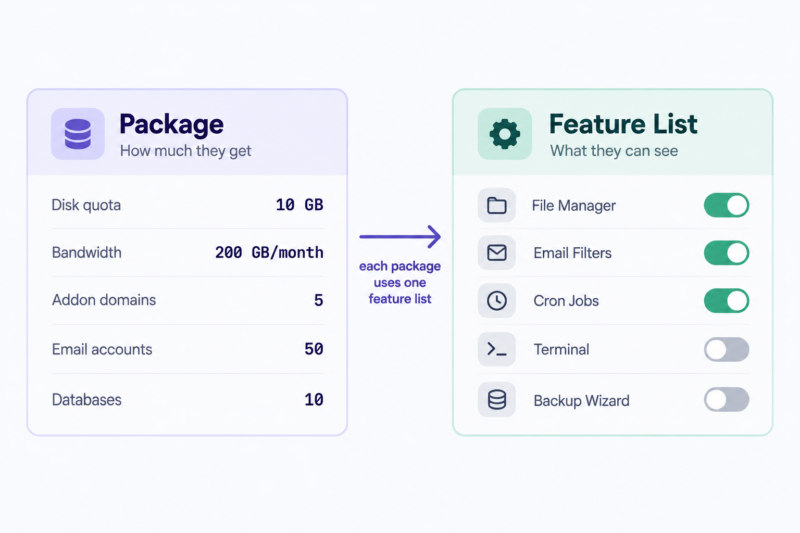
The common mistake is generosity in one and neglect in the other. You build a 10 GB package with fifty email accounts and leave the default feature list attached, which shows the client every tool cPanel ships with, including several your plan doesn’t actually support. They find one, use it, and open a ticket when it doesn’t behave. You’ve generated support load out of a checkbox you never looked at.
The opposite failure is quieter and worse: hiding a feature the client needs, so they conclude your hosting can’t do something it can do perfectly well.
Build the feature list first, then the package that uses it. Step-by-step instructions are in how to create hosting packages in WHM, and the commercial question of how many tiers to offer is covered in how many hosting tiers should you offer.
Resource limits, and what “unlimited” really means
Every reseller plan advertises a disk and bandwidth figure. Those are the two limits that matter least.
Disk, bandwidth and inodes
You hold a pool of disk and bandwidth and allocate it across accounts. Most providers let you allocate more than you hold, on the reasonable assumption that not every client uses their full quota. The mechanics are simple; the judgement call is covered in overselling: what it is and when it’s defensible.
Inodes are the limit that catches people. An inode is roughly one file or folder. A WordPress install is around 3,000. A caching plugin can generate tens of thousands. Every stored email is one. Every backup copy multiplies the count.
Inode limits are usually set per account or across your whole reseller pool, and hitting one is not a graceful failure. File creation stops. Uploads fail, sessions break, and backups can fail silently while the account still shows free disk space. A client with 2 GB used against a 10 GB quota can be completely stuck.
Ask what the inode limit is before you buy. It’s rarely on the pricing page.
CPU, memory and entry processes
This is the limit that determines whether your clients affect each other, and it’s the one you should check first.
Most quality reseller platforms run CloudLinux, which places each cPanel account in its own resource cage (an LVE). Each account gets a ceiling on CPU, physical memory, I/O, processes and entry processes — the number of simultaneous requests it can handle.
Without that isolation, one client’s badly written plugin consumes server resources and every site you host slows down. With it, that client hits their own ceiling and everyone else is unaffected. The client sees a 508 Resource Limit Reached error; your other twenty clients see nothing.
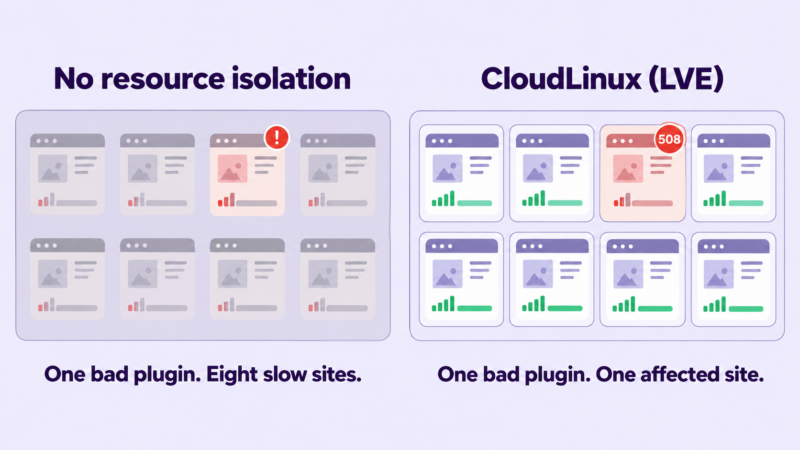
That difference is worth more than any figure on the plan page. Ask whether the platform runs CloudLinux, and what the per-account CPU and memory limits are. A generous disk allocation on a server without resource isolation is a worse product than a smaller allocation with it.
| Limit | Set by | What the client experiences when it’s hit |
|---|---|---|
| Disk quota | You, in the package | Uploads fail, email bounces |
| Bandwidth | You, in the package | Site goes offline until reset |
| Inodes | Provider | File creation fails despite free disk |
| CPU / memory (LVE) | Provider | Slow responses, 500 or 508 errors |
| Entry processes | Provider | 508 errors under traffic spikes |
| Emails per hour | You, in the package | Outgoing mail queues or is rejected |
Email sending limits
Packages include a max-emails-per-hour setting per domain, and your provider sets a hard ceiling above it. Leave the default too high and one compromised client can burn the server’s sending reputation. Set it too low and a legitimate newsletter fails.
Because you’re on shared IPs, your clients’ deliverability is partly determined by their neighbours. SPF and DKIM configuration falls to you, not to your provider, and it’s the single most common cause of the “my email isn’t arriving” ticket. Some hosts route outbound mail through a dedicated relay service, which largely removes shared-IP reputation from the equation. Worth asking about.
Who pays for the cPanel licence?
cPanel changed its licensing model in 2019, moving from a flat per-server fee to tiers based on account count. Prices have risen every year since. For anyone running their own server, it’s now a per-account cost that grows as you grow, which is the opposite of how hosting economics are supposed to work.
On a reseller plan, you don’t pay it. Your provider holds the licence for the server and the cost sits inside your plan price. Fifty accounts and five accounts cost you the same in licensing: nothing.
This matters more than it sounds, because it’s a large part of why reseller economics differ from VPS economics. Move to a VPS and the licence becomes yours, billed monthly, scaling with your account count, on top of the server cost. A plan comparison that looks close on headline price often isn’t once licensing is added.
Run your own numbers before deciding: the reseller profit calculator handles the arithmetic, and how to price reseller hosting plans covers what to do with the result.
Current cPanel tier pricing is published on cPanel’s own site and changes annually. Check it there rather than trusting a figure in an article, including this one.
Automation: API access and billing integration
Technical section. Skip to the next heading if you’re planning to provision accounts manually.
Every action available in the WHM interface is also available through WHM API 1. This is what makes a reseller account usable as infrastructure rather than as a dashboard.
The calls that matter for provisioning:
| Call | Does |
|---|---|
createacct | Creates an account against a package |
suspendacct / unsuspendacct | Non-payment handling |
removeacct | Termination |
modifyacct | Change domain, contact, quotas |
changepackage | Upgrades and downgrades |
listaccts / accountsummary | Inventory and usage |
Authenticate with an API token rather than your password. Generate one in WHM → Development → Manage API Tokens, scoped to the minimum ACLs the integration needs. A token that only ever creates and suspends accounts should not be able to terminate them.
curl -H 'Authorization: whm myreseller:YOUR_API_TOKEN' \ 'https://server.example.com:2087/json-api/createacct?api.version=1\ &username=client01&domain=clientsite.com&plan=starter-10gb&[email protected]'
Account-level operations use UAPI on port 2083 instead, which is how you’d automate anything inside a client’s account rather than around it.
Your token inherits your reseller permissions and nothing more. It can only see and act on your own accounts, and any call requiring root will be refused regardless of how the token is scoped.
This is exactly what billing platforms are doing. WHMCS and Blesta are, at the provisioning layer, a scheduler wrapped around these same API calls: invoice paid, createacct fires; invoice overdue by fourteen days, suspendacct fires. If you’re comfortable with the API, you can build the same behaviour into your own application and skip the billing platform entirely for provisioning, though you’ll still want one for invoicing and tax. WHMCS vs Blesta covers that choice.
Full method reference is in cPanel’s developer documentation.
Security and access hygiene
Three things, none of them optional.
Turn on two-factor authentication in WHM. Your WHM login controls every client site you host. Treat it accordingly.
Understand what “log in as any account” means. You can enter any client’s cPanel without their password and without notifying them. That’s necessary for support and it’s also a significant privacy position. Your terms of service should state that you have administrative access and when you’ll use it. Terms of service and AUP for a small host covers the wording.
Scope and rotate API tokens. One token per integration, minimum permissions, revoked when the integration is retired. A leaked token with full ACLs is equivalent to a leaked password.
And know your escalation path before you need it. When a client site is compromised, malware scanning and cleanup usually sit at the root level, which means your response depends on your provider. Find out now what they’ll do and how fast, not during the incident. When a client site gets compromised walks through the process.
Where the reseller model runs out
Reseller accounts have a natural ceiling. These are the signals you’ve reached it:
- Repeated requests for software you can’t install. One client wanting Redis is a conversation. Four is a product gap.
- Clients consistently hitting LVE limits. If a site regularly needs more CPU or memory than the account allows, it needs its own environment. Some hosts sell per-account resource boosts, which buys time.
- Non-standard stacks. Node, Python or Ruby applications beyond what cPanel’s application manager handles. Docker. Anything needing a persistent process.
- You need your own backup and restore guarantee. If you’re promising clients a four-hour restore and you can’t perform one yourself, you’re promising your provider’s response time.
- Deliverability requires your own IP. Volume email senders eventually need IP reputation you control.
- You’re near your account cap and the next reseller tier costs more than a small VPS.
The move up is covered in outgrowing reseller: moving to VPS or dedicated, and the underlying trade-offs in reseller vs shared vs VPS vs dedicated.
One caution: the move to a VPS trades a support relationship for a server administration job. You get root, and you get everything root is responsible for. Plenty of resellers who “outgrew” their plan discover they mostly wanted a faster support queue.
Is cPanel the only option?
No. DirectAdmin is lighter and cheaper, while Plesk supports Windows and offers a stronger developer toolset. Newer alternatives such as Enhance and AdminBolt are also designed for hosting providers seeking modern management tools and more flexible licensing. CyberPanel, aaPanel and CloudPanel are free or near-free options gaining ground, particularly among hosts squeezed by cPanel’s licensing costs.
cPanel still dominates the reseller market, and that has practical consequences worth weighing. Your clients are more likely to have used it before, so the support burden is lower. Freelancers you hire will know it. And the cpmove archive format is widely supported, allowing accounts to move between cPanel hosts with minimal friction.
If you’re building on a non-cPanel platform, most of this guide still applies conceptually. The permission model is broadly the same: you administer customer accounts, while someone else administers the underlying server.
Before you buy: questions to ask your host
Take this list to any reseller provider you’re evaluating. The answers vary far more than the pricing pages suggest.
- Does the platform run CloudLinux or equivalent per-account resource isolation?
- What are the CPU and memory limits per cPanel account?
- What is the inode limit, per account or pooled?
- Which WHM ACLs are enabled on reseller accounts?
- Can I restore a client account myself, or must I open a ticket?
- Are private nameservers included, and is there a charge?
- Is a billing platform licence included, and which tier?
- Is AutoSSL enabled for reseller accounts?
- What is the outgoing email limit, and is mail routed through a relay?
- How are PHP extension and firewall requests handled, and what’s the typical turnaround?
- Can I add resources to an individual client account without upgrading my whole plan?
For a worked example: on ChemiCloud reseller plans the answers are CloudLinux isolation with 3 GB memory and 2 CPU cores per cPanel account, private nameservers on every plan, a free WHMCS or Blesta licence (Blesta on Kickstart, WHMCS Starter from Grow upward), daily backups, free SSL, overselling enabled, and a Power Boost add-on for raising CPU and memory on individual client accounts without changing plan. Whichever host you choose, get the same eleven answers in writing before you commit clients to it.
Your first week in WHM
A sensible order of operations once your account is live:
- [ ] Enable two-factor authentication
- [ ] Set up private nameservers and confirm they resolve — see private nameservers
- [ ] Apply your branding to the cPanel interface
- [ ] Build one feature list
- [ ] Build one package that uses it
- [ ] Create a test account against that package
- [ ] Log into the test account as the client and check what they actually see
- [ ] Run a test migration of a real site you control
- [ ] Check the account’s resource usage after a day of traffic
- [ ] Generate a scoped API token if you’re automating
- [ ] Terminate the test account
Do all of this before onboarding a paying client. The test account will surface three or four things about your setup that you’d otherwise discover in front of a customer.
Frequently asked questions
Is WHM included with reseller hosting? Yes. WHM is what makes an account a reseller account. If a plan offers cPanel without WHM, it’s a shared hosting plan and cannot create separate accounts for clients.
Can a reseller get root access? No. Root is held by your hosting provider and is not available on any reseller plan, regardless of price. Root requires a VPS or dedicated server.
Do I need to buy a cPanel licence as a reseller? No. Your provider holds the server licence and the cost is included in your plan. You’d only pay for a licence if you moved to your own VPS or dedicated server.
Can clients tell that I’m a reseller? Not if you configure white-labelling properly. Private nameservers, branded cPanel and a branded billing system hide the underlying provider. A few seams remain, mostly in email headers and SSL certificate details.
Can I create sub-resellers? On most plans, yes, if your provider enables the Resellers ACL. You can grant a subset of your own permissions to another account, which is useful for agency partners managing their own client rosters.
How many cPanel accounts can I create? Whatever your plan allows. Reseller plans are typically sold by account count alongside disk and bandwidth, ranging from around 30 accounts at entry level to a few hundred at the top.
What’s the difference between a reseller account and a VPS? A reseller account gives you administrative control over accounts on a server someone else manages. A VPS gives you a server you manage entirely, including the operating system, the software stack, security patching and the cPanel licence. Reseller plans trade control for the provider handling everything below the account layer.
Next steps
If the constraints above are workable for your clients, the practical next step is building the plans you’ll sell: how to create hosting packages in WHM covers the mechanics, and how to price reseller hosting plans covers what to charge for them.
Looking for a reseller platform? ChemiCloud’s reseller hosting includes WHM and cPanel, CloudLinux resource isolation, private nameservers and a free billing platform licence on every plan.