Live Chat
 Help Center

ChemiCloud sells reseller hosting. This is our comparison — including where we’re not the right pick. We have no affiliate relationship with any provider on this page and earn nothing if you choose one of them. How we compared ↓
Most lists of the best reseller hosting compare two numbers: the starting price and the storage. Those are the two figures least likely to matter in your second year. The starting price applies to your first term only, and almost no client brochure site comes close to using the storage you’re shown.
What decides whether a reseller account works for your business shows up after you’ve signed: what you pay at renewal, what support will do when a client’s site breaks, and whether you can restore that site yourself at eleven at night. This page compares six cPanel/WHM reseller offers on those terms, picks by scenario rather than crowning a winner, and tells you where we’d send you instead of to us.
If you haven’t yet decided whether to start, how to start a reseller hosting business covers that decision first.
Table of Contents
- Quick picks: the best reseller host for each kind of business
- How we compared (and what we didn’t do)
- What actually matters in a reseller plan
- Reseller hosting compared: side-by-side
- The providers, in detail
- Where we’d send you elsewhere
- Questions to ask any provider before you buy
- Before you buy: is reseller hosting the right move?
- FAQ
Quick picks: the best reseller host for each kind of business
| If you… | Look at | Why, in one line | Plan compared: intro → renewal |
|---|---|---|---|
| Are a designer or small agency moving 10–40 client sites in and want 24/7 support from people, plus billing software included | ChemiCloud · See reseller hosting plans | “Round-the-clock human support with no AI anywhere in the process, Blesta or WHMCS included, free migrations, and you can restore client accounts yourself | $17.95 → $34.95/mo |
| Host lots of small brochure sites (more accounts than storage) | ChemiCloud, accounts-optimised | 60 cPanel accounts at our entry price — more than any plan compared here | $17.95 → $34.95/mo |
| Want to set CPU and memory limits per client account yourself | HostPapa | CloudLinux limits you assign per account, plus two dedicated IPs on every plan | $22.95 → $44.99/mo |
| Want the longest window to test | InMotion Hosting | 90-day money-back guarantee on 6-month and longer terms, with WHMCS on every plan | $16.99 → $35.99/mo |
| Have clients spread across many countries | hosting.com | Multiple hosting locations to choose from, with LiteSpeed and CloudLinux on every plan | $20.42 → $40.83/mo |
| Want backups more than once a day and phone support at any hour | Verpex | Daily backups (up to twice daily) and 24/7 phone, chat and ticket support on every plan | $20.58 → $49.00/mo |
| Want the smallest jump at renewal, or clients who care about green hosting | GreenGeeks | The smallest renewal step here (1.75×), green-energy matching, and WHMCS on request | $19.95 → $34.95/mo |
| Want the cheapest possible start for a handful of tiny sites | See cheapest reseller hosting and what you give up | — | — |
Monthly prices in USD on a 12-month term, verified 1 October 2026. For each provider we compare the plan closest to our entry plan — roughly 25 to 40 cPanel accounts — rather than simply its cheapest. Introductory rates apply to the first term only.
Not on this list: SiteGround. It’s often included in reseller roundups, but its reseller offer doesn’t use cPanel or WHM — you manage sites through its own Site Tools panel, with white-label access from the GoGeek plan up. If every site you build is WordPress and you’d rather never touch WHM, it’s worth a look. If you want to sell cPanel accounts as a product, it’s a different kind of service from everything compared here.
How we compared (and what we didn’t do)
We compared cPanel/WHM reseller plans only, because that’s what most resellers run and what most clients already know. For each provider we picked the plan nearest our own entry plan in size — roughly 25 to 40 client accounts — so the comparison is like for like rather than cheapest against cheapest. We read each provider’s current reseller plan page, its knowledge-base articles on backups and resource limits, its refund terms and its acceptable use policy, and recorded the introductory and renewal prices at the same term length. Where a provider doesn’t publish something, the table says so rather than guessing. Everything was verified on 1 October 2026, and we re-check it every quarter, because reseller pricing changes more often than the pages ranking for it do.
What we didn’t do: speed or uptime benchmarks. One reseller account on one shared server for a month tells you about that server that month, and a speed test of a competitor run by a competitor is the claim on a page like this you should trust least. Where a provider makes a performance claim, we’ve left it to them.
What we know that they don’t publish. When resellers move their client accounts to us, the reasons they give most often are slow-loading sites, poor customer service and downtime. None of those show up on a plan comparison table, which is why most of this page is about the things that do predict them.
How we treated ourselves. Same sources, same criteria, same “watch out for” section. Ours is longer than anyone else’s, because we know more about our own limits.
What actually matters in a reseller plan
What support will do for your clients’ sites
When you resell hosting, you become the support desk. Your provider becomes your escalation path, and the quality of that path decides how many of your evenings belong to your clients. Three things matter. Scope: will they help with a client’s broken WordPress install, or only with the server? Hours: does 24/7 mean an engineer at 3am, or a ticket acknowledgement? Who they’ll talk to: most providers support you, not your clients — which is what you want for white-label, but means every client problem passes through you first.
Ask: “If my client’s site shows a database error at the weekend, what will your support team do, and how fast?”
The renewal price, not the signup price
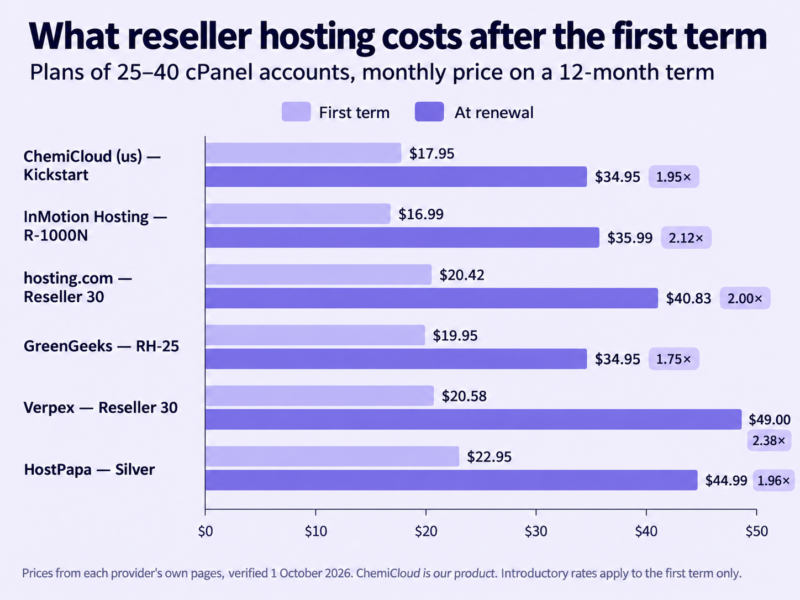
Introductory rates apply to your first term. On the plans on this page, renewal runs at between about 1.75 and 2.4 times the intro rate, and most land close to double. Your margin is built on the renewal rate for every year after the first, so that’s the number to price against — how to price reseller hosting plans works through it, and the reseller profit calculator will run your numbers at the renewal price. One more thing: don’t assume a longer term is cheaper per month. Check the monthly price at each term rather than following instinct.
Ask: “What’s the regular price for this plan at renewal, at the term I’m choosing?”
Billing software: included, add-on, or bring your own
A billing system — WHMCS, Blesta, or something newer — automates invoices, provisioning and suspensions. At small scale its licence is a real share of your costs, so whether it’s included changes your arithmetic. Several providers on this list, ourselves included, bundle a licence; included licences are usually the branded editions. Others integrate with billing software but expect you to buy the licence. WHMCS vs Blesta helps you choose between platforms, and reseller hosting with WHMCS included compares the bundles.
Ask: “Which billing licence is included, which edition, and what happens to it if I change plans?”
White-label: where your brand stops
Every reseller plan is “white-label” on the homepage. In practice it’s a list of places your provider’s name can leak: the nameservers, the server hostname, the control panel branding, the automated emails that reach your clients, and the page visitors see if an account is suspended. Private nameservers and an unbranded panel are standard; the emails and hostnames are where plans differ. White-label hosting: where the seams actually show walks through each one, and best white-label hosting for agencies compares providers on it.
Ask: “Which automated emails reach my clients, and whose name is on them?”
Backups you can restore yourself
A client deletes their site on a Friday afternoon. What matters then is retention (how far back), frequency, whether backups live off the server, and — most of all — whether you can restore one client’s account yourself or have to open a ticket and wait. Check too whether accounts you’ve suspended are still backed up. Who’s responsible when a client deletes their site covers the parts of this that are your job rather than your provider’s.
Ask: “Can I restore a single client account from your backups myself, and from how many days back?”
Resource limits and what happens when you hit them
Two separate questions. First, per-account limits: how much CPU and memory each client account gets, and whether you can change that yourself or have to pay to raise it. Second, plan ceilings: what happens when your whole account reaches its storage or bandwidth limit — a warning, a block on new accounts, throttling, or suspension. You want to know before it happens, not after. What WHM lets a reseller control covers the first; what “unlimited” really means covers the second.
Ask: “What happens, exactly, when I reach the storage or bandwidth limit?”
Migration help and the upgrade path
Moving your existing client sites in is usually the hardest week of starting. Free migration services vary in who does the work, how many accounts they’ll move and for how long after signup. Look also at the way up: can you move to a bigger plan, or switch plan type, without migrating again, and what’s the next step when a reseller plan isn’t enough? Migrating client sites without downtime covers the move itself; when you outgrow reseller hosting covers the step after.
Ask: “Who does the migration, how many accounts will you move, and until when?”
Specs that matter less than they look
Storage and bandwidth headline most comparison tables, and “unlimited” headlines many plan pages. A typical client brochure site uses a few gigabytes. “Unlimited” is a policy about how the provider manages fair use, not a resource. The spec that does matter is the ratio of accounts to storage, measured against your actual book: twenty-five accounts and 80 GB suits a few larger sites; sixty accounts and 40 GB suits a lot of small ones.
Reseller hosting compared: side-by-side
The renewal column and the restore column are the two to read first. Everything else is easier to change later.
| Provider (plan compared) | Intro → renewal (/mo) | cPanel accounts | Storage | Billing software | Private nameservers | Backups and restore | Per-account resource control | Free migrations | Money-back window |
|---|---|---|---|---|---|---|---|---|---|
| ChemiCloud (us) — Kickstart | $17.95 → $34.95 | 40 (60 on accounts-optimised) | 60 GB (40 GB on accounts-optimised) | Blesta included; WHMCS Starter from Grow | Yes | Daily; reseller can restore a client account | Fixed per account (3 GB RAM, 2 CPU) | Yes, from external hosts, time-limited. | 45 days |
| InMotion Hosting — R-1000N | $16.99 → $35.99 | 25 | 80 GB SSD | WHMCS included | Yes | Backup Manager available as an add-on | Fixed per account (1 GB RAM, 1 CPU) | Partial, they will restore your cPanel backups. A comprehensive manual migration service is available for $199 | 90 days (6-month+ terms) |
| hosting.com — Reseller 30 | $20.42 → $40.83 | 30 | 100 GB | Integrates with WHMCS, Blesta, Upmind; licence not listed as included | Yes | Daily; granular file restore | Fixed per account (2 GB RAM, 1 CPU); package limits set in WHM | Yes, including whole reseller transfers | 30 days |
| GreenGeeks — RH-25 | $19.95 → $34.95 | 25 | 60 GB SSD | WHMCS included on request | Yes | Daily backups. 1 Free restore per Month (Additional are $25) | Fixed per account (1 GB RAM, 2 CPU) | Up to 30 cPanel accounts | 30 days |
| Verpex — Reseller 30 | $20.58 → $49.00 | 30 | 100 GB NVMe | Not provided; compatible with WHMCS | Yes, plus unbranded server hostnames | Daily (up to twice daily) | Fixed per account (2 GB RAM, 2 vCPU) | Yes, no limit stated | 30 days |
| HostPapa — Silver | $22.95 → $44.99 | 40 | 100 GB NVMe | Not included (WHMCS or ClientExec from Gold) | Yes | Disaster-recovery backups; restorable website backups sold separately | Yes — set RAM and CPU per account | Yes, no limit stated | 30 days |
Verified 1 October 2026 against each provider’s own pages. Introductory rates are for the first term; renewal is the provider’s published regular rate at the same term. ChemiCloud figures are for the storage-optimised Kickstart plan unless noted. HostPapa’s headline offer is on a 3-year term (Silver $19.95 → $39.99); the 12-month price is shown here so terms match.
The providers, in detail
ChemiCloud — for designers and small agencies who want 24/7 human support and billing included
This is us, so read it with that in mind.
Best for: a designer or small agency moving an existing book of client sites onto one account, who wants billing software in the box, the tools to fix common problems themselves, and a person on the other end when they can’t.
What you get. Blesta on the entry plan, WHMCS Starter from Grow upwards — the branded editions, which is how bundled licences usually come. Every tier comes as storage-optimised or accounts-optimised, and you can move between the two, or up a tier, without migrating or any downtime. Our migrations team moves client sites from other hosts into the right cPanel account for free; the offer is for external moves and time-limited, though we make exceptions on request. You can restore a client’s cPanel account yourself from our retained daily backups, and those backups don’t count against your storage. On the white-label side, WHM’s branding tools are enabled, server hostnames are generic, and we send your clients no welcome email. Imunify360 runs with Proactive Defense on, and each account is isolated with CageFS. If you outgrow one plan, a second reseller account can share the same private nameservers, so growing doesn’t mean a DNS change.
Support. Our support runs 24/7/365 and every conversation is with a person. There’s no AI anywhere in the assistance process — no chatbot, no AI triage, no AI-written replies — whether it’s 3am or a bank holiday. That matters more to a reseller than to anyone else: your clients call you, and what you can tell them depends on who answers you. It also means help that goes well past the server: our engineers will work through a problem on a client’s site with you, rather than stopping at confirming the server is fine. If a client’s account is compromised, we run a malware scan and a short security audit and send you recommendations, at no charge. If you’d rather not run a restore yourself, we’ll do it for you. And when something doesn’t fit the standard terms — more time to pay an invoice, say — we look at it case by case rather than pointing at the policy.
Renewal reality. Kickstart is $17.95 a month on its first term and $34.95 a month after that — roughly double, which is where most of this market sits. Longer terms aren’t cheaper per month on our plans, so don’t commit to three years expecting a discount.
Not for you if:
- You need root access, your own WHM server, or a dedicated server to grow into. We don’t sell those.
- You want to set CPU and memory limits per client account yourself. Resellers can’t on our plans; raising one account’s resources is a paid add-on.
- You need dedicated IPs for client accounts. They’re not offered on reseller plans.
- You need Windows hosting.
Two things to know at setup. Quota and suspension notices go to the contact email on each client’s cPanel account — set that to your own address if you don’t want clients receiving them. And going over your plan’s bandwidth limit suspends the account rather than slowing it down, so keep an eye on it as you add clients.
Compare our reseller hosting plans →
InMotion Hosting — for a long trial window and dedicated IPs
Best for: resellers who want WHMCS from the first plan, dedicated IPs included, and the longest time on this list to decide whether they’ve chosen well.
What you get. WHMCS is included on every reseller tier, and each plan comes with dedicated IPs — one on the entry plan, five at the top. The 90-day money-back guarantee is the longest here, though it applies to 6-month and longer terms only. There’s a reseller VPS line above the shared plans for when you need dedicated resources.
Renewal reality. R-1000N is $16.99 a month on its introductory term and $35.99 at renewal — a little over double.
Watch out for: the entry plan’s support is chat and ticket only, with phone support from R-2000N up. Automatic backups are listed as “available”, with the Backup Manager sold as an add-on, so check what’s included before you rely on it. The entry tier’s storage is SSD rather than the NVMe on higher plans.
hosting.com — for clients spread across many countries
Best for: resellers whose clients sit in different regions and who want a large cPanel platform with the server stack decided for them.
What you get. hosting.com (formerly A2 Hosting) runs every reseller account on the same stack: cPanel and WHM, LiteSpeed, CloudLinux isolation per account and Monarx malware scanning. You can host in any of their multiple locations, which is far more choice than anyone else here. The entry plan gives you 30 accounts and 100 GB with unlimited bandwidth, daily backups with file-level restore, and free migrations handled by its own team — including whole reseller books. Moving between tiers is a plan change on its side, not a migration. Billing connects to WHMCS, Blesta or Upmind through its API.
Renewal reality. Reseller 30 is $20.42 a month on a 12-month term and $40.83 at renewal — almost exactly double.
Watch out for: the plan page doesn’t list a billing licence as included, so budget for one. Each client account on Reseller 30 gets 2 GB of memory and one CPU core, which is fine for brochure sites and tighter for busy stores.
GreenGeeks — for clients who care about green hosting
Best for: agencies whose clients choose suppliers partly on environmental credentials, and who want a straightforward cPanel reseller plan with WHMCS.
What you get. Green-energy matching is part of what you’re buying, and something you can pass on to clients in your own marketing. WHMCS is included on request, and the reseller plans come with up to 30 free cPanel migrations.
Renewal reality. RH-25 is $19.95 a month on a 12-month term and $34.95 a month at renewal — about 1.75 times, the smallest step on this list. The 24- and 36-month terms are priced at the regular rate, so the discount is a 12-month offer.
Watch out for: each client cPanel account is capped at 1 GB of memory, which is the lowest of the plans here that publish a figure — fine for brochure sites, tighter for WooCommerce. The money-back window is 30 days.
Verpex — for frequent backups and round-the-clock phone support
Best for: resellers who want backups taken more than once a day and a phone number they can call at any hour, on every plan.
What you get. Reseller 30 gives you 30 accounts and 100 GB of NVMe storage. Each client account gets 2 GB of memory and two CPU cores under CloudLinux. Backups run daily, up to twice daily, and phone, chat and ticket support are all 24/7 on every plan. Nameservers and server hostnames are unbranded, migrations are free with no stated limit, and there are nine locations to choose from.
Renewal reality. $20.58 a month on a 12-month term, then $49 — about 2.4 times, the largest step on this list. The renewal rate is the same whichever term you choose. If you’re starting with fewer than 15 clients, Reseller 15 is gentler: $17.16, renewing at $22.
Watch out for: that renewal step, and the cost of a billing licence — Verpex doesn’t provide WHMCS, so add it to your numbers.
HostPapa — for setting per-account resources yourself
Best for: resellers who want to decide how much CPU and memory each client gets, rather than living with a fixed allocation.
What you get. HostPapa lets you assign CloudLinux resource limits — RAM and CPU — per client account on every plan. Silver gives you 40 accounts and 100 GB of NVMe storage. Every plan includes two dedicated IP addresses, an OpenSRS domain reseller account, private nameservers and free migrations with no stated limit. Support is 24/7 by phone, chat and email, in English, French, German and Spanish.
Renewal reality. Silver is $22.95 a month on a 12-month term and renews at $44.99 — roughly double. The headline price is for a 3-year term ($19.95, renewing at $39.99); HostPapa’s longer terms are genuinely cheaper per month at renewal.
Watch out for: Silver doesn’t include billing software — a WHMCS or ClientExec licence starts at the Gold plan, so budget for one. The plan lists Acronis backups for disaster recovery; restorable website backups are sold as a separate product. Silver’s per-account disk I/O is 10 MB/s, lower than most plans here that publish a figure.
Where we’d send you elsewhere
Some readers shouldn’t buy from us. Here’s who, and where we’d look in your place.
You need root, your own WHM, or a server to grow into. We don’t sell those. InMotion’s reseller VPS is built for exactly that step, and hosting.com and HostPapa both sell managed VPS and dedicated servers. When you outgrow reseller hosting explains when it’s worth taking.
You want to set per-account CPU and memory limits yourself. HostPapa lets you. Ours don’t.
You need dedicated IPs, or the longest possible refund window. HostPapa includes two dedicated IPs on every plan; InMotion includes them too, along with a 90-day guarantee.
You never want to touch WHM, and every site is WordPress. SiteGround’s site-based model, mentioned above, will feel more natural than any cPanel reseller account, ours included.
You have three small sites and no plans to add more. You may not need reseller hosting at all — a multi-site shared plan will cost less and do the job. Reseller vs shared vs VPS hosting sets out where the line sits.
Questions to ask any provider before you buy
Paste these into a pre-sales chat. Every one has a short, checkable answer, and a provider that can’t give one is telling you something.
- What’s the regular price for this plan at renewal, at the term I’m choosing?
- Is a billing software licence included, which edition, and what happens to it if I change plans?
- Can I restore a single client account from your backups myself? How far back?
- Are backups stored off the server, and are suspended accounts still backed up?
- Can I set CPU and memory limits per client account? If not, how do I raise them?
- What happens when I reach my storage or bandwidth limit?
- Which automated emails reach my clients, and whose name is on them?
- If a client’s site breaks, will your support fix it, or only the server?
- Who does free migrations, how many accounts, and for how long after signup?
- Can I change plan size or plan type without migrating?
- When I outgrow this plan, what’s the next step, and can I keep my nameservers?
- What does your acceptable use policy restrict?
We’d answer every one of these. Ask us too by opening a chat with our 24/7 human support.
Before you buy: is reseller hosting the right move?
If you’ve come here from an ad and haven’t done the numbers, do that first. How much you can realistically make reselling hosting works through the first year honestly, and the reseller profit calculator will run your own figures at renewal prices. If you already build sites for clients, should web designers resell hosting covers the business case and the support trade-off. If you’re not sure reseller is the right kind of hosting at all, reseller vs shared vs VPS will settle it.
FAQ
What is the best reseller hosting?
There isn’t one best provider; there’s one that fits how you’ll run the business. Compare on renewal price, what support will do for your clients’ sites, and whether you can restore a client account yourself. The quick-picks table at the top matches common situations to the provider we’d look at first.
Is reseller hosting still worth it in 2026?
For designers and agencies who already have clients, usually yes: the hosting arrives with revenue attached. Starting from zero is harder and slower. How much you can make reselling hosting sets out realistic first-year numbers before you commit.
Do I need WHMCS to start reselling hosting?
No. With a handful of clients you can invoice manually. Billing software starts to pay for itself as you add clients, and several providers include a licence. WHMCS vs Blesta compares the two most common platforms.
Can my clients tell who my hosting provider is?
Usually only if they go looking. Private nameservers and an unbranded control panel hide the obvious signs, but server hostnames, automated emails and suspension pages can still give it away. Where white-label seams show covers each one.
What’s the difference between storage-optimised and accounts-optimised reseller plans?
Some providers offer each tier in two shapes: more storage and fewer accounts, or more accounts and less storage. If your book is mostly small brochure sites, you’ll run out of accounts long before storage, so the accounts-optimised shape is usually the better fit.
Can I switch reseller hosts without downtime?
Yes. Lower your DNS records’ TTL a day or two ahead, have the sites copied across, check them on the new server, then change DNS. Most providers on this page will do the copying for free. Migrating client sites without downtime covers the sequence.
If ChemiCloud fits how you work, our reseller plans include Blesta or WHMCS, free migration of your existing client sites, and a 45-day money-back window to check we were straight with you. If it doesn’t fit, the section above tells you where we’d look instead.
See reseller plans · Talk to us about moving your clients →