Live Chat
 Help Center

We make reseller hosting, and we compete with InMotion Hosting. This page compares InMotion’s reseller plans with five alternatives, ours included, and it’s honest about the cases where you’re better off staying where you are.
It covers reseller hosting only. If you host your own website on InMotion’s shared, WordPress or VPS plans, most of what follows won’t apply, and our web hosting plans are the better comparison. If you don’t have clients yet, our guide to starting a reseller hosting business is a better first stop.
The short answer (verified 5 October 2026): whether switching helps depends on why you’re looking. A move can fix backups that cost extra, small per-account resources, or a server location InMotion doesn’t offer. It won’t help if you rely on dedicated IPs, a 90-day refund window or a reseller VPS to grow into, because InMotion does those well. The quickest test is renewal price per cPanel account, which we’ve worked out for every InMotion plan below.
- Already reselling on InMotion? Start with why resellers switch, then the plan-by-plan match and the switching checklist.
- Comparing before you buy? Go to the comparison table. Our roundup of the best reseller hosting covers more ground.
Table of Contents
InMotion reseller hosting at a glance
| R-1000N | R-2000N | R-3000N | R-4000N | |
|---|---|---|---|---|
| cPanel accounts | 25 | 50 | 80 | 100 |
| Storage | 80 GB SSD | 160 GB NVMe | 200 GB NVMe | 300 GB NVMe |
| Intro → renewal ($/mo) | $19.99 → $35.99 | $26.99 → $55.99 | $39.99 → $75.99 | $49.99 → $109.99 |
| Renewal per cPanel account | $1.44 | $1.12 | $0.95 | $1.10 |
| Dedicated IPs | 1 | 2 | 3 | 5 |
| Phone support | No (chat and ticket) | Yes | Yes | Yes |
Prices in USD from InMotion’s reseller page and its sales team, 5 October 2026. InMotion told us the R-1000N rate is the same on every billing term. InMotion runs frequent promotions, and lower figures circulate on review sites; check the live page before you buy.
Every plan includes WHM and a WHMCS Starter licence, an eNom domain reseller account and white-label branding. Servers are in three regions: US East, US West and EU Central (Amsterdam). The money-back guarantee is 90 days on 6-month and longer terms. Python, Node.js and Git are available on most plans under InMotion’s “Hosting Plus” label, and there’s a reseller VPS line above the shared plans.
InMotion’s sales team told us each cPanel account gets 1 GB of memory and 1 CPU. Its plan page doesn’t publish those figures.
Why resellers look for an InMotion alternative
Each reason below comes with a straight answer to the question that matters: will a different host actually fix it?
The renewal step
R-1000N goes from $19.99 to $35.99 at renewal, about 1.8 times the intro rate. That’s in the middle of the range for the plans compared here, which run from about 1.75× (GreenGeeks) to 2.4× (Verpex Reseller 30). Switching changes the size of the step. It doesn’t remove it.
The number that does differ is renewal price per cPanel account. On R-1000N you pay $1.44 per account per month at renewal. Some alternatives below come in well under that, and some above it. If you pass hosting costs on to clients, a lower renewal per account is what keeps you from raising your clients’ prices.
cPanel raises its licence prices every January, and resellers carry that cost in the end. InMotion and ChemiCloud both hold a reseller’s price until the end of the term you’ve paid for. Ask any host the same question before you buy. To see what the next increase means for your book, try our cPanel price increase calculator.
What the entry plan leaves out
R-1000N uses SSD storage, where the higher plans use NVMe, and its support is chat and ticket only. Phone support starts on R-2000N.
If those two are your reasons, the cheapest fix may be R-2000N rather than a new host. It doubles the accounts to 50 and renews at $1.12 per account, below R-1000N’s $1.44.
Backups
InMotion sells its Backup Manager as an add-on at $2.99 a month, chosen at checkout. Before you decide whether that matters, ask InMotion two things: what’s backed up without the add-on, and whether you can restore one client’s account yourself or have to open a ticket.
Switching fixes this only if the new host includes backups you can actually use. That means daily copies, kept for more than a day, that you can restore one client account at a time without waiting on support. The alternatives below differ a lot on all three. There’s more on who’s responsible when a client deletes their site.
Resources per client account
Each cPanel account on a reseller plan has a ceiling on memory and CPU. When a client’s site hits that ceiling, it slows down. InMotion’s ceiling is 1 GB and 1 CPU per account. The alternatives here publish between 1 GB and 3 GB, and HostPapa lets you set the limits yourself.
A higher ceiling doesn’t make a site faster on its own. It means a busy site has more room before it’s held back. If your clients’ sites are slowing down at peak times, this is the comparison to make, and it’s one where switching can help.
Where your servers can be
InMotion offers US East, US West and EU Central. If most of your clients’ visitors are in Canada, the UK, Germany, Asia-Pacific or India, a closer data centre will help their sites load faster.
ChemiCloud’s offers 9 different server locations to cover multiple regions around the globe. Check each provider’s own locations page against where your clients’ visitors are.
Billing software
This one isn’t a reason to leave. InMotion includes WHMCS on every reseller plan, and that’s hard to beat.
It is a reason to check carefully before you switch. InMotion’s WHMCS licence is cancelled when your plan is, so you need a licence at your new host, and two of the five alternatives here don’t include one. Our comparison of reseller hosting with free WHMCS goes through what each host includes.
You’ve outgrown 100 accounts
R-4000N stops at 100 cPanel accounts. InMotion’s reseller VPS is the natural next step, and it keeps you with the same provider and support team.
The alternatives here top out between 80 and 200 accounts on their shared reseller plans, and we don’t sell a reseller VPS or root access. If you’re past R-4000N, read outgrowing reseller hosting before you look elsewhere.
Does switching fix it?
| Why you’re looking | Does switching fix it? | Where to look |
|---|---|---|
| Renewal step | Partly. Compare renewal per account, not the multiple | Plan match below |
| Entry plan: SSD, no phone | Often fixed by moving up to R-2000N | InMotion R-2000N, or Verpex, GreenGeeks or HostPapa for phone on the entry plan |
| Backups cost extra | Yes, if the alternative includes restorable daily backups | ChemiCloud, Verpex, hosting.com |
| Per-account resources | Yes | ChemiCloud, Verpex, hosting.com; HostPapa to set your own |
| Location outside US/EU | Yes | ChemiCloud, hosting.com, Verpex |
| Billing software | Not a reason to leave | Check the alternative includes it |
| More than 100 accounts | Usually not | InMotion’s reseller VPS, ChemiCloud. |
Reasons to stay with InMotion
Some of InMotion’s reseller features are better than ours, and better than most of the alternatives here. If two or more of these are why you chose InMotion, switching may cost you more than it saves.
- The 90-day money-back guarantee on 6-month and longer terms is the longest of any host on this page. Ours is 45 days; the others offer 30.
- Dedicated IPs are included, from one on R-1000N to five on R-4000N. You don’t need one for SSL or white-label hosting, and a dedicated IP doesn’t hide who your host is. But if a client’s contract requires one, InMotion includes it and we don’t offer them.
- WHMCS on the entry plan. Our entry plan includes Blesta, and WHMCS starts on our second tier.
- A reseller VPS to grow into without changing provider.
- No notices to your clients in InMotion’s name. InMotion told us suspension, abuse and quota notices don’t go to end clients.
- An eNom domain reseller account in the same place as your hosting.
- Independent, owned infrastructure. InMotion has been founder-led for 25 years and runs its own data centres.
There’s also a different model to consider if reselling itself is the problem. In May 2026 InMotion launched an Agency Partner Program that pays agencies commission for consolidating client accounts with InMotion. If you’d rather not handle hosting billing and support at all, referring clients rather than reselling to them may suit you better.
The alternatives compared
We compared InMotion with ChemiCloud and the four other cPanel/WHM reseller hosts we cover across this series: GreenGeeks, HostPapa, Verpex and hosting.com (its cPanel reseller plans, not its Enhance line). SiteGround also sells reseller-style plans, but on its own control panel rather than cPanel, so it isn’t a like-for-like move from InMotion.
Each row shows the provider’s plan closest to R-1000N, where most InMotion resellers start. The plan match further down covers the bigger tiers.
| Plan | Accounts | Storage | Intro → renewal ($/mo) | Renewal per account | Billing software | Backups | Per-account memory / CPU | Phone on this plan | Dedicated IP | Refund window | |
|---|---|---|---|---|---|---|---|---|---|---|---|
| InMotion | R-1000N | 25 | 80 GB SSD | 19.99 → 35.99 | $1.44 | WHMCS Starter | Backup Manager add-on, $2.99/mo | 1 GB / 1 CPU | No | 1 | 90 days (6-month+ terms) |
| ChemiCloud | Kickstart | 40 (or 60*) | 60 GB NVMe (or 40 GB*) | 17.95 → 34.95 | $0.87 (or $0.58*) | Blesta (WHMCS from Grow) | Daily, retained, self-restore per account | 3 GB / 2 CPU | No | No | 45 days |
| GreenGeeks | RH-25 | 25 | 60 GB SSD | 19.95 → 34.95 | $1.40 | WHMCS Starter, on request | Nightly, kept 24 hours | 1 GB / not published | Yes | Not listed | 30 days |
| HostPapa | Silver | 40 | 100 GB NVMe | 22.95 → 44.99 | $1.12 | None (from Gold) | Disaster-recovery only; website backups extra | You set per account | Yes | 2 | 30 days |
| Verpex | Reseller 30 | 30 | 100 GB NVMe | 20.58 → 49.00 | $1.63 | None | Daily, up to twice a day | 2 GB / 2 CPU | Yes | Not listed | 30 days |
| hosting.com | Reseller 30 | 30 | 100 GB | 20.42 → 40.83 | $1.36 | None | Daily | 2 GB / 1 CPU | Yes | Not listed | 30 days |
*ChemiCloud’s accounts-optimised Kickstart: 60 accounts and 40 GB at the same price as the storage-optimised version. Monthly prices in USD at a 12-month term, checked 1–5 October 2026 on each provider’s own pages, with InMotion’s per-account limits from its sales team. Introductory rates apply to the first term only.
At renewal, ChemiCloud, HostPapa and hosting.com cost less per account than R-1000N, GreenGeeks costs about the same, and Verpex costs more. Storage pulls the other way. InMotion’s 80 GB is more than ChemiCloud’s or GreenGeeks’ entry plans, so if your clients’ sites are large, compare storage per account as well.
The alternatives, one by one
Every provider gets the same treatment: what you’d gain compared with InMotion, and what you’d give up. That includes us.
ChemiCloud (our plans)
Best if you’re leaving InMotion because of: renewal cost per account, backups, per-account resources, or a location InMotion doesn’t cover.
What you gain. More accounts for the money: Kickstart has 40 accounts (storage-optimised) or 60 (accounts-optimised) at the same price, against R-1000N’s 25. Each account gets up to 3 GB of memory and 2 CPUs. We keep daily backups and you can restore a single client’s cPanel account yourself. We migrate your whole InMotion book for free, however many cPanel accounts it has, and we move your existing WHMCS installation and its database onto the licence included with Grow and above, also at no cost. Support is 24/7, by people, with no AI chatbots. Node.js and Python apps run through CloudLinux’s selector. We hold your price until the end of the term you’ve paid for, and month-to-month billing is available.
What you give up. Phone support: we offer chat and tickets only, because we’ve found we resolve issues faster that way. The 90-day refund window (ours is 45 days). Dedicated IPs, which we don’t offer. WHMCS on the entry plan: Kickstart includes Blesta, so if you’re bringing WHMCS, start on Grow or plan to buy a licence. A reseller VPS to grow into. And a domain reseller account: for client domains, we’ll introduce you to account managers at ResellerClub or CentralNic.
Renewal reality. Kickstart is $17.95 a month on a 12-month term and $34.95 at renewal, about 1.95×. Grow is $19.95 and renews at $45.95.
Two things to know at setup. Quota, suspension and abuse notices go to the contact email set on each cPanel account, so set it to your own address, not the client’s. And going over your plan’s bandwidth limit suspends the account rather than slowing it down.
| InMotion R-1000N vs ChemiCloud Kickstart | InMotion | ChemiCloud |
|---|---|---|
| cPanel accounts | 25 | 40 or 60 |
| Renewal per account | $1.44 | $0.87 or $0.58 |
| Billing software on this plan | WHMCS Starter | Blesta |
| Per-account memory / CPU | 1 GB / 1 CPU | 3 GB / 2 CPU |
| Refund window | 90 days (6-month+ terms) | 45 days |
| Dedicated IP | 1 | None |
GreenGeeks
Best if you’re leaving InMotion because of: the renewal step, while keeping WHMCS and phone support on the entry plan.
What you gain. RH-25 renews at about 1.75× its intro rate, the smallest step among the plans here that include WHMCS. Phone support is on every plan. GreenGeeks also includes an eNom domain reseller account, so your domain workflow can stay as it is, and its green-energy matching is something agencies can pass on to clients.
What you give up. Backups are nightly and kept for 24 hours, so a problem noticed on day two can’t be rolled back from GreenGeeks’ copy. Free migration covers up to 30 cPanel accounts. The largest plan, RH-80, stops at 80 accounts, below R-4000N. The refund window is 30 days.
Renewal reality. RH-25: $19.95 → $34.95 on a 12-month term. RH-50: $24.95 → $49.95.
HostPapa
Best if you’re leaving InMotion because of: wanting to set CPU and memory limits for each client yourself.
What you gain. Per-account resource limits that you assign, which no other host here offers. Two dedicated IPs on every plan, an OpenSRS domain reseller account, free migrations with no stated account limit, and 24/7 phone, chat and email support in four languages.
What you give up. Billing software, which starts on Gold, so Silver means buying a WHMCS licence or using something else. Backups: the plans include disaster-recovery backups, and automated website backups you can restore are sold separately. The refund window is 30 days.
Renewal reality. Silver: $22.95 → $44.99 on a 12-month term.
Verpex
Best if you’re leaving InMotion because of: backups and per-account resources, and you don’t need billing software.
What you gain. Daily backups (up to twice a day), 2 GB of memory and 2 CPUs per account, unbranded nameservers and server hostnames, 24/7 phone support, and free migrations with no stated limit. Verpex renews at the same price whatever term you choose.
What you give up. WHMCS: Verpex doesn’t include a licence. And the renewal step on Reseller 30 is the largest here. If you run a very small book, Reseller 15 renews far more gently, at $22 for 15 accounts.
Renewal reality. Reseller 30: $20.58 → $49.00. Reseller 60: $27.60 → $69.00.
hosting.com (cPanel reseller plans)
Best if you’re leaving InMotion because of: location, or wanting LiteSpeed and CloudLinux on every plan.
What you gain. 2 GB of memory and 1 CPU per account, daily backups, LiteSpeed, CloudLinux and Monarx malware scanning on every plan, free migrations that include whole reseller books, and tier changes without a migration. hosting.com also sells reseller plans on the Enhance panel; those are a different product, so make sure you’re looking at the cPanel line.
What you give up. A billing licence, which isn’t included; hosting.com connects to WHMCS, Blesta or Upmind if you bring your own. The refund window is 30 days.
Renewal reality. Reseller 30: $20.42 → $40.83 on a 12-month term.
Matching your InMotion plan to an alternative
Find your InMotion plan, then read across. Each cell shows the smallest plan that fits the same number of accounts, with storage as close to InMotion’s as the provider offers.
| Your plan (accounts, storage) | Renewal per account | ChemiCloud | GreenGeeks | HostPapa | Verpex | hosting.com |
|---|---|---|---|---|---|---|
| R-1000N (25, 80 GB) | $1.44 | Kickstart: 40 accts, 60 GB, $34.95 → $0.87 | RH-25: 25, 60 GB, $34.95 → $1.40 | Silver: 40, 100 GB, $44.99 → $1.12 | Reseller 30: 30, 100 GB, $49.00 → $1.63 | Reseller 30: 30, 100 GB, $40.83 → $1.36 |
| R-2000N (50, 160 GB) | $1.12 | Grow: 60, 120 GB, $45.95 → $0.77 | RH-50: 50, 80 GB, $49.95 → $1.00 | Gold [VERIFY] | Reseller 60: 60, $69.00 → $1.15 | [VERIFY] |
| R-3000N (80, 200 GB) | $0.95 | Expand: 90, 160 GB, $61.95 → $0.69 | RH-80: 80, 160 GB, $69.95 → $0.87 | [VERIFY] | Reseller 100: 100, $109.00 → $1.09 | [VERIFY] |
| R-4000N (100, 300 GB) | $1.10 | Established: 130, 250 GB, $77.95 → $0.60 | No plan this size | Platinum [VERIFY] | Reseller 100: 100, $109.00 → $1.09 | [VERIFY] |
Renewal price per month at a 12-month term, divided by the plan’s cPanel accounts. Checked 1–5 October 2026. ChemiCloud’s accounts-optimised plans have more accounts and less storage at the same price: Kickstart 60 accounts and 40 GB ($0.58), Grow 90 and 60 GB ($0.51), Expand 140 and 90 GB ($0.44), Established 200 and 100 GB ($0.39).
Two things stand out. InMotion gets more competitive per account as the plans get bigger: R-3000N is its best value. And on storage, InMotion’s larger plans hold more than the equivalent plans at ChemiCloud and GreenGeeks, so a book with large sites should weigh storage as well as accounts.
Where we’d send you elsewhere
We’d rather you move once, to the right host, than move to us and leave in six months.
- You’ve outgrown 100 accounts or need root access: stay with InMotion and move to its reseller VPS. We don’t offer root access or reseller VPS plans.
- A client’s contract requires a dedicated IP: stay with InMotion, or look at HostPapa, which includes two.
- You want the longest window to change your mind: InMotion’s 90-day guarantee beats every alternative on this page.
- You want to set CPU and memory limits for each client yourself: HostPapa.
- You want phone support on the entry plan: Verpex, GreenGeeks or HostPapa. We support by chat and ticket only.
- You want out of reselling altogether: a referral or partner programme, InMotion’s own included, may suit you better than any reseller plan.
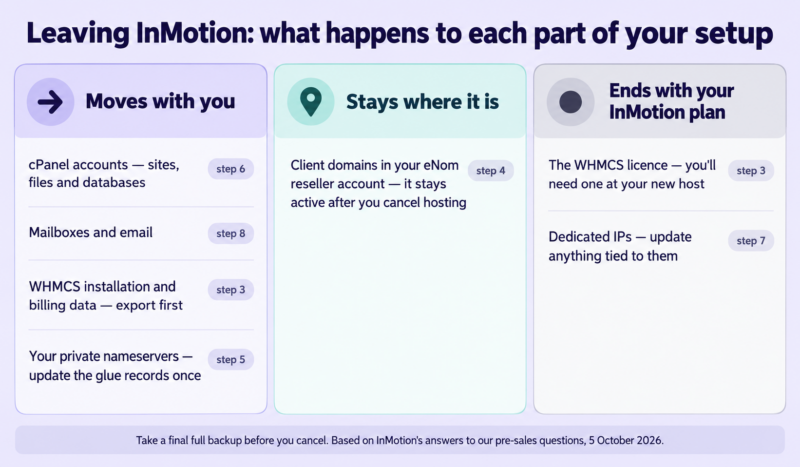
You’ve decided to move. The order matters more than the speed. These steps follow the sequence our migrations team uses; the detail for each is in our guide to migrating client sites without downtime.
- Start four to six weeks before your InMotion renewal date, and don’t cancel anything yet. You’ll pay for a few weeks of overlap. That’s cheaper than a rushed move.
- List everything in the book. cPanel accounts, client domains and where each is registered, mailboxes, cron jobs, and any Node.js or Python apps. Note anything that depends on a dedicated IP.
- Decide what happens to WHMCS. InMotion’s licence is cancelled with your plan, but your billing data is yours. Take a full export first, whichever route you choose. Then either move the installation and database to the new host’s licence or rebuild. If you’re moving to ChemiCloud’s Grow plan or above, we’ll move the installation and database for you at no cost. If your new plan includes Blesta instead, read WHMCS vs Blesta before deciding.
- Leave the domains where they are for now. InMotion told us its eNom reseller account stays active after you cancel hosting, so client domains don’t have to move at the same time. If you want them elsewhere later, transfer them as a separate project. Never let a domain transfer overlap the hosting move.
- Set up private nameservers at the new host first. If your clients already point at your own nameservers, you change the glue records once and the whole book follows. Here’s how private nameservers work.
- Migrate and test each account before touching DNS. Check each site on the new server using a hosts-file entry or a temporary URL.
- Update anything tied to your old dedicated IPs. InMotion cancels them with the plan. Most sites need nothing, but check firewall allow-lists, payment gateway settings and any DNS records that point at the IP directly.
- Prepare email. Lower DNS TTLs a day ahead and confirm SPF records include the new host’s mail servers.
- Tell your clients before, not after. A short note about the date and what they might notice saves most of the questions. Here’s how to tell clients about a hosting change, and what to say if something goes down.
- Switch DNS, then follow up. The most common problem our migrations team sees after a move is a DNS change that’s been left undone. Chase every client whose domain doesn’t point at you yet.
- Cancel InMotion last. Do it only when every account, mailbox and domain is confirmed working on the new host and you’ve taken a final full backup.
FAQ
Can I move my InMotion reseller accounts to another host without downtime? Yes, if you migrate and test every account before changing DNS, and cancel InMotion only after everything is confirmed. Our migration guide covers the steps.
What happens to my WHMCS licence if I leave InMotion? InMotion cancels the licence with your reseller plan. Your WHMCS installation and its data are yours, so export them first. They can then be moved onto a licence at your new host. ChemiCloud moves the installation and database for you at no cost on Grow and above.
What happens to client domains in my InMotion eNom account? InMotion told us the eNom reseller account stays active after you cancel hosting, so the domains can stay where they are. If you’d rather consolidate, move them later as a separate step.
Does InMotion include backups on reseller plans? InMotion sells Backup Manager as an add-on at $2.99 a month. Ask InMotion what’s backed up without it and whether you can restore a single client account yourself.
Is there a cheaper alternative to InMotion’s R-1000N at renewal? Compare renewal price per cPanel account rather than the monthly price. R-1000N renews at $1.44 per account; the plan match shows the equivalent for each alternative. Our look at the cheapest reseller hosting explains what low prices usually leave out.
Do I need a dedicated IP for reseller hosting? Usually not. SSL works without one, and a dedicated IP doesn’t hide your host from anyone checking. You need one only if a client’s contract or a piece of software specifically requires it. Our guide to white-label hosting for agencies covers what actually keeps your host out of sight.
Moving a book off InMotion? Our migrations team moves every client account into your new WHM for free, however many you have, and moves your WHMCS installation too. We hold your price until the end of the term you pay for.
See ChemiCloud reseller plans →
Before you move, run your own numbers to see what the change does to your margin. And if you’re wondering whether reselling is still right for you, start with how to run a reseller hosting business.