Live Chat
 Help Center

Reseller hosting is a good business if you already have clients, and a hard one if you don’t yet. That single fact decides almost everything else: what it costs you, how long it takes to earn anything, and whether the support load is a minor addition to your week or the whole job.
This guide covers what reselling actually involves. The margins, with real arithmetic. The support load, which is the part every other guide leaves until the end. The setup steps in the order you’ll do them, and roughly how long each takes. It also covers the situations where reselling is the wrong call and you’re better off leaving your clients where they are.
Two paths run through the page. Start with the one that matches you.
Start here: which of these are you?
You’re reading this for one of two reasons, and the answer to “is this worth doing” is different for each.
| Track A — you already have clients | Track B — you’re starting from zero | |
|---|---|---|
| What you have | Sites you built, relationships, a reason for people to trust you with their hosting | Time, and the freedom to pick your market |
| What you’re missing | The operational side: WHM, billing, support cover, policies | Clients. All of them. |
| When it pays | Month one, usually. The revenue arrives already attached to people who know you | Month nine to eighteen, realistically |
| Your real risk | Support load and awkward client conversations | Running fixed costs for months before the fourth client arrives |
| Start reading at | “Does the business work?”, then skip to “what you’re signing up for” 👇 | The next section, then read straight through |
If you’re on Track A, you can skip the next section entirely. You already know what reseller hosting is; your questions are operational, and they start two sections down.
What reseller hosting actually is
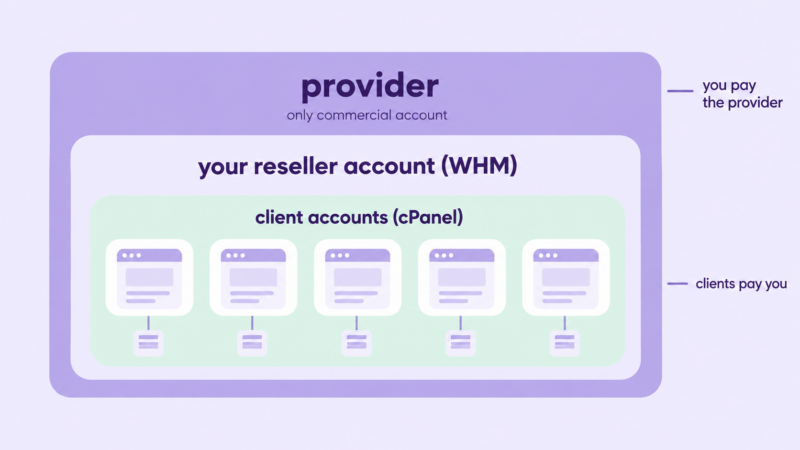
You buy one hosting account that comes with WHM (Web Host Manager). WHM lets you carve that account into separate cPanel accounts and hand them out. You bill your clients directly, at whatever price you set. The provider keeps the servers running, patches them and handles the hardware. Your clients see your brand, your nameservers and your invoices.
Three parties: the provider, you, and your clients. The provider’s customer is you. Your clients’ provider is you.
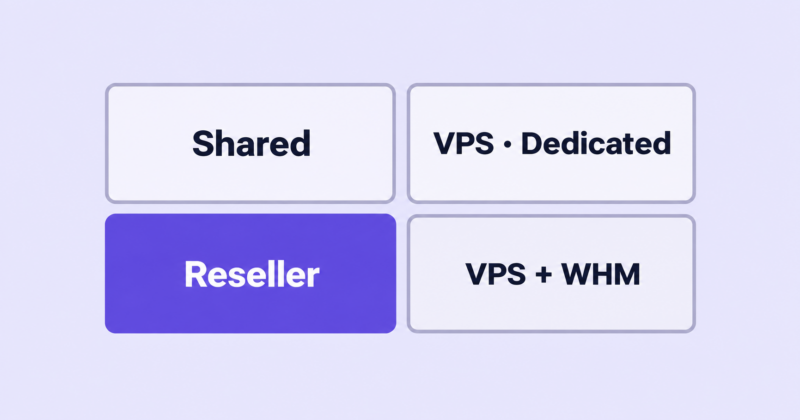
| Who administers the server | Can you create accounts for others | Root access | Typical monthly cost | |
|---|---|---|---|---|
| Shared | The host | No | No | $3–$15 |
| Reseller | The host | Yes, within your limits | No | $20–$50 |
| VPS | You (or a managed plan) | Yes | Usually | $20–$100+ |
| Dedicated | You | Yes | Yes | $100+ |
The short version: reseller hosting is shared hosting with the right to subdivide and resell it. You get the commercial control without the systems administration.
For a fuller definition, see what reseller hosting is and how it works. For a proper comparison of the four, see reseller vs shared vs VPS vs dedicated.
Does the reseller hosting business work? The real economics
Yes, with a caveat that depends entirely on which track you’re on.
Your costs are small, fixed and predictable. Here is what a one-person operation actually pays each month.
| Line item | Typical monthly cost | Notes |
|---|---|---|
| Reseller plan | $25–$45 | Scales with accounts and storage, not with revenue |
| Billing software | $0–$25 | WHMCS and Blesta both charge monthly. Some providers, including ChemiCloud, include a WHMCS licence with the plan, which removes this line entirely |
| SSL certificates | $0 | Let’s Encrypt is standard and free. Paid certificates are a client-specific extra |
| Off-site backups | $0–$15 | Only if you’re not relying solely on the provider’s |
| Payment processing | ~3% of revenue | Stripe, PayPal or similar |
| Your time on support | The real cost | See the next section 👇 |
Call the fixed cost $50–$60 a month before your time. That’s the number to hold in your head, because it doesn’t move much whether you have four clients or forty.
Two worked examples
Track A: an agency with 15 existing client sites. You charge $25 a month per site for hosting plus basic maintenance, which is a normal rate for that bundle and well below what your clients pay for a single hour of your time.
- Revenue: 15 × $25 = $375/month
- Costs: $55/month
- Gross: $320/month, or about $3,840 a year
You’re profitable in month one, because the revenue arrives already attached. There’s no ramp. Every site you build from here adds $25 a month for as long as the client stays, which is the part that compounds.
Track B: starting from zero. Same $55 a month in fixed costs, from the day you sign up. At $15 a month per client, break-even is four clients. Four is achievable. The question is when.
If you’re actively selling into a defined niche, one to two clients a month is a realistic rate once you’ve started. That puts break-even somewhere around month three or four, and a meaningful income much later. Most people who quit do so at exactly that point: three or four months of paying $55 and answering questions for two clients, with the fifth nowhere in sight. The costs are trivial. The patience is not.

Neither example is your business. Put your own client count, your own price and your own hours into the reseller hosting profit calculator and see what the arithmetic says — it takes about a minute, and it costs nothing to find out before you buy anything.
Two inputs do most of the work there. The first is your hourly rate, because support time is the cost that decides whether this is worth doing and the one nobody puts in the spreadsheet. The second is churn: at 15 clients, losing three a year means selling three a year just to stand still. The calculator ships with a default retention figure, and you should override it with whatever you know about your own clients. The ones who came through a relationship churn far less than the ones who came through a price comparison.
For the full model, including how the numbers change at 50 and 200 accounts, see how much you can actually make reselling hosting. For setting the prices themselves, see how to price reseller hosting plans.
What you’re actually signing up for
Most guides put this at the bottom under “Cons”. It belongs here, before the setup instructions, because it’s the part that decides whether you should do this at all.
How technical do you need to be? More than the marketing suggests, less than a sysadmin. Ask this on any hosting forum and the answer comes back the same: yes, you need someone technical on hand, and the thing that catches people is DNS. Not server administration, which the provider handles. DNS.
Specifically, you need to be able to:
- Point a domain at your nameservers, and explain to a client’s IT contact why their A record is wrong
- Move email without losing a week of it, including MX records, SPF and DKIM
- Read a cPanel error log well enough to tell a PHP version problem from a plugin problem
- Restore a backup, under pressure, having tested it before you needed it
You don’t need to patch a kernel, tune MySQL or respond to a hardware failure at 3am. That’s what you’re buying. But if the four items above sound like someone else’s job, reselling will be a bad experience, and no provider’s support desk changes that.
What the tickets are actually about. Not the server. The pattern is consistent: email problems first by a distance, then passwords and access, then “my site is slow” (usually a plugin or an unoptimised image), then things the client did themselves and would rather not discuss. Genuine infrastructure faults are rare and, when they happen, they’re the provider’s to fix while you handle the communication.
Whose problem is it?
| Situation | Whose problem | What handling it looks like for you |
|---|---|---|
| Server or network outage | The provider’s | Tell your clients before they tell you. Have a template ready |
| Client’s site hacked through an outdated plugin | Yours, in practice | Clean-up or a restore, then an uncomfortable conversation about updates |
| Client deleted their own files | Yours, in practice | Restore from backup, if you have one you’ve tested |
| Email going to spam | Yours | DNS records, reputation, and patient explanation |
| Client hasn’t paid in 60 days | Yours | A written policy you follow, so it isn’t a decision each time |
| Data loss with no backup | Yours, entirely | This is the one that ends businesses. Read the provider’s backup terms before you need them |
The pattern: almost everything that touches the client is yours, whatever the underlying cause. That’s what they’re paying for.
Cover. A one-person operation has no out-of-hours cover unless it creates it. What most people actually do is set expectations honestly (a stated support window, with genuine emergencies defined narrowly), pick a provider whose own support runs 24/7 so infrastructure problems are handled while you sleep, and arrange reciprocal cover with another freelancer for holidays. What doesn’t work is implying 24/7 support and then not answering.
Go deeper:
- Backups, and who’s responsible when a client deletes their site
- Handling downtime: a communication plan
- When a client site gets compromised
- Should web designers resell hosting to their clients?
How to choose a reseller plan
Every provider’s feature list says the same things. The useful work is verifying them before you buy, because the gaps only show up once you have clients on the account.
| Criterion | Why it matters | How to verify before buying |
|---|---|---|
| WHM access and account limits | Determines how many clients you can hold | Ask for the hard cap and what happens when you hit it |
| Private nameservers | Clients see your brand, not the provider’s | Ask whether they cost extra and who registers the glue records |
| White-label depth | Provider branding leaks in login screens, emails and error pages | Ask for a screenshot of the client-facing cPanel and the automated emails |
| Billing licence | $0 or $25/month is a real difference at your scale | Ask whether WHMCS or Blesta is included, and at which tier |
| Resource limits | Where “unlimited” stops being unlimited | Ask for the inode limit, CPU/entry-process limits and the throttling policy |
| Overselling policy | Whether your neighbours are overselling too | Ask directly. A straight answer is itself informative |
| Migration help | 20 sites is a week of your life or a free service | Ask how many sites are included and who does the DNS |
| Backups | Frequency, retention, and whether you can restore without a ticket | Ask for retention days and whether restores are self-service |
| Support response times | Their support is now your support | Open a pre-sales ticket at 2am and time the reply |
| Server locations | Latency and data residency for your clients | Check the actual data centre list against where your clients are |
| Renewal pricing | The intro price is not the price | Ask for the renewal rate in writing |
Two of these decide most of the outcome: support response times, because you inherit them, and backups, because that’s the failure that has no recovery.
Go deeper:
Setting it up: the order of operations
A weekend of work if nothing goes wrong, plus a few days of waiting on DNS. Do it in this order.
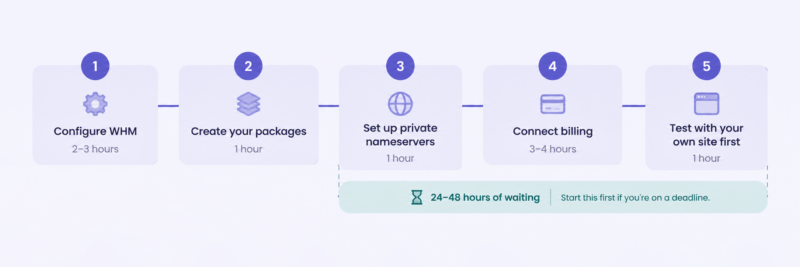
1. Configure WHM (2–3 hours). Set your contact details, branding, and the reseller nameservers. Turn on the account-creation notifications so you know when something provisions. See cPanel and WHM for resellers.
2. Create your packages (1 hour). Three tiers is usually right. Define disk, bandwidth, email accounts, databases and inode limits for each, and name them after who they’re for rather than their specifications. See how to create hosting packages in WHM.
3. Set up private nameservers (1 hour, then up to 24–48 hours of waiting). Register ns1.yourdomain.com and ns2.yourdomain.com as glue records at your registrar and point them at your provider’s IPs. This is the step that goes wrong most often, and the one where the delay is out of your hands. Do it first if you’re on a deadline. See private nameservers: setting up true white-label hosting.
4. Connect billing (3–4 hours). WHMCS or Blesta, connected to WHM so accounts provision automatically, and to Stripe or PayPal so payments recur without you invoicing. Automate provisioning from day one; retrofitting it at 30 clients is miserable. See WHMCS vs Blesta: choosing your billing platform.
5. Test with your own site first (1 hour). Provision it through billing exactly as a client would, so you find the broken automated email before a client does.
Migrating existing sites is a separate job with its own sequence. See migrating client sites to your reseller account without downtime.
Pricing and packaging your plans
Two mistakes account for most bad pricing.
The first is anchoring against $3 shared hosting. You aren’t selling shared hosting. You’re selling hosting plus the fact that a person who knows the site answers when something breaks. Price against that, or you’ve sold a support contract for $5 a month and you’ll resent it by the third ticket.
The second is pricing per megabyte. Disk space is the cheapest thing you’re providing and the least relevant to the client. Tier on what they’d actually notice: how fast you respond, whether updates are included, how far back the backups go.
What you’re actually charging for: uptime someone monitors, backups someone tests, updates someone applies, and a named person who answers. Three tiers, roughly doubling in price, with the middle one built to be the obvious choice.
Whether hosting sits inside a retainer or on a separate invoice is a real decision with consequences for both churn and how easy it is to raise prices later. See hosting inside a retainer vs billed separately, and how many hosting tiers should you offer? for the packaging. Prices are much easier to set correctly than to raise: raising hosting prices on existing clients covers that when you get there.
Full method, with margin targets: how to price reseller hosting plans.
Getting clients
If you already have clients
Your first fifteen clients are people you’ve already worked with. The conversation is the whole job, and framing decides how it lands.
What works is continuity and accountability: right now, when something breaks, they call you and you log into a hosting account you don’t control and can’t fix quickly. Moving hosting to you means one person is responsible. That’s true, and it’s the actual benefit.
What doesn’t work is leading with price, because the comparison to $4 shared hosting is one they’ll make themselves and one you’ll lose.
Timing helps. Move hosting during a redesign or a migration that was happening anyway, when downtime is expected and the site is being touched regardless. And accept that some clients will keep their own accounts. That’s fine, and occasionally it’s the right answer for them.
See telling existing clients you’re taking over their hosting for the conversation itself, and migrating client sites without downtime for the mechanics.
If you’re starting from zero
The first ten clients are the hard part, and they don’t come from ads. At $15 a month, no paid channel is affordable. They come from referrals, local business networks, and communities where you’re already known.
Niching down helps more than anything else, because it makes you findable and referrable in a way that “web hosting” never will be. Hosting for dental practices, or for photographers, or for a regional trade association, is a sentence someone can repeat on your behalf.
See finding your first hosting clients and why niche hosting beats generic hosting.
Running it: policies and the day-to-day
Three things should exist in writing before your first client, because writing them afterwards means writing them during an argument:
- Terms of service and an acceptable use policy. What you host, what you don’t, and what happens when a site sends spam or gets suspended.
- A backup policy. Frequency, retention, and what you charge to restore. Say plainly whether the backup is a courtesy or a commitment.
- A stated support window. When you answer, what counts as an emergency, and how fast.
See terms of service and AUP for a small host.
Then there’s non-payment, which is unpleasant precisely because these are people you know. Write the suspension sequence down once, including the day counts, and follow it. See non-payment, suspensions and getting paid.
A normal week at 30 accounts is a handful of tickets, most of them email or access, and a few hours a month total. It scales in steps rather than smoothly: the jump comes when you can no longer remember every client’s setup and need it documented.
Clients leave for reasons that are mostly predictable and partly preventable. See why hosting clients leave: realistic churn.
Growing, or getting out
The signs you’ve outgrown reseller hosting are consistent: one client’s traffic affecting everyone else, requests you can’t fulfil without root, or resource limits you’re constantly negotiating around. That’s the point to look at a VPS. See outgrowing reseller: moving to VPS or dedicated.
Overselling comes up long before that, usually as an accusation. It’s a normal practice with a defensible version and an indefensible one, and it’s worth understanding which you’re buying into. See overselling: what it is and when it’s defensible.
The last thing worth knowing early: a book of hosting clients is a saleable asset with a real multiple, because recurring revenue with low churn is exactly what buyers want. Even if you never sell it, that reframes what you’re building. See selling a hosting book of business.
The first 90 days: a checklist
Weeks 1–2 — decide (both tracks)
- Run your numbers through the calculator with your own client count and price
- Decide whether hosting sits inside a retainer or on its own invoice
- Shortlist two providers and open a pre-sales ticket with each, out of hours
- Write down what you’ll do when a site goes down while you’re away
Weeks 3–4 — set up (both tracks)
- Buy the plan and configure WHM
- Register private nameservers and wait out propagation
- Build three packages
- Install and connect billing, with automatic provisioning
- Provision your own site through the full flow and check every automated email
Weeks 5–6 — write the policies (both tracks)
- Terms of service and AUP
- Backup policy, including restore charges
- Support window and what counts as an emergency
- Suspension sequence with day counts
Weeks 7–10 — first clients
- Track A: pick three easy clients, migrate them, then review what broke before touching the rest
- Track B: define your niche in one sentence, then have ten conversations in it
Weeks 11–13 — check it works
- Restore one site from backup as a test, before you need to
- Confirm the first recurring payments actually took
- Write down each ticket and its cause; that log becomes your real support data
- Track A: migrate the remaining clients in batches
- Track B: review honestly. Two clients at week 13 with no third in sight is information, not failure
Questions people actually ask
Is reseller hosting profitable? Yes, but the margin comes from volume and retention rather than markup. Fixed costs of around $55 a month against 15 clients at $25 gives roughly $320 a month gross. The profit is real and it compounds; it’s rarely large early. Full breakdown.
How does reseller hosting work? You buy one account with WHM, split it into individual cPanel accounts, and sell those to your clients under your own brand and pricing. The provider maintains the servers; you handle billing and support. More detail.
What’s the cheapest reseller hosting? There are plans under $10 a month, and the honest answer is that you’ll pay for the difference somewhere else. At the bottom of the market you typically get slower support that you then inherit, backup terms that put restores on you, aggressive overselling, and renewal prices well above the intro rate. Cheap is defensible while you’re testing the idea. It’s a poor place to put clients you can’t afford to lose.
What are the four types of hosting? Shared, VPS, dedicated and cloud. Reseller isn’t a fifth type; it’s shared hosting with the right to subdivide and sell it. Comparison.
How much does it cost to start? $50 to $60 a month in fixed costs, plus a domain. There’s no meaningful capital requirement, which is exactly why so many people start and so few continue.
How many clients do I need to break even? Four, at $15 a month each. Add a fifth if you’re paying separately for billing software.
Can I use my own brand, or will clients see the provider’s name? Your own, if the provider supports private nameservers and white-label cPanel. Ask to see the client-facing login screen and the automated emails before you buy; that’s where the provider’s branding usually survives.
What happens when a site goes down at 2am? If it’s the server, the provider is already working on it and your job is communication. If it’s the site, it waits until your stated support window unless you’ve promised otherwise. Publish that window before you need it.
Do I need a company, a contract, or insurance? A contract, yes, always. A limited company, usually sensible once you’re holding other people’s data and taking recurring payments. Insurance depends on your clients’ size and your jurisdiction. This isn’t legal advice; get local advice before you sign anything.
Should I resell hosting at all, or just refer clients to a host? Referring is a legitimate answer. If you don’t want to be responsible for uptime, don’t want the tickets, and your clients are comfortable managing their own accounts, referring them out gets you a small commission and no liability. Reselling makes sense when you’re already being called about hosting problems you can’t fix. If that isn’t happening, the case is weaker than it looks.
Can I resell domains as well? You can, through a registrar’s reseller programme, and many resellers do it for convenience rather than margin. Domain margins are thin. The real benefit is holding the domain and the hosting together, which removes an entire category of “who has access to the DNS” problems.
When do I outgrow reseller hosting? When you need root, when one client’s traffic starts affecting the others, or when you’re routinely arguing about resource limits. What to do then.
Where to go next
If you already have clients, the next question is whether hosting them is the right move for your particular business: should web designers resell hosting to their clients?
If you’re starting from zero, start with the numbers before anything else: how much you can actually make reselling web hosting
And when you’re ready to compare what a reseller plan actually includes, see ChemiCloud’s reseller hosting plans.